> For the complete documentation index, see [llms.txt](https://morphic.com/docs/llms.txt). Markdown versions of documentation pages are available by appending `.md` to page URLs; this page is available as [Markdown](https://morphic.com/docs/jp/how-tos/storyboarding/storyboarding-using-a-script.md).

# スクリプトを使ったストーリーボード作成

この方法は、Copilotに物語を生成させたい場合や、すでにスクリプトがあり、それをストーリーボードのフレームとして可視化したい場合に便利です。

Morphic上でスクリプトを使ってストーリーボードを作成する簡単なチュートリアルです：

1. へ移動 [Copilot](https://studio.morphic.com/chat) Morphic上で
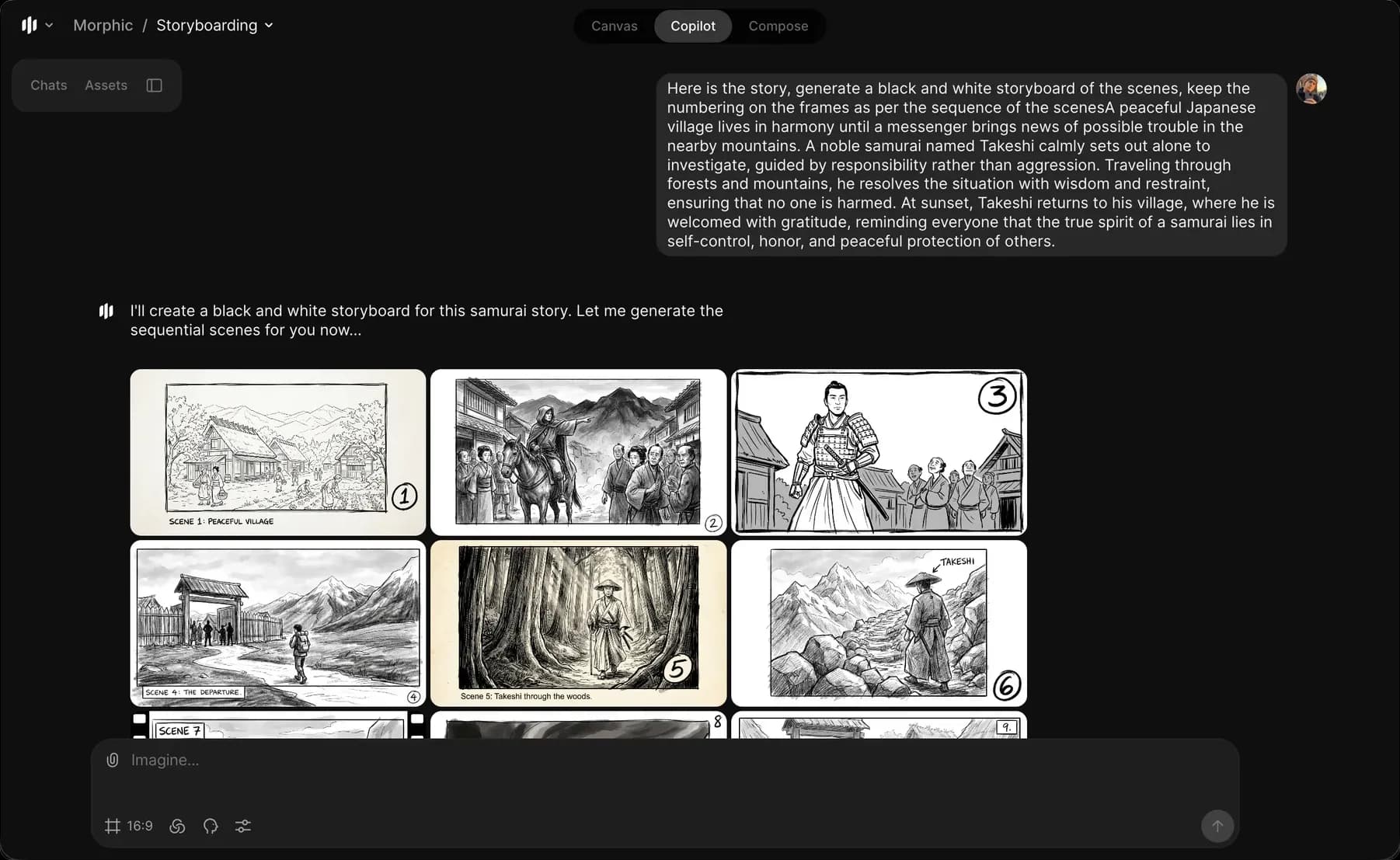
2. 「これらのシーンのモノクロのストーリーボードを生成して…」のようなプロンプトを入力します
3. 必要に応じて、登場人物の動作、カメラアングル、雰囲気、環境を含めてください
4. プロンプトバーの青いボタンをクリックして、ストーリーボードを作成します

<figure><img src="https://2982589234-files.gitbook.io/~/files/v0/b/gitbook-x-prod.appspot.com/o/spaces%2FoPhHCbNZdzW70rakoLhf%2Fuploads%2F6JFTMEybO1TAvQ6zFbSz%2FCleanShot%202026-01-12%20at%2019.45.50%402x.png?alt=media&amp;token=83683d2a-c7d8-4ba2-91ec-de5b9391f491" alt=""><figcaption></figcaption></figure>

Copilotは、生成されたストーリーやスクリプトを明確な視覚シーンに分解して、ストーリーボードのフレームを作成します。これが、Morphic上でスクリプトを使ってストーリーボードを作成する方法です。これにより、文章化されたスクリプトをわかりやすい視覚シーンに変換できます。

***

ご不明な点やお困りのことがあれば、お気軽にご連絡ください。喜んでお手伝いします。以下までご連絡ください [**support@morphic.com**](mailto:support@morphic.com)**.**


---

# Agent Instructions
This documentation is published with GitBook. GitBook is the documentation platform designed so that both humans and AI agents can read, navigate, and reason over technical content effectively. Learn more at gitbook.com.

## Querying This Documentation
If you need additional information that is not directly available in this page, you can query the documentation dynamically by asking a question.

Perform an HTTP GET request on the current page URL with the `ask` query parameter, and the optional `goal` query parameter:

```
GET https://morphic.com/docs/jp/how-tos/storyboarding/storyboarding-using-a-script.md?ask=<question>&goal=<endgoal>
```

`ask` is the immediate question: it should be specific, self-contained, and written in natural language.
`goal` is optional and describes the broader end goal you are ultimately trying to accomplish on behalf of the user. GitBook uses it to tailor the answer towards what is most useful for that goal.

The response will contain a direct answer to the question and relevant excerpts and sources from the documentation.

Use this mechanism when the answer is not explicitly present in the current page, you need clarification or additional context, or you want to retrieve related documentation sections.