모델 선택
어떤 모델이 Copilot 채팅을 실행할지 고르는 방법, 각 모델이 무엇에 적합한지, 그리고 새 채팅이 시작될 모델을 어디서 설정하는지.
Copilot은 언어 모델에서 실행되며, 어떤 모델을 사용할지 직접 선택할 수 있습니다. 이 모델이 요청을 읽고, 작업을 계획하고, 다시 응답합니다. 어떤 이미지 또는 비디오 모델이 미디어를 생성할지는 프롬프트 바의 'Model preferences' 아래에 있는 별도 설정입니다.
모델
| 모델 | 적합한 용도 |
|---|---|
| 자동 | 각 작업에 가장 적합한 모델을 선택합니다. 기본값 |
| Sonnet 4.6 | 대부분의 작업에 균형 잡힌 지능과 속도 |
| Sonnet 5.5 | 대부분의 작업에 균형 잡힌 지능과 속도 |
| Haiku 5.5 | 빠르고 집중된 작업에 적합한 빠르고 경제적인 모델 |
| Grok 4.6 | 일상적인 작업에 대한 빠르고 직접적인 응답 |
| Grok 4.7 | Grok 4.6만큼 빠르면서 길고 복잡한 다단계 작업에 더 강함 |
| GPT 6 Sol | 복잡한 다단계 작업에 대한 심층 추론 |
| GPT 6.1 Sol | 복잡한 다단계 프로젝트를 위한 유능하고 효율적인 추론 |
| GPT 5.6 Terra | 요구가 높은 일상 작업에 균형 잡힌 지능과 비용 효율성 |
| Fable 5.1 | 스토리텔링과 아이디어 구상에 적합한 창의적이고 세련된 응답 |
| Opus 5.5 | 까다로운 프로젝트를 위한 강력한 추론과 창의적 판단 |
'Auto'로 두세요. 그렇게 하지 않을 이유가 없다면요. GPT 6 Sol, GPT 5.6 Terra, Fable 5.1, Opus 5.5는 유료 플랜이 필요합니다. 일부 모델은 목록에 표시되지만 흐리게 보이며, 아직 선택할 수 없습니다.
크레딧
각 응답에는 크레딧이 사용되며, 요금은 모델에 따라 달라집니다. Auto가 가장 적게 사용합니다. 선택한 모델은 항상 과금되며, 드롭다운은 목록 아래에 'Auto에서 특정 모델로 전환하면 해당하는 크레딧이 부과됩니다'라고 안내합니다. 계정에 따라 Auto도 과금될 수 있습니다.
대화 중간에 모델을 바꾸면 먼저 확인을 요청합니다. 새 모델은 응답하기 전에 전체 대화를 읽기 때문에 첫 응답 비용이 더 많이 듭니다. 이를 피하려면 대화를 시작할 때 모델을 선택하세요.
각 모델의 일반적인 응답당 크레딧은 아래에 Copilot 응답 비용.
대화에 사용할 모델 선택
- 열기 Copilot
- 프롬프트 바 오른쪽 아래의 버튼을 클릭하세요. 먼저 모드를, 그다음 모델을 표시하므로, 'Auto · Sonnet 4.6'은 Sonnet 4.6에서 실행되는 자동 생성입니다
- 'Model' 아래에서 드롭다운을 열고 하나를 선택하세요. 체크 표시가 현재 활성 모델을 나타냅니다
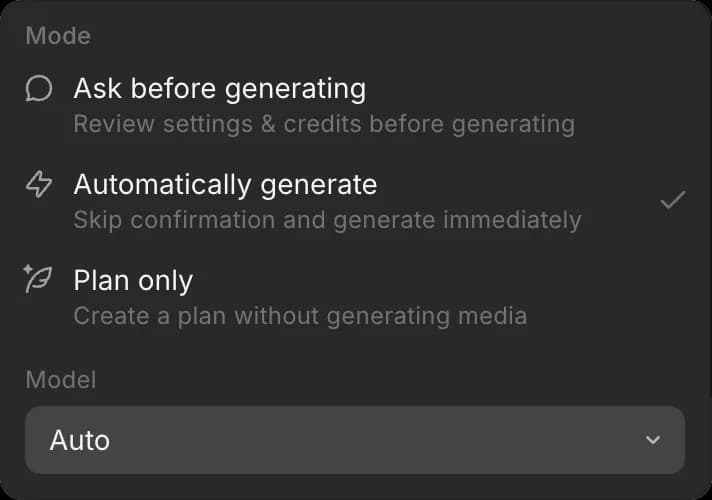
선택은 채팅에 적용되므로, 서로 다른 채팅이 동시에 다른 모델에서 실행될 수 있으며, 변경할 때까지 유지됩니다.
새 채팅의 기본값 설정
- 열기 'Preferences'
- 'Default chat mode' 옆에서 드롭다운을 여세요
- 그 자리에서 'Model' 아래에서 모델을 선택하고, 'Mode' 아래에서 모드를 선택하세요
새 채팅은 해당 모델로 시작합니다. 한 채팅의 모델을 변경해도 기본값은 바뀌지 않습니다.
이것이 Morphic에서 모델을 선택하는 방법입니다. 대부분의 작업은 'Auto'로 충분합니다. 채팅에서 속도나 더 많은 추론이 필요할 때는 직접 모델을 선택하세요.
문제가 있거나 궁금한 점이 있으면 언제든지 연락해 주세요. 기꺼이 도와드리겠습니다. 다음 주소로 이메일을 보내 주세요: support@morphic.com.