Import and export
Bring a script in from Fountain, Final Draft, PDF or plain text, keep its notes, and download or print a whole screenplay, one doc, one group or the title page.
Morphic reads and writes the common screenplay formats, so a script moves between Morphic and other screenplay apps with its formatting intact. New to these formats? See Key terms.
| Format | File | Best for |
|---|---|---|
| Fountain | .fountain, .spmd | Plain text any editor can open |
| Final Draft | .fdx | Exchanging scripts with film and TV productions |
| Reading, printing and sending a draft |
Import a script
-
Open a file. You land on the Canvas
-
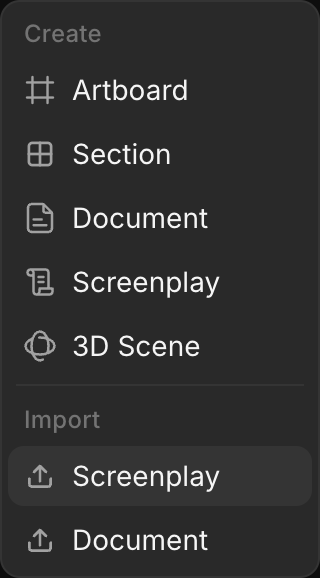
Click '+' in the toolbar at the top left, then 'Screenplay' under 'Import'
-
Pick a .fountain, .spmd, .fdx, .pdf or .txt file. It opens full screen once imported
-
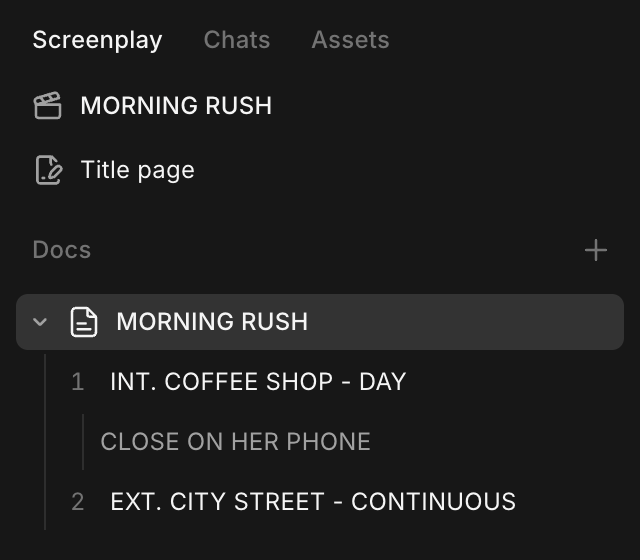
The import becomes a new screenplay with one doc, named from its title page, or else from the file name
-
Dropping a .fountain, .spmd or .fdx file on the Canvas also imports it. A dropped PDF or .txt becomes a note or an asset, so use 'Import' > 'Screenplay' for those
-
One import runs at a time
-
Size limit: 8 MB on the Free plan, 100 MB on every other plan
-
PDFs: up to 300 pages, no password, and real text (a scan of page images has none). Page numbers, CONTINUED lines and revision marks are removed; margin scene numbers are kept
What is kept and what is not
| Kept | Left out or changed |
|---|---|
| The title page | Sections, synopses and hidden text are left out; a message says how many |
| Every line type, including shots | Centred text becomes action |
| Scene numbers | Side-by-side dialogue becomes two speeches in a row |
| Bold, italic and underline | |
| Page breaks | |
Notes: Fountain [[notes]] and Final Draft script notes |
Notes
A note is a comment inside the script that is not part of it, such as a reminder to check a line. Type it between double square brackets, for example [[check this with legal]]. Notes show in grey in the line they sit in.
- Click 'Hide notes' in the toolbar to read the script without them, and 'Show notes' to bring them back
- Downloads and printouts include notes. To leave them out, turn off 'Include notes' at the bottom of the 'Download' or 'Print' menu.
- Notes travel as Fountain notes and as Final Draft script notes, both ways
Export a screenplay
Download or print the whole screenplay, one doc, one group of docs, or the title page on its own.
| Where | What it exports |
|---|---|
| 'Download' in the toolbar | The doc you are in |
| '...' beside a doc in the side panel, then 'Download' or 'Print' | 'Whole screenplay', 'This doc' or 'Title page' |
| '...' beside a group in the side panel, then 'Download' or 'Print' | 'Whole screenplay', 'This group' or 'Title page' |
| '...' at the top right of the editor | 'Whole screenplay', 'This doc' or 'Title page' |
| Cmd+P (Ctrl+P on Windows) | Prints the whole screenplay |
- Open the screenplay
- Click '...' beside a doc in the side panel
- Point at 'Download' and pick a format under the part you want: 'Fountain', 'Final Draft (.fdx)' or 'PDF'. Or point at 'Print' and pick the part.
- 'Whole screenplay' prints the title page, then every doc in side panel order
- The file is named after the screenplay, then the doc or group, then the date
- 'Print' opens your browser's print window with the PDF pages
- The title page prints first when there is one. Downloading a doc that has its own title page prints that one instead. See Write a screenplay
- PDFs use your block styles
- PDF: US Letter, 12 point Courier, scene numbers in both margins, (MORE) and (CONT'D) at page breaks
- Fountain has no shot type, so shots are saved as action
Troubleshooting
Script will not import
| Message includes | Fix |
|---|---|
| "isn't a Fountain, Final Draft or PDF screenplay" | Save the script as PDF or Fountain (for example from Word), then upload it |
| "is too large to import as a screenplay" | The file is over your plan's size limit |
| "has more than 300 pages" | Split the PDF, or export Fountain or Final Draft from the app it came from |
| "is password-protected" | Remove the password and upload again |
| "No screenplay content found" | The file has no readable text, usually a scanned PDF |
Nothing to export
"Nothing to export yet. Add a title page or write some of the script first." The part you picked is empty. Pick another part, or write in it first.
Characters show as '?' in the PDF
The PDF font can't print some characters, such as some accents, symbols and non-Latin scripts. Morphic lists them. Download as Fountain or Final Draft to keep them.
Title page does not fit in the PDF
"The title page doesn't fit on one PDF page" means it is too long. Download as Fountain or Final Draft to keep all of it.
That's how you import and export screenplays on Morphic. Bring in the draft you have, and send it out in the format your production uses.
If you have any trouble or have any questions, feel free to reach out. We're happy to help. Write to us at support@morphic.com.