Bir model seçin
Bir Copilot sohbetini hangi modelin çalıştıracağını nasıl seçeceğiniz, her birinin neye uygun olduğu ve yeni sohbetlerin başlayacağı modelin nerede ayarlanacağı.
Copilot bir dil modeli üzerinde çalışır ve hangisini kullanacağınızı seçebilirsiniz. İsteğinizi okuyan, işi planlayan ve size yanıt veren model budur. Medyayı hangi görüntü veya video modelinin oluşturduğu ise ayrı bir ayardır; istem çubuğundaki 'Model tercihleri' altında bulunur.
Modeller
| Model | Uygun olduğu |
|---|---|
| Otomatik | Her görev için en iyi modeli seçer. Varsayılan |
| Sonnet 4.6 | Çoğu görev için dengeli zekâ ve hız |
| Sonnet 5.5 | Çoğu görev için dengeli zekâ ve hız |
| Haiku 5.5 | Kısa, odaklı görevler için hızlı ve uygun maliyetli |
| Grok 4.6 | Günlük görevler için hızlı ve doğrudan yanıtlar |
| Grok 4.7 | Grok 4.6 kadar hızlı, uzun ve çok adımlı görevlerde daha güçlü |
| GPT 6 Sol | Karmaşık, çok adımlı görevler için derin akıl yürütme |
| GPT 6.1 Sol | Karmaşık, çok adımlı projeler için yetkin ve verimli akıl yürütme |
| GPT 5.6 Terra | Zorlu günlük işler için dengeli zekâ ve maliyet |
| Fable 5.1 | Hikâye anlatımı ve fikir üretimi için yaratıcı, kusursuz yanıtlar |
| Opus 5.5 | Zorlu projeler için güçlü akıl yürütme ve yaratıcı yargı |
Bir sebebiniz yoksa 'Otomatik' olarak bırakın. GPT 6 Sol, GPT 5.6 Terra, Fable 5.1 ve Opus 5.5 ücretli plan gerektirir. Bazı modeller listelenmiş ancak soluk gösteriliyor; bunlar henüz seçilemez.
Krediler
Her yanıt kredi kullanır ve oranı model belirler. Otomatik en azını kullanır. Seçtiğiniz bir model her zaman ücretlendirilir; açılır liste bunu listenin altında 'Otomatik'ten herhangi bir belirli modele geçmek ilgili kredilere mal olur' şeklinde belirtir. Hesabınıza bağlı olarak Otomatik de ücretlendirilebilir.
Bir sohbetin ortasında modeli değiştirmek önce onayınızı ister: yeni model yanıt vermeden önce sohbetin tamamını okur, bu yüzden ilk yanıtı daha pahalıya mal olur. Bundan kaçınmak için sohbeti başlatırken modeli seçin.
Her model için yanıt başına tipik kredi miktarları altında Copilot yanıt maliyetleri.
Bir sohbet için birini seçin
- Açın Copilot'u
- İstem çubuğunun sağ altındaki düğmeye tıklayın. Önce modu sonra modeli okur; yani 'Otomatik · Sonnet 4.6', Sonnet 4.6 üzerinde çalışan otomatik oluşturmadır
- 'Model' altında açılır listeyi açın ve birini seçin. Etkin modeli bir onay işareti belirtir
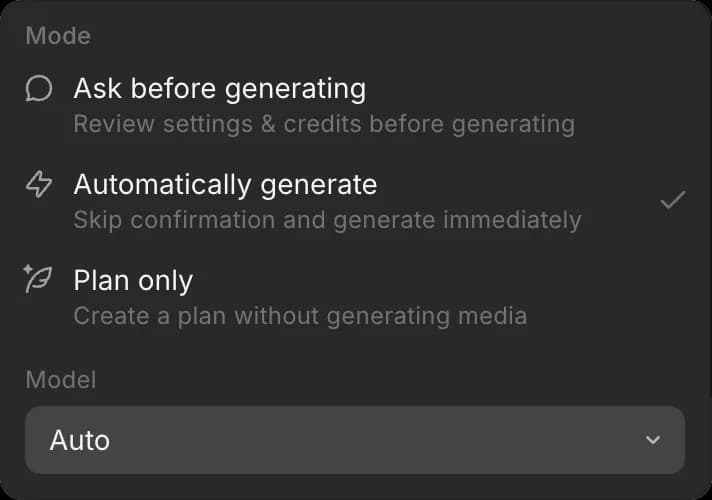
Seçim sohbete aittir; bu nedenle sohbetler aynı anda farklı modellerde çalışabilir ve siz değiştirene kadar geçerliliğini korur.
Yeni sohbetler için varsayılanı ayarlayın
- Açın 'Tercihler'
- 'Varsayılan sohbet modu'nun yanında açılır listeyi açın
- 'Model' altında modeli ve oradayken 'Mod' altında modu seçin
Yeni sohbetler o modelle başlar. Bir sohbetin modelini değiştirmek varsayılanı değiştirmez.
Morphic'te bir modeli böyle seçersiniz. Çoğu iş için 'Otomatik' yeterlidir; bir sohbet hız veya daha fazla akıl yürütme gerektirdiğinde kendiniz birini seçin.
Herhangi bir sorun yaşarsanız ya da sorularınız olursa, bizimle iletişime geçmekten çekinmeyin. Yardım etmeye memnuniyet duyarız. Bize şu adresten yazın: support@morphic.com.
Sohbet modları
Bir Copilot sohbetinin çalışabileceği üç mod, her birinin kredilerinize ne yaptığı ve istediğiniz modu nasıl ayarlayacağınız.
Yeni bir sohbette devam et
Bir Copilot sohbetini herhangi bir mesajdan nasıl çatallayacağınız, yeni sohbete nelerin aktarıldığı ve çatallamanın ne zaman en yararlı olduğu.