What you need
- The locked shots the role appears in. Each recast takes one clip, up to 30 seconds.
- One photo of the new actor, clear and front-facing, in the role's hair and wardrobe.
- The paperwork. Releases for the original footage, and the new actor's written agreement to appear.
- A Morphic paid plan. Morphic Recast is on paid plans; see pricing.
Can you change an actor after filming without a reshoot?
Yes, when the take itself works and only the person in the role has to change. The job runs in five steps, and the first two happen before any picture is touched.
List every shot the role appears in
Go through the cut and pull each shot with the character in it. Morphic Recast takes one clip per job, so split long takes at their cuts and keep each part at 30 seconds or less. The list is the size of the job.
Clear the change on paper
Confirm that your releases cover everyone in the footage, including the performer whose role is changing, since their movement and recorded voice stay in the shot. Get the new actor's agreement in writing. Your production counsel decides what the contracts allow.
Recast one test shot
Open Morphic Recast, add a shot where the role is clearly visible and add the new actor's photo. Name the role by what the frame shows, for example "Replace the mechanic in the navy coveralls with the man in the photo. Keep everyone else as they are." Ask Copilot for a few takes and they arrive side by side.
Run the remaining shots with the same photo
Use the same photo on every shot, or save the new actor as a Reference and add it by name, so the role is one person across the film. Anyone you give no photo stays as shot, in every clip.
Rebuild the cut and decide the voice
Drop the recast shots into the cut on the Compose timeline. The soundtrack comes back as recorded, so the role still speaks with the voice from the shoot. Re-voicing is a separate pass: the AI voice changer re-voices a recorded performance in another voice and keeps the delivery, and Morphic Dub takes a scene into another language.
Keep the take, change who plays the role
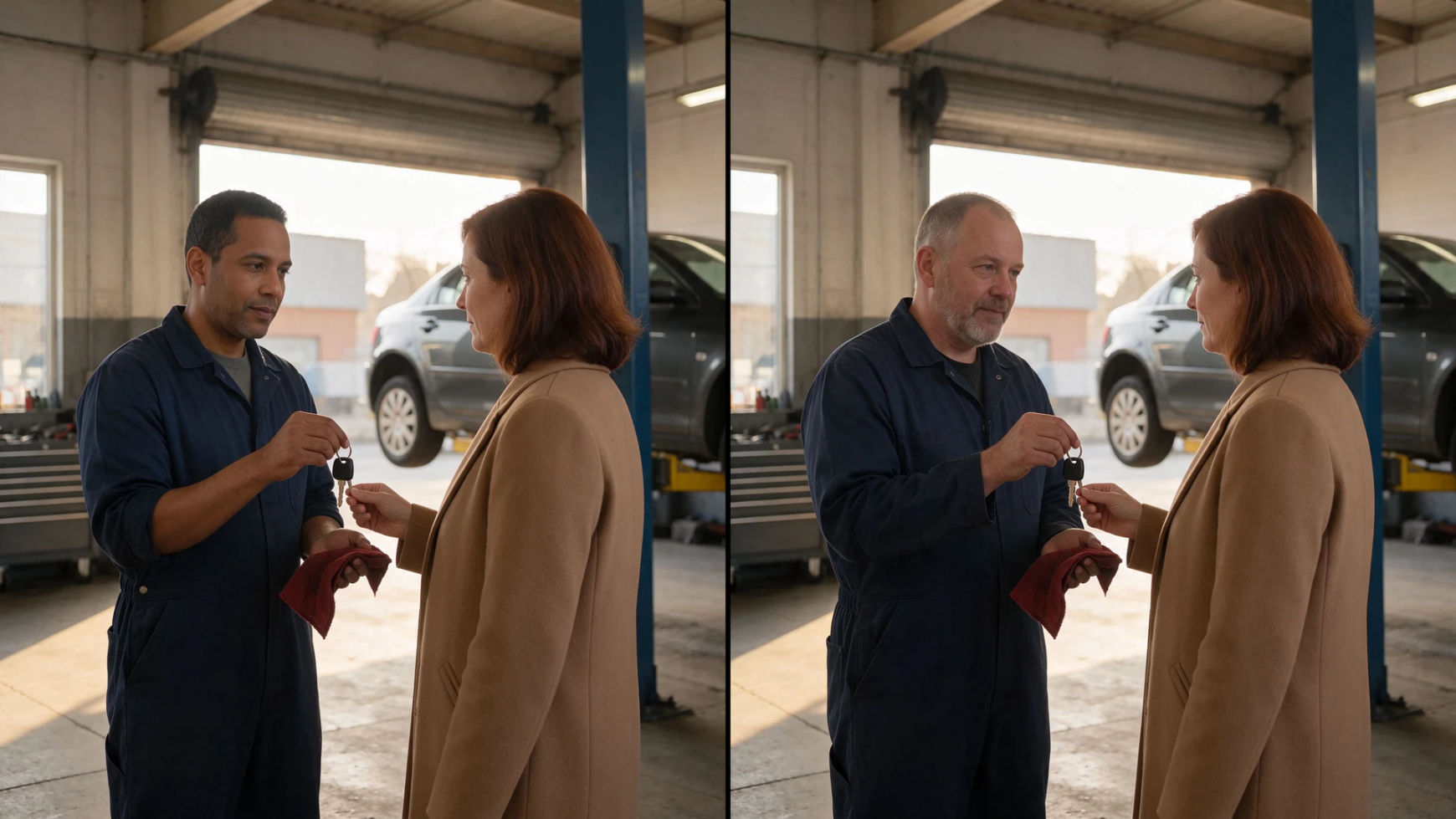
Two takes after wrap: one role recast with everyone else left alone, and two candidates tried on the same performance.
As shot
Role recast
The mechanic is played by a new actor from one photo. He wipes his hands on the same rag and holds out the keys on the same frame, and the customer in the tan coat had no photo, so she is untouched.
Recasting a role across a finished film or series? Let's build your custom workflow.
For producers, studios and post houses. Tell us how many shots the role appears in, who is replacing whom and when you deliver, and we'll design a custom Recast workflow with you that keeps the new actor consistent in every shot.
What to check before you recast a role
| Check | Why it matters |
|---|---|
| Releases for the original footage | A recast changes how people in the footage appear. Everyone on screen needs to be covered, including the performer whose role is changing. |
| The outgoing performer's terms | Their movement, expressions and recorded voice stay in the shot with a new person on screen. Ask production counsel what the contract and any union or guild terms allow. |
| The new actor's agreement | They are agreeing to appear in a performance they did not give. Get it in writing, along with the photo you will use. |
| Shot length | One clip per recast, up to 30 seconds. A scene is recast shot by shot. |
| The voice | The soundtrack stays as recorded, so the role keeps the voice from the shoot until you re-voice it. |
| Continuity | The same photo or saved Reference on every shot keeps the role one person from scene to scene. |
| What a recast leaves alone | The action, the blocking and the lines stay as shot. If any of those must change, plan a reshoot. |
Reshoot or recast?
| Reshoot | Morphic Recast | |
|---|---|---|
| What it takes | A shoot day, with the location, the crew and the remaining cast called back | The finished shots and one photo of the new actor |
| The performance | The new actor's own, directed on the day | The original take, carried by a new person |
| The rest of the scene | Set up again to match the light, the camera and the continuity | As shot: the camera, the cuts, the background and everyone without a photo |
| The voice | Recorded with the new actor | The original soundtrack, until you re-voice it |
| Versions for other markets | A shoot for each version | One take can carry a different cast for each market |
| Choose it when | The action, the blocking or the lines must change, or the new actor's own performance is the point | The take works and only who plays the role should change |
Tips and common mistakes
- Test on the hardest shot. A close-up with fast movement shows soonest whether the recast holds, before the whole list is run.
- Lock the photo early. A different photo halfway through is a different-looking character. Choose one and use it to the last shot.
- Keep the original shots in the project. Reviewers can then watch each recast beside the take it came from.
- Collect notes on the footage. Teammates in your workspace can pin a comment to the exact moment in a take that needs another pass.
- Treat the voice as its own decision. Picture and sound change in separate passes, so settle who the role sounds like before the mix.
Other casting changes
- The step-by-step for any swap, including several roles in one clip, is in how to replace a person in a video.
- Before the shoot. Try candidates on a rehearsal take in test casting for a micro drama.
- A cast for each market. See how to recast an ad for every market.
- The same actor, younger. Recast the role with a younger reference on the AI de-aging page.
- The tool itself. Morphic Recast has more examples, and the Recast library shows it by scene type, such as an office scene or a wedding scene.
Questions fréquentes
Yes. Morphic Recast takes a finished clip and one photo of the new actor and returns the same take with the new person in the role. The motion, expressions, lip movement, camera, cuts and soundtrack stay as shot. It works one clip at a time, up to 30 seconds each.
Several roles can change in one clip. Name each one by what is visible, such as clothing or position, and give each new actor their own photo. Anyone without a photo stays as shot.
Releases from everyone in the original footage, including the performer being replaced, and the written agreement of the new actor whose photo you use. Contract and union questions belong with your production counsel.
No. The soundtrack comes back as recorded, so the voice is the one from the shoot. Re-voicing is a separate pass after the recast, and a new language is a dub of the recast scene.
Yes, shot by shot. Recast each clip the role appears in with the same photo, up to 30 seconds per clip, then rebuild the sequence on the Compose timeline.
When the action, the blocking or the lines themselves have to change, since a recast keeps all three as shot. A reshoot is also the route when the new actor's own performance is what the scene needs.
Morphic Recast is on paid plans. Open it from the Recast tool, from the video edit options on the Canvas, or by asking Copilot.