Pick by where it is going
| Where it is going | Export | Why |
|---|---|---|
| Into an edit or a grade | ProRes | Every editing and grading app opens it, and it survives being worked on |
| To a visual effects artist | EXR | The only one that can be combined with other footage properly |
| To a streaming platform | H.265 | Small enough to deliver, and platforms expect it |
| To a client, just to watch | H.265 | Plays on phones and TVs without a huge download |
| Into storage for later | ProRes | Keep the best version you can afford to store |
| You also need a normal version | ProRes first | Make the HDR master, then produce the ordinary version from it |
That last row saves the most work. Make the HDR file first and derive the standard version from it, and one round of grading gives you both. Do it the other way and you grade twice.
The three you will actually use
ProRes is the workhorse. It is the file you edit, grade and hand between people who are still working on the footage. It is large, and that is the point: it stays clean while you keep changing it.
EXR is the specialist. It stores light rather than a picture, which is what lets a visual effects artist drop your shot into a scene with other footage and have the lighting actually match. It is only for that job. Nobody watches an EXR.
H.265 is the deliverable. It is what you send when someone is going to press play. Small, widely supported, and not meant to be worked on any further.
Why there are two kinds of HDR file
The split between ProRes and EXR confuses people, and it is worth thirty seconds because it is the mistake that gets files sent back.
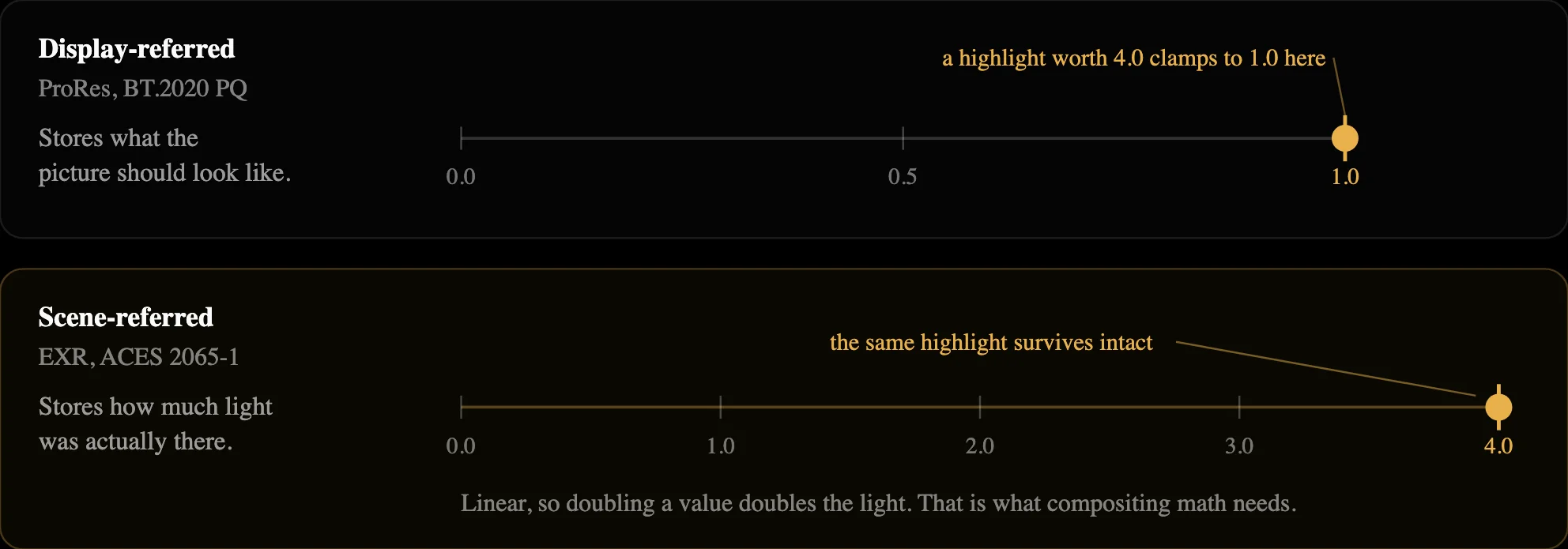
A ProRes file stores a picture: this pixel should look this bright on screen. That is what you want for anything a person is going to watch or grade.
An EXR file stores light: this part of the scene had this much light in it. Brightness values can go past what a screen can show, so nothing gets clipped off. That is what compositing needs, because adding light to light only works if the numbers behave like real light.
Keep two files, not one
The file you work in and the file you hand over should not be the same file. Working files are big on purpose so they survive editing. Delivery files are small on purpose so they travel.
Keep the ProRes master even after you deliver. Someone will ask for a different version eventually, and you want to make it from the good file rather than from an already-squashed copy. Every time you re-export from a compressed file, it gets a little worse.
If you are not sure and nobody has given you a spec, export ProRes. It opens everywhere, it holds up to being worked on, and you can make anything else from it later.
FAQs
ProRes if a person is going to watch, edit or grade it. EXR if it is going to a visual effects artist who needs to combine it with other footage. That one question settles it nearly every time. If you are handing it to someone and are not sure which they are, ask, because sending the wrong one usually means redoing the export.
Not better, different. EXR keeps brightness information beyond what a screen can show, which matters when the shot still has heavy work ahead of it. Viewed side by side on the same screen, a ProRes and an EXR of the same footage look the same. EXR files are also far larger.
H.265, unless they have told you otherwise. It carries HDR properly and compresses to a size platforms accept. Do not send ProRes to a streaming platform; it is a working format and the file size is impractical.
Going from a big working file to a smaller delivery file is fine and normal. Going the other way does not recover anything that was lost. Moving between ProRes and EXR needs a proper conversion rather than just changing the file type, and skipping that step is how footage comes back looking wrong.
Because they hold more information per frame, and because working formats deliberately store every frame in full rather than only storing what changed. That is what makes them safe to edit. Delivery files are much closer to normal video sizes, which is why the working file and the delivered file are different files.
You can run the conversion without one, but you cannot judge the result. Grading or approving HDR on a normal screen means working blind on exactly the part you changed. At minimum, view it on an HDR screen in a player that supports HDR before signing anything off.