Full fabric spread
A wide view of tie dye-patterned fabric laid flat, showing the full repeating pattern across woven textile.
Edit prompt
Design tie dye patterns in your browser with Morphic's AI image generator. Generate vibrant spirals, bold sunbursts, or flowing concentric swirls for any scale or palette. Lock your favorite colors with Style Transfer, then resize for any textile or design project.
A wide view of tie dye-patterned fabric laid flat, showing the full repeating pattern across woven textile.
Edit promptA magnified view of tie dye pattern revealing the texture of the weave, dye saturation variation, and organic.
Edit prompt
A tie dye patterned textile draped as a finished shirt or scarf, showing how the pattern flows across.
Edit prompt
A tie dye pattern printed on a flat design surface—pillow, poster, or product packaging—showing the full.
Edit prompt
Describe the tie dye pattern you want, in plain words.
Morphic generates a clean, ready-to-publish image on your canvas in seconds.
Tweak the prompt, regenerate variations, then download or share the frame.

Describe your fabric type, pattern, color, and use. Get a photorealistic 2K textile swatch to spec.
Choose your viewing angles and get precise perspective shifts of any image with full camera control.
Convert any image to a new aspect ratio. Smart crop or extend the edges to fit.
Pick a reference image, apply its visual style to your own photo or artwork.
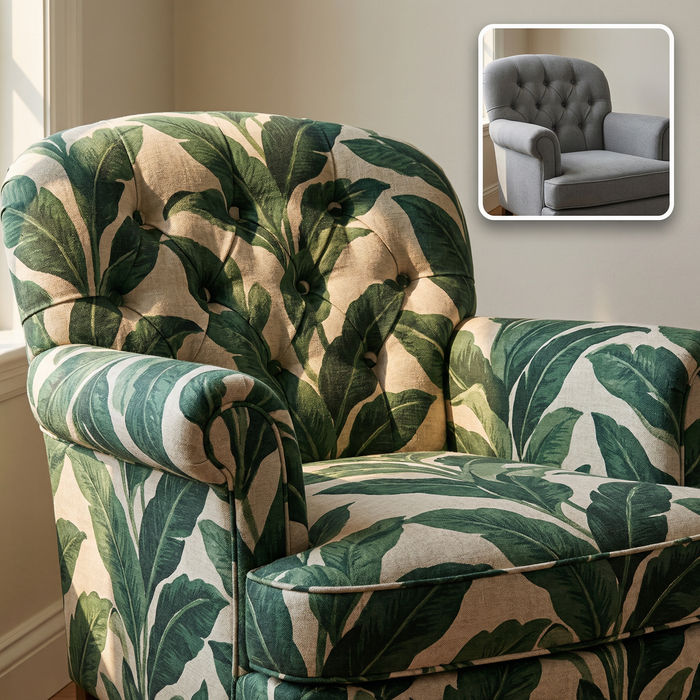
Swap the fabric on any furniture, cushion, or curtain. New texture, same shape and lighting.

Upload a product photo and get studio-quality shots on any surface with configurable lighting, angles, and aspect ratios.
Stone AI textures
Create AI stone textures with our stone texture generator. Find realistic stone textures for any project in seconds.
Checkered AI patterns
Create AI checkered patterns with our checkered pattern generator. Find clean checkered patterns for any project in seconds.
Floral pattern AI images
high-res floral pattern for any project. Browse AI-generated collections or generate a custom version with Morphic. Generate your own with Morphic AI.
Grass texture AI images
high-res grass texture for any project. Browse AI-generated collections or generate a custom version with Morphic. Generate your own with Morphic AI.
Get started for free today, with the option to upgrade or cancel anytime.
Basic
2400 monthly credits
1 user only
All models
Workflows
Standard
3625 monthly credits
1 user only
All models
Workflows
Pro
6350 shared monthly credits
1 user
All models
Workflows
Max
24650 shared monthly credits
1 user
All models
Workflows
Enterprise
For higher limits
Custom
pricing and billing terms

Free
For playing around
$0
forever free