How to make A Christmas Carol videos with AI

A Christmas Carol is Charles Dickens's 1843 novella in five "staves." On Christmas Eve in foggy London, the miser Ebenezer Scrooge closes his counting-house, refuses every appeal for charity, eats his gruel alone, and is visited that night by the chained ghost of his late partner Jacob Marley. Three more spirits follow before dawn: the Ghost of Christmas Past, the Ghost of Christmas Present, and the silent Ghost of Christmas Yet to Come. By Christmas morning Scrooge is a different man, raising Bob Cratchit's salary, sending the prize turkey to Camden Town, and saving the life of Tiny Tim.

Almost two centuries on, the novella still defines the cinematic Christmas ghost story. Now you can direct it.

A Christmas Carol is Dickens's little ghost-book of 1843: a miser at his counting-house on Christmas Eve, a chained partner returning, three spirits in one night, a frozen child on a crutch, a graveyard at dawn. Morphic lets you direct any of it in your browser. Pick a stave, a figure, or a workflow below and start now.

A Christmas Carol characters you can direct

A Christmas Carol scenes you can stage

The door-knocker turns into Marley

On a foggy London Christmas Eve at the front door of Scrooge's lodging, the brass lion-head knocker shimmers and resolves into the half-transparent face of Jacob Marley, eyes opening to look at Scrooge.

Edit prompt
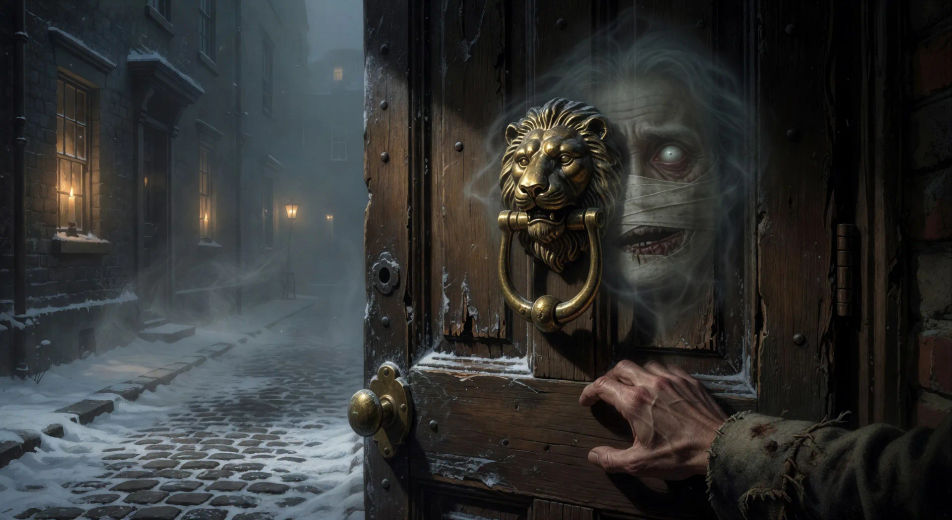
The door-knocker turns into Marley

Marley's ghost in chains

In Scrooge's candle-lit bedchamber at midnight, Marley's ghost stands wrapped in a long chain of cash-boxes and ledgers, jaw bandaged in white linen, wailing as Scrooge cowers in the high four-poster bed.

Edit prompt
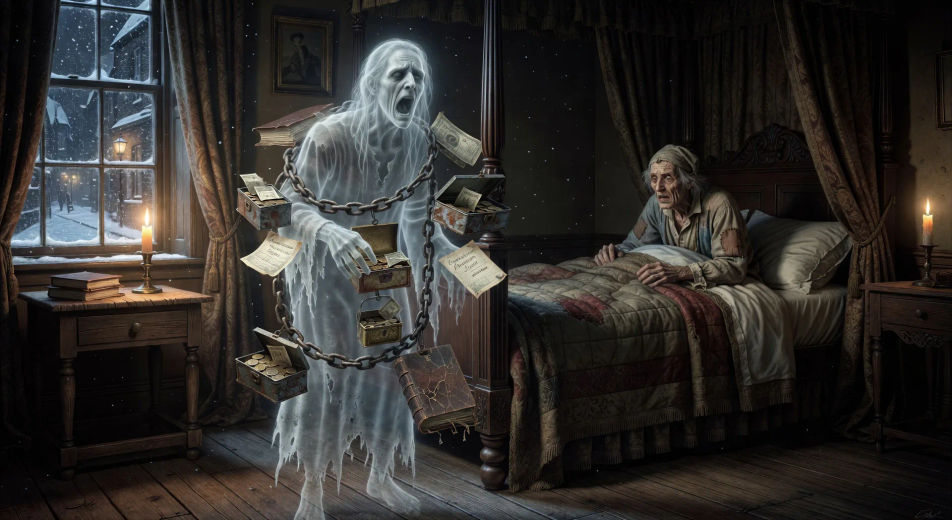
Marley's ghost in chains

Fezziwig's ball

In a candle-lit Fezziwig warehouse cleared for dancing, the great Mr. Fezziwig spins his wife at the head of a country dance while clerks and bakers and milkmaids whirl around the floor, fiddler at one end.

Edit prompt
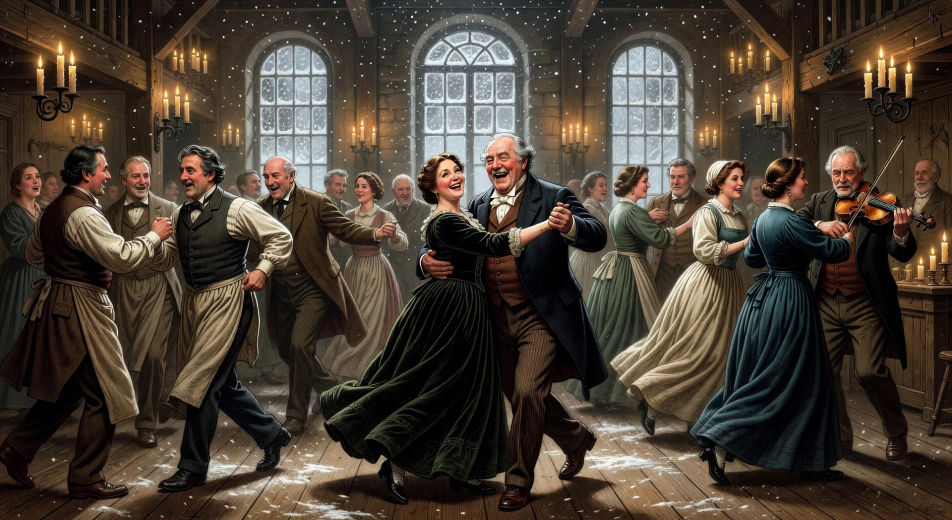
Fezziwig's ball

The Cratchit Christmas dinner

In a small Camden Town parlour at firelight, the Cratchit family crowds around a small table set with a goose, a pudding, and Tiny Tim raised on a stool with his crutch beside him as Bob carves.

Edit prompt
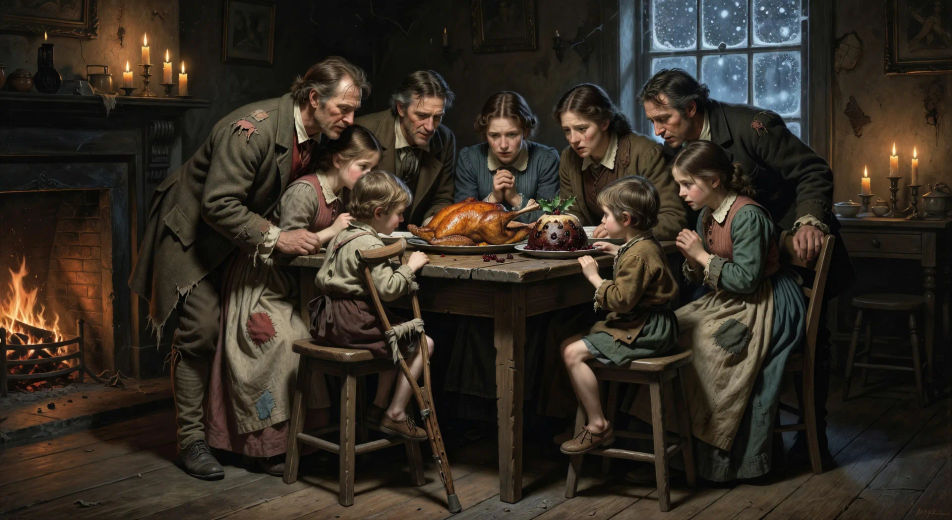
The Cratchit Christmas dinner

The neglected grave

Under low winter sky in a snow-dusted London churchyard, the silent hooded Ghost of Christmas Yet to Come points to a leaning gravestone with the name Ebenezer Scrooge cut into the stone.

Edit prompt
The neglected grave

Christmas morning at the bedpost

In a sun-flooded London bedroom on Christmas Day, Scrooge in nightcap and dressing-gown laughs out loud at the bedpost, throws open the window into a white snow-quiet street, and shouts to a boy below.

Edit prompt
Christmas morning at the bedpost

Make A Christmas Carol videos in three steps

  1. 01

    Describe your A Christmas Carol scene

    Write the A Christmas Carol scene you want to see in your own words. Be specific about the London location, the figure in frame, the light source, and the camera direction. The more concrete the description, the closer the result lands to what you pictured.

  2. 02

    Generate the video

    Morphic generates a cinematic, frame-ready clip on your canvas in seconds — no editing software required.

  3. 03

    Refine your A Christmas Carol video

    Tweak the prompt, regenerate variations, then download or share the moment the shot lands.

Related workflows

A short guide to A Christmas Carol for video creators

The novella moves through a clean five-stave structure. Stave one: the counting-house in fog, the door-knocker turning into Marley's face, Marley's ghost in chains and cash-boxes coming through the locked bedroom door. Stave two: the Ghost of Christmas Past, white-robed with candle-flame at her head, taking Scrooge to the boarding-school, to Fezziwig's ball, to the lost engagement with Belle. Stave three: the Ghost of Christmas Present, jolly green-robed with a torch and the half-starved children Want and Ignorance hidden in his robe, taking Scrooge to the Cratchit dinner with Tiny Tim and his small crutch. Stave four: the Ghost of Christmas Yet to Come, hooded and silent, pointing at a stripped bed, a forgotten grave, the Cratchit family in mourning. Stave five: Christmas morning in London with Scrooge laughing at the bedpost, sending the turkey, walking out into the snow.

For video, anchor each Christmas Carol scene to one stave and one beat. The visual library is unusually rich: the door-knocker mid-transformation; Marley wrapped in cash-box chains; Fezziwig's candle-lit warehouse ball; the Cratchit goose at the small dinner-table; Tiny Tim on his crutch at the door; the bare grave under snow with Scrooge's hand on the stone; the laughing Christmas-morning Scrooge at the bedpost in nightcap and gown.

Three styles consistently land. Cinematic photoreal in the spirit of high-budget early-Victorian period drama delivers the prestige Dickens look. Painterly oil with chiaroscuro echoes the John Leech illustrations from the original 1843 edition. Stop-motion or storybook animation in the spirit of mid-century holiday specials can carry the lighter family-friendly tone. Name the style directly in the prompt.

You might also like

FAQs

Where can I make A Christmas Carol videos with AI?
You can create A Christmas Carol scenes directly in your browser on Morphic. Open the Text to Video tool, describe the moment you want, and Morphic produces the clip. No installs and no specialist software needed.
What kinds of A Christmas Carol scenes work best with AI video?
Single-shot moments tend to work best: the door-knocker turning into Marley, Marley's ghost in chains, Fezziwig's ball, the Cratchit Christmas dinner with Tiny Tim, the neglected grave under snow, the laughing Christmas-morning bedpost. Anchor each A Christmas Carol scene to a specific stave and a specific light source.
How do I keep A Christmas Carol characters consistent across scenes?
Use the Character Lineup workflow to lock Scrooge, Marley, the three spirits, Bob Cratchit, and Tiny Tim before producing scenes, then reference those character cards in every prompt. Morphic preserves the design across the five staves so an A Christmas Carol series feels continuous.
How do I make my A Christmas Carol videos feel like Dickens, not a Muppets adaptation?
Anchor your prompts to Dickens's actual settings: Scrooge's counting-house, Camden Town, Fezziwig's warehouse, the Cratchit parlour, the snowy churchyard. Reference the John Leech illustrations from the 1843 first edition as the visual anchor. Set the period in 1840s London with gas-lamps, fog, and snow. Avoid likeness language for any film performer.
Can I add narration and music to my A Christmas Carol videos?
Yes. The Speech tool generates a Dickensian-narrator voiceover from your script in the voice you choose, and the Music tool produces an original orchestral or carol-led soundtrack. Layer them onto your generated video to publish a complete A Christmas Carol episode.
What visual style works best for an A Christmas Carol video?
Three styles consistently land. Cinematic photoreal in the spirit of high-budget early-Victorian period drama delivers the prestige Dickens look. Painterly oil with chiaroscuro echoes the John Leech illustrations from the 1843 first edition. Stop-motion or storybook animation in the spirit of mid-century holiday specials can carry the lighter family-friendly tone. Name the style directly in the prompt.



