3D Scene

The agentic 3D blocking editor. Prompt the agent to stage the shot, then set every angle exactly.

Tidewater
CanvasCopilotCompose
ChatExport
LayersChatsAssets
  • Shot camera
  • Sun
  • June
  • Mara
  • Jetty
  • Railing · left
  • Railing · right
  • Lighthouse
3D SceneDesignAnimateView Perspective
Drag to orbit
Shot camera35 mm
00:04/ 00:081x
01s2s3s4s5s6s7s8s
Shot camera
June
Mara
ChatAuto

June waits at the end of the jetty. Mara runs to her. Crane down to a two-shot at golden hour.

  • Built a jetty at golden hour
  • Placed June, and Mara on a 5 s run
  • Keyed a crane down to a two-shot
  • Checked the scene: clear
Prompt the scene…

Precise controlPrompt it or place it, in either order

A dance for twelve
Agent
LeadPosition0.00 0.00 1.80You

Prompt it, then fine-tune. The agent stages the shot. You adjust anything it made, down to the frame.

BottlePosition0.00 1.00 0.00You
Add a three-point rig
Agent

Place it, then prompt. Block it by hand, then prompt a change. The agent builds on what you placed.

  • Finds any piece by name. It searches the model library, from a street lamp to a plane cabin.

  • Asks first when you want. Set it to ask before it edits, and approve each change before it runs.

  • Checks its own work. After each edit it looks for overlaps, props below the floor, or a camera inside a wall.

Direct every detailMarks, moves, framing, and checks

JunePosition-1.02 0.00 0.00Rotation0° 90° 0°
Seat June and Mara at the booth
June at the boothMara facing her
Put everyone on their mark
Drag anyone into place, or type the exact position and turn. The staging holds from shot to shot, so nobody drifts.
Put everyone on their mark
Draw the move, then time it
Click a path on the floor, choose walk or run, and set the second each character or car arrives.
Draw the move, then time it
JuneWalk · 0:04
The car stops, then June crosses
Car stops at 0:03June crosses at 0:04
Shot cameraLens35 mmRoll1.50°
Shot camera
Over June’s shoulder, handheld
Over the shoulderMediumHandheld rig
Frame the shot, pick the rig
One-click framing from a two-shot to over the shoulder, a dolly, handheld, or drone rig, and lens and roll by number.
Frame the shot, pick the rig
Catch mistakes before you generate
Checks warn you when the camera jumps across two characters, so they would swap sides on screen, or when someone moves too fast to walk.
Catch mistakes before you generate
Continuity checks · 2Camera crosses the line at 0:04Mara moves too fast to walk
Fix the continuity warnings
Camera kept on one sideMara set to run

Blocking to final shotGenerate the shot you staged
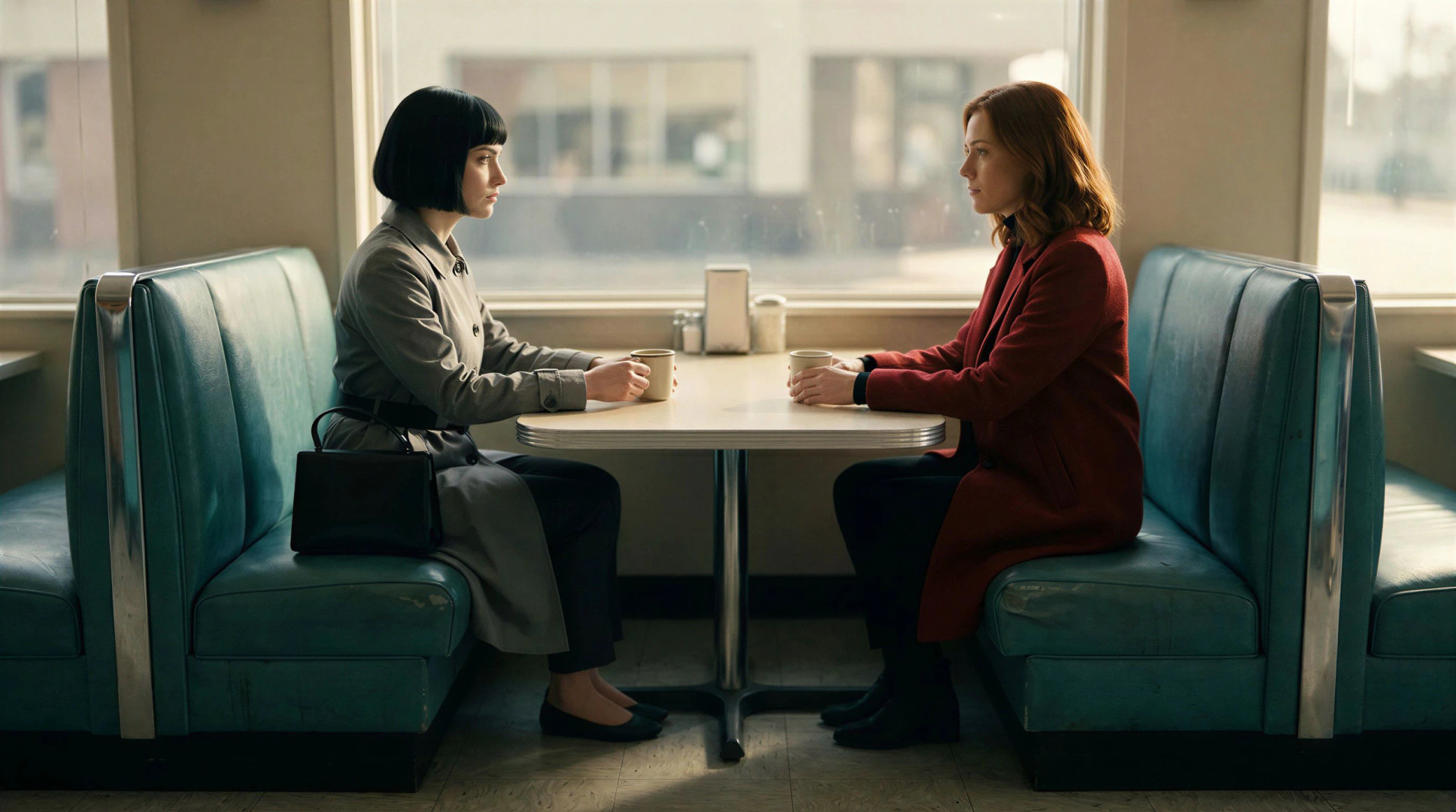
BlockingFinal shot
BlockingFinal shot

Red mannequinMara, red coatBlue mannequinJune, grey trench

Cast by color
Name each mannequin by its color in the prompt.

16:99:162.39:14:31:1
1080p

Export in any shape
A still or a video, from widescreen to vertical.

MayaTheo
MT2 editingSaved

Block it together
Co-edit one scene live, with every cursor and selection on screen.

Full 3D toolsetPoses, crowds, light, and timing

Pose every performer

Pose each joint, pick a gait, or apply a motion preset, from a punch to a sit.

Character pose
PoseCustom
JointRight elbow
MotionWalk

Stage a whole cast

Dances, fights, and chases in one step, with every performer still editable.

Dance numberFightFoot chaseCar chase
Cast size 8

Light the scene

Looks from golden hour to club, lighting rigs, and single lights with shadows.

StudioDaylightGolden hourDuskNight

Time it to the frame

Keyframes, easing, and range tools that shift or stretch a whole beat at once.

01s2s3s4s5s6s7s8s
Shot camera
June
Mara
Ferry
Range toolsShift +12fStretch 120%
Ease in/out

For every shootStudios, agencies, brands, and creators

FAQs
What is Morphic 3D Scene?
A 3D blocking editor on your Morphic canvas. Blocking is deciding where everyone stands, how they move, and where the camera sits, before any footage is generated.
Do I need 3D or previs experience?
No. Start from an example shot, or describe the shot to the agent. Characters are ready-made mannequins and sets come from a built-in library, so there is nothing to model.
What can the agent do in a scene?
Build the set, stage the action, move and key the camera, change the lighting, fix continuity warnings, and play the shot back.
Can I undo the agent’s edits?
Yes. Prompt it to undo, and it reverses its change as one step. Each agent edit lands whole, so a half-finished change never reaches your scene. Your own edits have full undo and redo.
Does 3D Scene cost credits?
Building and editing a scene doesn’t. Prompting the agent uses credits for its replies, the same as any Copilot chat. Generation credits are spent only when you make the final shot.
How does the model know who is who?
Give each mannequin its own color and a label; both show in the export. Use the export as the reference and name each one by color in the prompt: “The red mannequin is Mara, a woman in a red coat. The blue mannequin is June, in a grey trench coat.” The model then knows who stands where and which way each one faces.
How is it different from the camera tools on the Canvas?
The camera tools change an image or clip you already made, such as a new angle on the same frame. 3D Scene comes first: you decide the staging and the camera move, then generate the shot to match.
What can I export?
A PNG of any frame, or an MP4 of the whole shot, in 16:9, 9:16, 2.39:1, 4:3, or 1:1 at 720p or 1080p. Video renders in your browser, so use a current Chrome, Edge, or Safari.
Which plans include the agent?
Every paid plan. The agent in a scene is off on the Free plan.
Why block in Morphic instead of a separate previs tool?
Your blocking lives in the same file as your generations and your team, so the reference never leaves the project and nothing moves between apps.
chair
Block your first shot
Prompt the agent, or open an example.