Preferences
How to set the mode new Copilot chats start in, and whether your browser tells you when a generation is ready.
Preferences on Morphic lets you set your own defaults. These settings apply to you, not to your whole organization, so changing them does not affect your teammates.
Here's a quick tutorial on how to set your preferences on Morphic:
Accessing Preferences
- In the Dashboard view, click the Org logo in the top-left corner.
- From the dropdown, select Settings.
- Click 'Go to Profile settings' at the bottom of the left sidebar, then click 'Preferences'.
Or go straight there: studio.morphic.com/settings/account/preferences
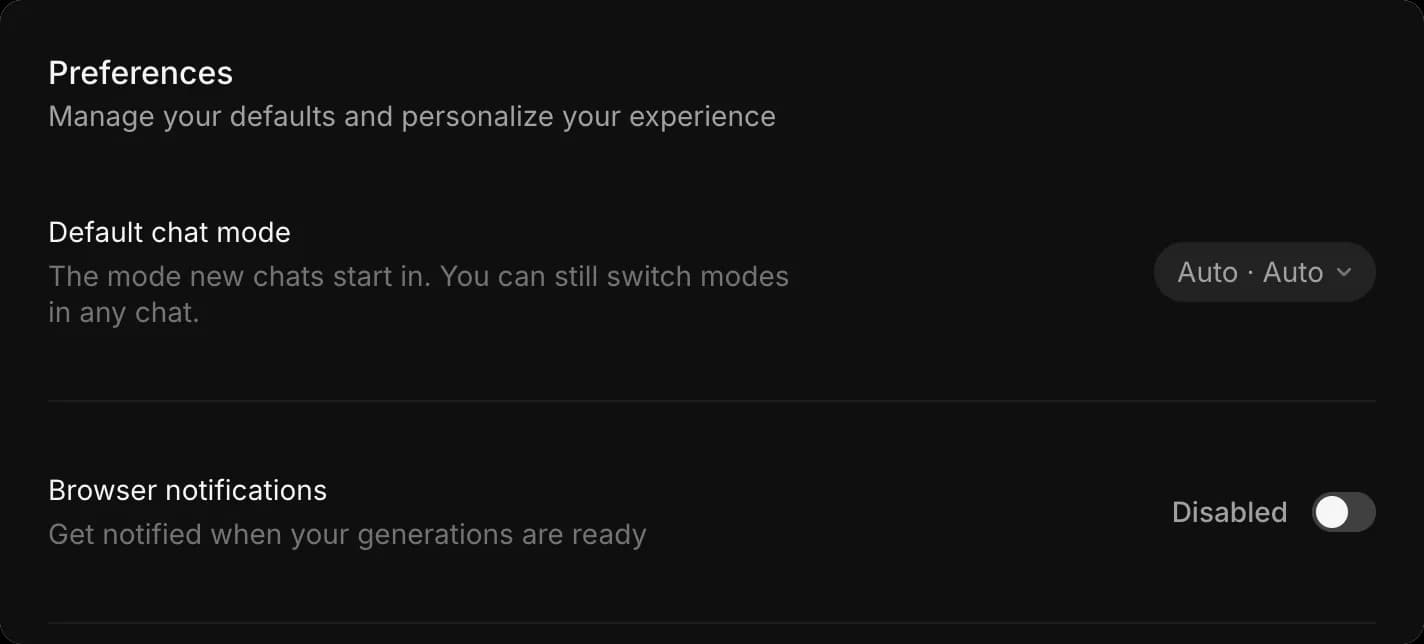
Default chat mode
'Default chat mode' sets how new Copilot chats start. The control holds two settings, and the pill beside it reads mode first and model second, so 'Auto · Auto' is automatic generation on the automatic model.
- Open 'Preferences'
- Click the dropdown beside 'Default chat mode'
- Under 'Mode', pick 'Ask before generating', which shows you the settings and credit cost before anything runs, 'Automatically generate', which generates straight away, or 'Plan only', which writes a plan without generating. A checkmark marks the active one. See Chat modes for what each one does
- Under 'Model', pick the model new chats start on. 'Auto' picks the best model for each task; the rest are the named models your workspace allows. See Choose a model
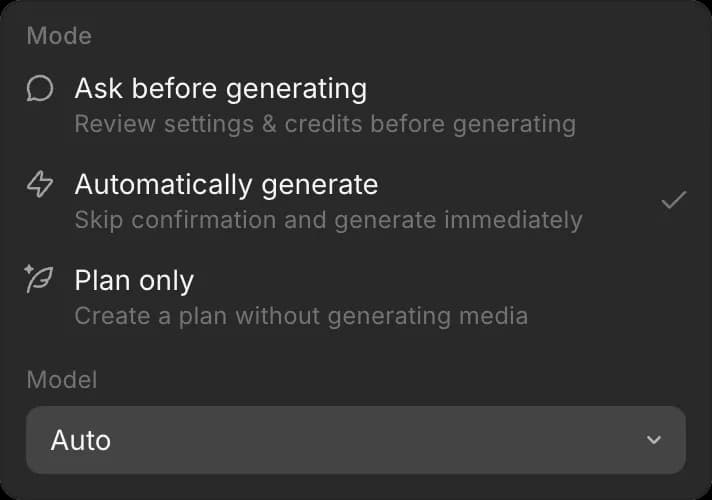
Switching the default from 'Auto' to a specific model means those chats are charged that model's credits, which the dropdown notes underneath.
This only affects new chats. You can still switch mode and model in any chat, and changing a single chat does not change your default.
If you often work with video or from a shared credit balance, setting your default to 'Ask before generating' means every new chat shows you what a generation costs before it runs.
Browser notifications
'Browser notifications' tells your browser to let you know when a generation is ready, so you can work in another tab while a long render finishes.
- Open 'Preferences'
- Switch 'Browser notifications' on or off
Good to know
- Your browser asks for permission the first time you turn notifications on. If you do not see them afterwards, check that Morphic is allowed to send them in your browser settings.
- These settings are yours alone. Changing them does not affect anyone else in your organization.
- If you work with video or from a shared balance, a default of 'Ask before generating' means every new chat shows what a generation costs before it runs.
That's how you set your preferences on Morphic. It sets how new chats behave and how you hear about finished work.
If you have any trouble or have any questions, feel free to reach out. We're happy to help. Write to us at support@morphic.com.