FLUX 3 Max vs FLUX 3: what changed
FLUX 3 Max is Black Forest Labs' FLUX 3, post-trained by fal Research for closer prompt adherence, better-looking output, and speed. fal reports more than 11 times faster inference and a 50-point quality gain over FLUX 3 on the Artificial Analysis leaderboard (Unite.AI).
| FLUX 3 | FLUX 3 Max | |
|---|---|---|
| Made by | Black Forest Labs | fal Research, from FLUX 3 |
| Speed | Baseline | More than 11 times faster, per fal |
| Quality, image to video | 1,086 Elo | 1,138 Elo, level with the leaders |
| Inputs | Text, image, keyframes, a clip to continue | Text, image, first and last frame, keyframes |
| Output | 720p or 1080p, plus 2K and 4K on Black Forest Labs' API | 720p, or 1080p |
| Length and sound | 5 to 20 s, native audio | 5 to 20 s, native audio |
Speed: fal's own benchmark puts a 10-second 720p clip at about 12 seconds of rendering (fal). On Morphic, our 10-second clips with sound came back in under 30 seconds, queue included.
How to use FLUX 3 Max on Morphic, step by step
Pick FLUX 3 Max in the video model picker
Open Morphic, switch the prompt bar to video, and choose FLUX 3 Max. You can also name it in a Copilot prompt and Copilot picks it for you.
Choose a starting point
Start from text alone, or add stills. One still animates that image, two set a first and last frame, and three to ten become keyframes pinned to times in the clip.
Write the shot as actions in order
Describe what happens in the order it happens, then the camera, the light, and the sound. The sections below show each part of the prompt with the clip it made.
Set the length, resolution, and aspect ratio
Pick any length from 5 to 20 seconds, 720p for drafts or 1080p for the final, and an aspect ratio for text to video. Turn audio on for sound and dialogue.
Generate, compare, and refine
On Morphic, two 10-second clips with sound each came back in under 30 seconds, queue included. Run a prompt two or three times, keep the best take, change one line, and run it again. For starting points, the FLUX 3 Max prompt library has 20 prompts, each with its clip.
A boy in a yellow raincoat stamps into a deep puddle on a city pavement, water exploding outward, then looks up at the camera with a huge grin. Low angle. Sound: rain, the big splash, his delighted laugh. No music, no text, no logos.
How to write a FLUX 3 Max prompt
Write the shot as a sequence of things you can see, in the order they happen, then the camera, the light, and the sound. FLUX 3 Max plays the actions in order, so the last beat of the prompt is the last beat of the clip. Name concrete actions ("rolls up the shutter") rather than moods ("a hopeful morning").
A florist in a canvas apron unlocks the shutter of her small flower shop at dawn, rolls it up with both hands, carries a zinc bucket of yellow tulips out to the pavement, then looks up at the camera and grins. Camera: a slow push in from across the quiet street. Soft blue dawn light turning warm. Sound: the shutter rattling up, early birds, distant traffic, the bucket set down on stone. No music. Plain clothes, no logos, no signage text.
How to time beats in FLUX 3 Max
When a moment has to land at a set point, give each beat a time range. Keep one main action per range and leave the final range a little longer, so the payoff has room to play.
0-3s: a sealed jar of honey sits on a sunny kitchen table. 3-6s: a child's small hands twist the lid off. 6-10s: the child dips a finger in and tastes it, eyes widening with delight. Close shot, warm morning light. Sound: the lid popping, a small gasp, a happy giggle. No music, no text, no labels.
How to write FLUX 3 Max sound effects
Audio is generated with the picture, so a sound tied to a visible action lands on that action. Name each sound plainly, in the order you will hear it, and add "no music" when you want only the scene.
A table tennis rally in an empty school gym, two players trading fast shots, every bounce crisp and clear, ending with a smash that one player cannot return. Side-on wide shot. Sound: each paddle hit and table bounce, sneakers squeaking, the ball rolling away. No music, no crowd, no text.
How to write FLUX 3 Max dialogue that lip-syncs
Put the exact words in quotes and say who speaks them and how. Keep a line to one or two short sentences so it finishes inside the clip. We transcribed six quoted lines generated on Morphic, and all six came back word for word.
An elderly watchmaker looks up from his workbench, lifts his loupe and says warmly: "Every watch tells you how it was treated." Close-up, warm desk lamp light. Sound: his voice, the soft ticking of many clocks around him. No music, no text, no logos.
How to use images with FLUX 3 Max
Stills give FLUX 3 Max a fixed look to start from or to pass through. How many you add decides the mode: one for image to video, two for a first and last frame, three to ten for keyframes.
FLUX 3 Max image to video: animate a still
Image to video starts from your still, keeps its framing and look, and takes its aspect ratio. So the prompt only needs what happens next and how it sounds; there is no need to describe the picture again.
He pauses, pulls the net taut between his hands, then looks up and nods to someone off camera as a small boat motors past behind him. Sound: gulls, water lapping on stone, a small outboard engine passing. No music.
FLUX 3 Max first and last frame
Give two stills and FLUX 3 Max builds the motion between them. Make both frames from the same shot, then edit the second, so only the things that should change do. The prompt describes how you get from one to the other.
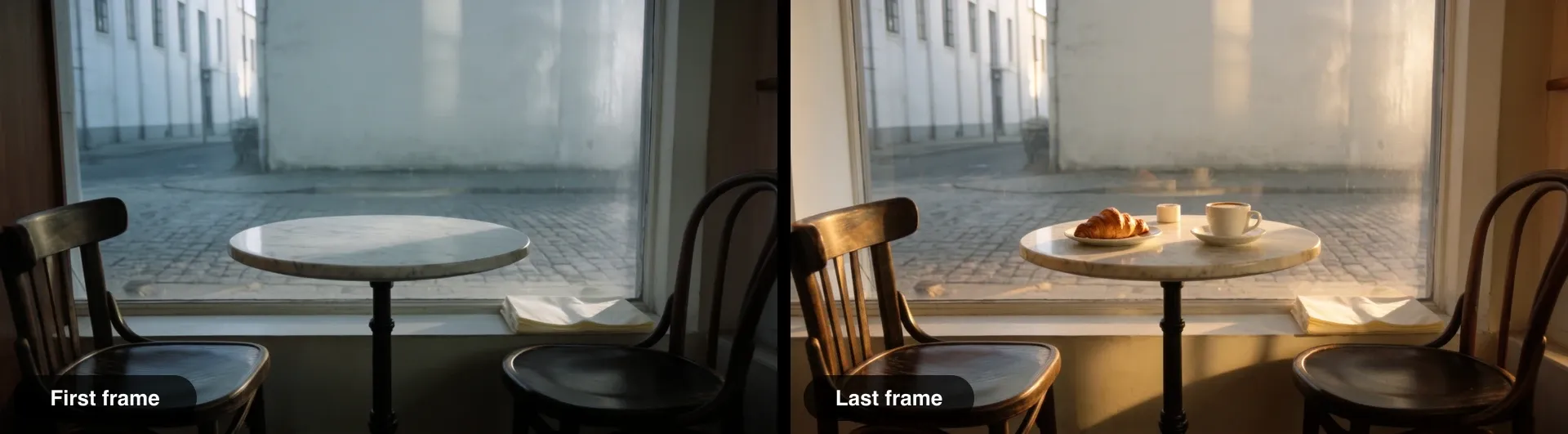
Morning arrives at the café table: the cool pre-dawn light warms into golden sunlight that spreads across the marble, and a waiter's hand sets down a cup of coffee and a croissant, then withdraws as steam rises. Locked-off shot. Sound: a quiet café waking up, a cup set on a saucer. No music.
FLUX 3 Max keyframes: 3 to 10 stills
With three to ten stills, each one is pinned to a time in the clip: the first at 0 seconds, the last no later than the clip's length. Space them where the story turns, keep the camera and light the same in every still, and let the prompt describe the change that links them.

Time-lapse of a sunflower growing in a terracotta pot on a windowsill: the seedling climbs, broad leaves unfurl, a bud forms at the top and opens into a full yellow flower, daylight drifting across the wall. Locked-off shot. Sound: soft room tone, a clock ticking faintly. No music.
How to make a 20-second FLUX 3 Max video
Twenty seconds is enough for a journey. List the landmarks the camera passes in order and say the shot is continuous, and FLUX 3 Max holds one subject through all of them without a cut.
One continuous 20-second macro shot following a honeybee as it lifts off a lavender flower, flies low across a sunny cottage garden, past a dripping tap and a row of tomato plants, and lands at the entrance of a wooden beehive among other bees. The camera tracks close behind the bee the whole way. Sound: the bee's buzz, birdsong, the tap dripping, the hum of the hive growing louder. No music, no text.
FLUX 3 Max settings and limits
- Provider: Morphic runs FLUX 3 Max through fal, at fal's high reasoning setting, which expands your prompt before rendering and follows it most closely.
- Length: any whole second from 5 to 20.
- Resolution: 720p by default, or 1080p, which fal describes as an upscale of the 720p render.
- Aspect ratio: 21:9, 2:1, 16:9, 4:3, 1:1, 3:4, or 9:16 for text to video. Image to video and keyframes follow your stills.
- Inputs: one still, a first and last frame, or 3 to 10 timed keyframes, as PNG, JPEG, or WebP. Keyframes guide the shot rather than lock every face.
- Prompt: up to 5,000 characters.
- Audio: a switch per clip. Turn it on for sound and dialogue, off for a silent clip.
- Not supported: continuing or editing an existing clip, and 2K or 4K output.
A lone hiker in an orange jacket walks along a narrow snowy ridge under a vast evening sky, tiny against the mountains, wind lifting snow off the crest. Ultrawide locked-off wide shot. Sound: wind, boots crunching on snow. No music, no text, no logos.
FAQs
Describe the shot as visible actions in the order they happen, then the camera, the light, and the sound. FLUX 3 Max plays the actions in order, so end the prompt on the moment you want the clip to end on, such as a look to camera or a line of dialogue.
Any whole-second length from 5 to 20 seconds in one generation. Twenty seconds is long enough for a single continuous take that passes several places or beats, as long as you list them in order.
Yes. Write the words in quotes and say who speaks them, for example: he looks up and says, "Every watch tells you how it was treated." The line comes back lip-synced with the rest of the scene's sound. Keep it to one or two short sentences per clip.
Add 3 to 10 stills and pin each to a time: the first at 0 seconds, the last no later than the clip's length. FLUX 3 Max builds one continuous shot that passes through each frame. With exactly two stills, they act as the first and last frame.
Draft at 720p, the default, while you settle the action and the sound. Switch to 1080p for the version you will publish. fal describes 1080p as an upscale of the 720p render, so it sharpens the result rather than adding detail the 720p take did not have.
For text and image to video, it follows prompts more closely and runs several times faster. FLUX 3 still covers jobs Max does not: continuing an existing clip, and 2K or 4K output on Black Forest Labs' own API.
Yes. Pick FLUX 3 Max in the video model picker or name it in Copilot, on any of Morphic's paid plans. Every clip in this guide was made with FLUX 3 Max on Morphic, from the exact prompt shown with it.