Design post-graffiti art in your browser with Morphic's post-graffiti AI image generator. Build a spray-can figure on a gallery canvas, layer stencils and torn paste-up over a gritty wall, lock the urban palette with Style Transfer, then animate any still with Image to Video.

Post-graffiti subjects you can compose

Post-graffiti compositions you can design

Gallery wall of canvases

A white-cube gallery wall hung with three unstretched post-graffiti canvases, each a bold spray-can figure in flat primaries with drip outlines, raw canvas tooth and overspray fog at the edges, a wild-style tag scrawled across the bottom of each.

Edit prompt
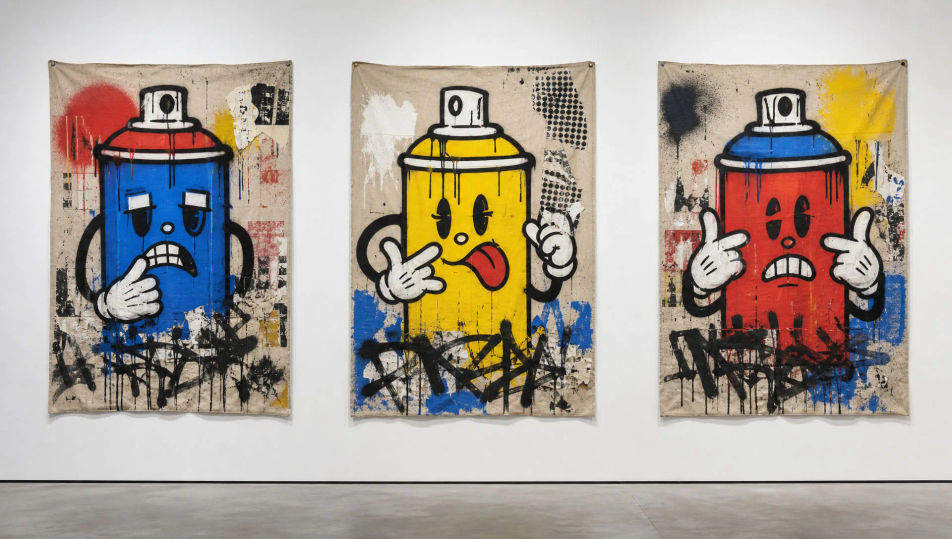
Gallery wall of canvases

Layered alley wall

A gritty brick alley wall stacked with overlapping work, hand-sprayed wild-style tags beneath a hard-edged stencil king and a curling wheat-paste poster, paint drips running over the mortar, a single radiant figure crowning the layers.

Edit prompt
Layered alley wall

Subway car panel

The flat side of a subway car covered end to end with a post-graffiti burner, fat bubble letters in flat primaries outlined thick black, a spray-can cartoon figure riding the lettering, drips and overspray haze, dull steel rivets showing through.

Edit prompt
Subway car panel

Exhibition poster

A tall post-graffiti exhibition poster for an invented downtown show, a bold spray-can crowned figure centred over torn paste-up scraps, hand-scrawled marker title across a black bar, garish flat colour and visible drips on a gritty ground.

Edit prompt
Exhibition poster

Make Post-graffiti in three steps

  1. 01

    Describe your Post-graffiti

    Describe the Post-graffiti you want, in plain words.

  2. 02

    Generate the image

    Morphic generates a clean, ready-to-publish image on your canvas in seconds.

  3. 03

    Refine your Post-graffiti

    Tweak the prompt, regenerate variations, then download or share the frame.

Related workflows

You might also like

Simple pricing

Get started for free today, with the option to upgrade or cancel anytime.

Basic

$0/ month
billed as $0 per year

900 monthly credits

1 user only

All models

Workflows

Standard

$0/ month
billed as $0 per year

3200 monthly credits

1 user only

All models

Workflows

Pro

$0/ month
billed as $0 per year

6200 shared monthly credits

1 user

+ up to 4 more at extra cost

All models

Workflows

Pro Max

$0/ month
billed as $0 per year

24000 shared monthly credits

1 user

+ up to 9 more at extra cost

All models

Workflows

Enterprise

For higher limits

Custom

pricing and billing terms

Unlimited credits
Custom seat limits
All models
Workflows
Pricing Gradient

Free

For playing around

$0

forever free

Up to 20 credits
1 user only
Limited models
Workflows

FAQs

Where can I make post-graffiti art with AI?
You can create post-graffiti images directly in your browser on Morphic. Open the Image tool, describe the spray-can outline, the layered stencils and paste-up, and the gritty canvas surface, and Morphic produces the composition. No installs and no specialist software needed.
What defines post-graffiti for an AI prompt?
Four locked-in choices: thick spray-can outlines with visible drips and overspray fog, bold flat cartoon figuration, layered stencils, hand tags and torn paste-up stacked over one another, and a gritty surface that reads as raw canvas or weathered brick. Name all four so the look lands as gallery-canvas street art, not clean vector clip art.
What is the difference between post-graffiti and street graffiti in AI prompts?
Street graffiti lives on the wall as wild-style lettering and tags. Post-graffiti takes that spray-can language onto a canvas or gallery surface and adds bold cartoon figuration and fine-art framing. Name "unstretched canvas, bold figure, drip outline on a gallery wall" and the look reads as post-graffiti rather than a plain wall tag.
How do I keep a post-graffiti series feeling like one collection?
Use the Style Transfer workflow to lock the spray-can palette, the drip outline weight, and the gritty surface before producing additional pieces, then reference that style card in every prompt. A canvas series or a poster run stays consistent across the whole set.
Can I turn post-graffiti compositions into animated video?
Yes. The Image to Video tool animates any still you generate, and a slow drip running down a tag or a stencil layer fading up suits the register. Pair with the Music tool for a hip-hop or breakbeat score.
Do I need any prior art experience to make post-graffiti art?
No. Morphic runs in your browser and you direct it with plain-language prompts. Anyone who can describe a bold spray-can figure, dripping black outlines, and a gritty canvas can produce a post-graffiti composition. Spray cans and a wall are not required.



