AI doorbell cam encounter video

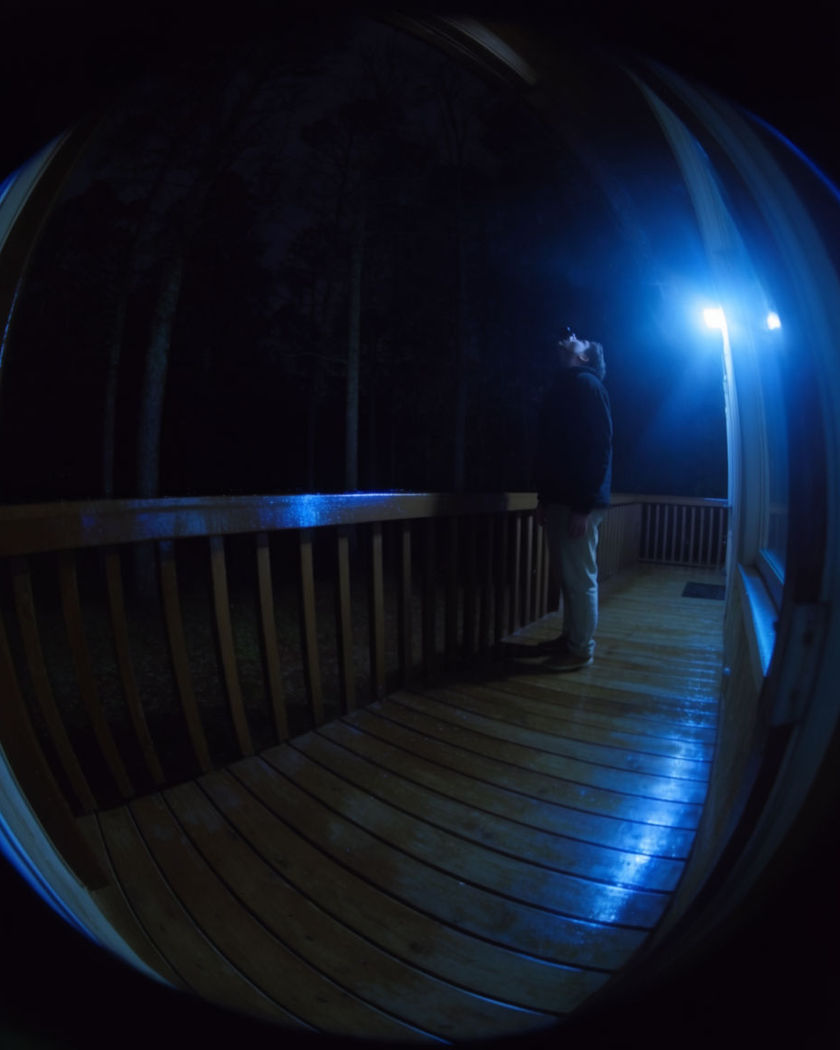
Doorbell cam encounter shots generated with the wide fisheye porch look built in: a shape stepping into frame at night, pausing, and turning to look up at the camera.

A wide fisheye doorbell camera view at night showing a figure pausing on a porch and looking up at the lens

Doorbell cam encounter examples

Wide street to porch approach

Use this prompt

A figure crosses a dark street and climbs the porch steps into camera range. a wide fisheye porch camera view at night looking out across a quiet suburban street, a figure crossing from the far side, walking up the driveway and climbing the porch steps into the harsh circle of porch light, infrared night grade, natural pacing

Motion light activation

Use this prompt

A dark porch suddenly floods with light as a figure steps into range. a wide fisheye porch camera view of a dim front yard at night, a motion sensor light suddenly flooding the porch with harsh white light as a figure steps into range, the figure shielding their eyes briefly, infrared to full colour transition, natural camera-app grain

Delivery drop and glance

Use this prompt

A figure sets down a package and glances up at the camera before leaving. a wide fisheye porch camera view at dusk, a figure setting a plain box down on the doormat, straightening up and glancing briefly up at the camera before turning to walk away, warm porch light, natural handheld camera-app framing

Waving at the doorbell

Use this prompt

A figure smiles and waves casually up at the camera before ringing. a wide fisheye porch camera view in early evening light, a figure smiling and giving a casual wave up toward the lens before reaching to press the doorbell button just below frame, warm natural light, friendly and ordinary tone

Approach and pause

Use this prompt

A figure walks up the porch steps and stops directly under the lens. a wide fisheye porch camera view at night, a figure walking up a few concrete steps and stopping directly beneath the camera, porch light casting a harsh circular pool of light, infrared-tinted night colour grade, subtle lens distortion at the edges, still after the stop

Shape crossing behind the glass

Use this prompt

A blurred shape passes across a frosted door panel just after dark. a wide fisheye porch camera view just after dark, a blurred shape passing slowly across a frosted glass door panel behind the porch, motion-triggered light flicking on midway through, infrared night tint, quiet suburban street beyond

Close stare hold

Use this prompt

A figure leans in close to the lens and holds a long, quiet stare. a wide fisheye porch camera view at night, a figure leaning in close to the lens until their face fills most of the frame, holding a long quiet stare directly into the camera before slowly stepping back, infrared night tint, tense stillness

Slow look up at the lens

Use this prompt

A figure tilts their head back slowly to stare directly into the camera. a wide fisheye porch camera view at night, a figure standing close to the lens slowly tilting their head back and up until they are staring directly into the camera, porch light flickering faintly, night-vision green-grey tone, unsettling stillness

Package left and door glance

Use this prompt

A figure places a package by the door and looks toward it before leaving. a wide fisheye porch camera view at dusk, a figure setting a plain package beside the front door, standing to glance once toward the doorbell camera, then walking calmly back down the driveway, warm evening light, ordinary and unremarkable pacing

Startled step back

Use this prompt

A figure notices the camera and takes a sudden step back off the porch light. a wide fisheye porch camera view at night, a figure standing under the light suddenly noticing the camera lens and taking a quick step back out of the harsh light into shadow, motion blur on the step, infrared night colour grade

Generate your own doorbell cam encounter video

Pick a starting point, edit anything you like, then generate it in Morphic.

Generate

Simple pricing

Get started for free today, with the option to upgrade or cancel anytime.

Basic

$19/ month
billed as $0 per year

2400 monthly credits

1 user only

All models

Workflows

Standard

$24/ month
billed as $0 per year

3625 monthly credits

1 user only

All models

Workflows

Pro

$45/ month
billed as $0 per year

6350 shared monthly credits

1 user

+ up to 4 more at extra cost

All models

Workflows

Max

$170/ month
billed as $0 per year

24650 shared monthly credits

1 user

+ up to 9 more at extra cost

All models

Workflows

Enterprise

For higher limits

Custom

pricing and billing terms

High-volume credits
Custom seat limits
All models
Workflows
Pricing Gradient

Free

For playing around

$0

forever free

Up to 20 credits
1 user only
Limited models
Workflows

FAQs

Where can I make doorbell cam encounter videos with AI?
You can create doorbell cam encounter videos directly in your browser on Morphic. Open the Image to Video tool, bring a photo of your subject or porch, describe the encounter beat, and Morphic generates the clip with the fisheye porch-camera look built in.
What kinds of doorbell cam encounter shots work best with AI video?
A clear approach, a pause under the light, and a look up at the lens read cleanest. Naming the fisheye framing and the night or dusk lighting is what sells the doorbell-camera feel rather than a normal shot.
How do I write a good prompt for a doorbell cam encounter video?
Name the fisheye camera style, the time of day, the exact action of the encounter, and the porch light behaviour. The more specific the beat, the more convincing the doorbell-cam look Morphic returns.
Can I use my own photo for a doorbell cam encounter video?
Yes. Upload a photo of the subject or the porch setting, describe the encounter, and Morphic generates the clip from that image. You can then add music or a caption on the timeline before you export.
Do I need video editing experience to make a doorbell cam encounter video?
No. Morphic runs in your browser and you direct it with plain-language prompts. If you can describe the beat, you can produce the video. The prompts on this page are written so anyone can paste and run them.
What can I use a doorbell cam encounter video for?
They make punchy, shareable trend content for social feeds. Generate the clip, add music and a caption on the timeline, then export a vertical cut sized for the app you are posting to.