Choreograph for the camera in your browser with Morphic's dance film AI video generator. Generate a contemporary soloist unspooling across an empty warehouse floor, a duet folding and lifting in a single unbroken take, or a body sculpted by a single hard side-light, then score the movement with the Music tool, add breath and ambient sound with Speech, and stitch the piece in the Canvas.

Dance film characters you can create

Dance film scenes you can direct

Soloist in a single unbroken warehouse take

A barefoot dancer unspools a long contemporary phrase across an empty warehouse floor, dusty window light raking low across the concrete, a slow steadicam circling to hold the whole figure in one continuous take.

Edit prompt

Contact-improv duet in hard side-light

Two dancers fold, share weight, and lift in a continuous roll of motion against a black studio, one hard side-light sculpting the muscle and the seam of contact, the camera tracking the arc of the lift in a single move.

Edit prompt

Ballet phrase in a shaft of window light

A principal in pointe shoes works a slow adagio through a single shaft of dusty light in a bare studio, the floor glowing pale, a low locked camera letting the dancer rise and fall through the beam.

Edit prompt

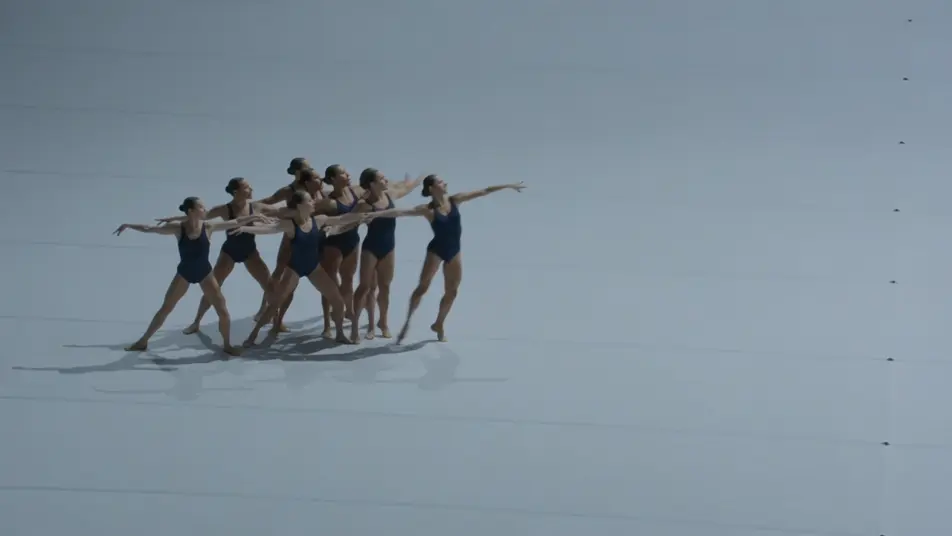
Corps ensemble rippling across an empty stage

A dozen dancers in slate leotards send a ripple of motion through the group across a vast empty stage under a cool even wash, a high crane drifting back to reveal the full geometry of the formation.

Edit prompt

Make dance film videos in three steps

  1. 01

    Describe your dance film scene

    Write the dance film scene you want, in plain words.

  2. 02

    Generate the video

    Morphic generates a cinematic, frame-ready clip on your canvas in seconds.

  3. 03

    Refine your dance film video

    Tweak the prompt, regenerate variations, then download or share the shot.

Related workflows

You might also like

Simple pricing

Get started for free today, with the option to upgrade or cancel anytime.

Basic

$0/ month
billed as $0 per year

900 monthly credits

1 user only

All models

Workflows

Standard

$0/ month
billed as $0 per year

3200 monthly credits

1 user only

All models

Workflows

Pro

$0/ month
billed as $0 per year

6200 shared monthly credits

1 user

+ up to 4 more at extra cost

All models

Workflows

Pro Max

$0/ month
billed as $0 per year

24000 shared monthly credits

1 user

+ up to 9 more at extra cost

All models

Workflows

Enterprise

For higher limits

Custom

pricing and billing terms

Unlimited credits
Custom seat limits
All models
Workflows
Pricing Gradient

Free

For playing around

$0

forever free

Up to 20 credits
1 user only
Limited models
Workflows

FAQs

What is a dance film?
A dance film is a cinematic work where choreography is created for the camera rather than recorded from an audience seat, with the moving body as the subject. Its visual hallmarks are directional light sculpting the figure, the space acting as a partner like a bare studio or empty warehouse, and long unbroken takes that move with the dancer.
How do I make dance film videos with AI?
Make dance film videos in your browser on Morphic with the Text to Video tool. Describe the space, the light, the movement, and the camera, and Morphic produces the clip. No installs and no specialist software are needed.
How do I write a good dance film video prompt?
Name the space, the light on the body, and the take in one line so Morphic lands the dance film register. For example, "a barefoot soloist unspools a long phrase across an empty warehouse floor in raking window light, a slow steadicam circling in one continuous take." Calling out the directional light and the unbroken move is what cues the cinematic dance look.
What dance film scenes work best for AI video?
Single-figure or small-ensemble movement in sculpted light works best for AI dance film, such as a soloist in a single unbroken warehouse take, a contact-improv duet in hard side-light, a ballet phrase in a shaft of window light, and a corps ensemble rippling across an empty stage. Each pairs clear movement with a defined camera move.
How do I keep dancers consistent across dance film scenes?
Use the Character Lineup workflow to lock the wardrobe and silhouette for each dancer, then reference those character cards in every prompt. Morphic preserves the soloist grey tank, the ballet principal practice tutu, and the corps slate leotards across the whole piece so the figures stay recognizable from phrase to phrase.
Can I add music and sound to my dance film videos?
Yes. The Music tool produces an original score that matches the dynamics of the movement, and the Speech tool generates breath, ambient room tone, and any spoken layer in the voice you choose. Layer both onto your dance film to publish a complete piece with the movement, the music, and the breath in place.
What is the best AI video generator for dance film videos?
Morphic is one of the best AI video generators for dance film videos. It runs in your browser: describe a scene in plain language and the Text to Video tool generates the dance film clip, the Character Lineup workflow keeps your cast consistent across shots, and the Music and Speech tools add an original score and narration. You can direct, refine, and assemble a full dance film video on a single canvas with no installs.