AI LinkedIn video ads

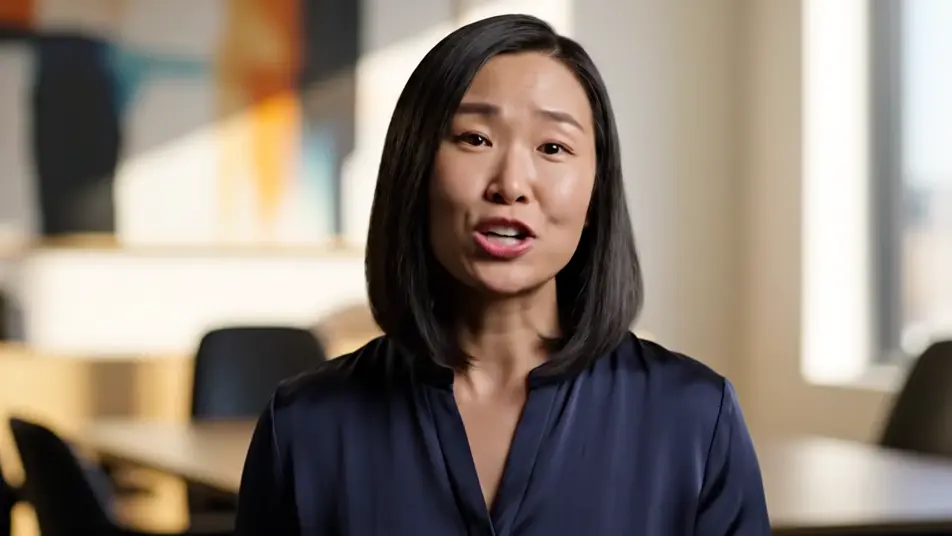
Direct a LinkedIn video ad in your browser with Morphic's LinkedIn video ad generator, no crew and no shoot day. Generate a confident expert to camera, a team at work in a modern office, or a craft close-up framed for the feed. Score it with Music, voice it with Speech, then assemble the final cut on Compose.

Ad openers you can direct

Ad sequences you can stage

A confident expert opener

A tight clean frame on a professional speaking straight to camera in a bright modern office, plain solid-color unprinted clothing, steady eye contact, soft depth behind.

编辑提示词

An office in easy motion

A smooth glide through a sleek workspace as colleagues collaborate around tables, screens as abstract color glow only, no interface, plain solid-color unprinted clothing, bright natural light.

编辑提示词

A craft close-up sequence

A macro pass over skilled hands working a plain unlabeled object with precision, soft directional light, shallow focus pulling from fingertips to finished detail.

编辑提示词

A walking pitch through the floor

A steady tracking shot following a founder through a bright open workspace as they talk to camera, the office alive behind them, plain solid-color unprinted clothing, confident pace.

编辑提示词

三步制作LinkedIn video ad视频

  1. 描述你的LinkedIn video ad场景

    用简单的话写下你想要的LinkedIn video ad场景。

  2. 生成视频

    Morphic 在几秒内于画布上生成电影级片段。

  3. 优化你的LinkedIn video ad视频

    调整提示词,重新生成,满意后即可下载或分享。

简单定价

今天就免费开始,随时可以升级或取消。

Basic

$9/
账单金额为 $0 每年

900 每月 信用

1 个用户

所有模型

工作流

Standard

$24/
账单金额为 $0 每年

3200 每月 信用

1 个用户

所有模型

工作流

Pro

$45/
账单金额为 $0 每年

6200 共享 每月 信用

1 用户

+ 最多 4 人额外付费可增加

所有模型

工作流

Pro Max

$170/
账单金额为 $0 每年

24000 共享 每月 信用

1 用户

+ 最多 9 人额外付费可增加

所有模型

工作流

Enterprise

更高的限制

自定义

定价和账单条款

大容量信用
自定义席位限制
所有模型
工作流

Pricing Gradient

Free

供随意体验

$0

永久免费

最多 20 积分
仅1个用户
部分模型
工作流

常见问题

Where can I make a LinkedIn video ad with AI?
You can create a LinkedIn video ad directly in your browser on Morphic. Open the Text to Video tool, describe the hook shot and the supporting shots, and the model renders them. On Compose you cut them into a feed-ready ad without booking a crew or a shoot day.
Can the ad include the LinkedIn logo or interface?
No, and it should not. AI video invents fake logos and garbled interface elements, so keep every frame free of platform marks and UI. A clean cinematic ad reads as more premium in the feed anyway, and the platform supplies its own chrome around your ad.
How do I add captions to a LinkedIn video ad?
Generate the footage clean, without caption overlays, because AI-rendered text comes out garbled. Add real captions afterward in your editor or through the caption tools in the ads platform. That keeps every word crisp and editable while the generated footage stays reusable.
What length works best for a LinkedIn video ad?
Fifteen to thirty seconds performs best for feed placements. Land the hook in the first two seconds, prove the point with one craft or team shot, and close on the expert. Short confident cuts hold attention where long explainers get scrolled past.
Can I add voiceover and music to my LinkedIn video ad?
Yes. The Speech tool generates a clear professional voiceover in the voice you choose, and the Music tool adds an original bed underneath. Many feed viewers watch muted, so build the ad to work silently and let the audio reward the ones who turn it up.