AI Podcast videos

Direct a podcast video in your browser with Morphic's podcast video generator and give your show a studio it never rented. Generate a host at a plain unbranded microphone, two voices trading a story across the table, or a slow push through warm booth light. Score it with Music, voice it with Speech, then cut the episode visuals on Compose.

Studio moments you can direct

Episode visuals you can stage

A host settling into the take

A steady medium shot of a host leaning into a plain unbranded microphone, headphones on, warm studio light, plain solid-color unprinted clothing, the room soft and dim behind.

编辑提示词

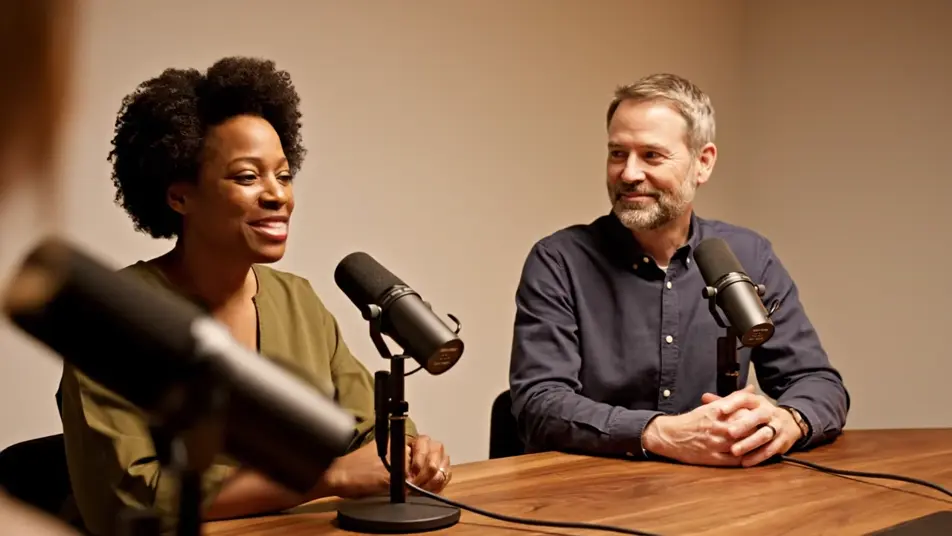
A conversation across the table

A slow two-shot of two people trading a story across a studio table, plain unbranded microphones between them, animated hands and easy laughter, warm intimate light, plain solid-color unprinted clothing.

编辑提示词

A laughing guest reaction

A close warm frame of a guest breaking into laughter at a plain unbranded microphone, head tipping back, hands rising, shallow focus on the joy, plain solid-color unprinted clothing.

编辑提示词

A slow push through the studio

A gentle push-in across a cozy booth, past warm lamps and plain unbranded microphones toward two hosts deep in conversation, dark walls glowing amber, unhurried mood.

编辑提示词

三步制作podcast video视频

  1. 描述你的podcast video场景

    用简单的话写下你想要的podcast video场景。

  2. 生成视频

    Morphic 在几秒内于画布上生成电影级片段。

  3. 优化你的podcast video视频

    调整提示词,重新生成,满意后即可下载或分享。

简单定价

今天就免费开始,随时可以升级或取消。

Basic

$9/
账单金额为 $0 每年

900 每月 信用

1 个用户

所有模型

工作流

Standard

$24/
账单金额为 $0 每年

3200 每月 信用

1 个用户

所有模型

工作流

Pro

$45/
账单金额为 $0 每年

6200 共享 每月 信用

1 用户

+ 最多 4 人额外付费可增加

所有模型

工作流

Pro Max

$170/
账单金额为 $0 每年

24000 共享 每月 信用

1 用户

+ 最多 9 人额外付费可增加

所有模型

工作流

Enterprise

更高的限制

自定义

定价和账单条款

大容量信用
自定义席位限制
所有模型
工作流

Pricing Gradient

Free

供随意体验

$0

永久免费

最多 20 积分
仅1个用户
部分模型
工作流

常见问题

Where can I make a podcast video with AI?
You can create podcast videos directly in your browser on Morphic. Open the Text to Video tool, describe the studio shots your episode needs, and the model renders them. On Compose you cut the visuals against your episode audio without renting a studio.
How do I add episode titles and captions to a podcast video?
Keep the generated footage free of titles and waveform overlays, since AI-rendered text comes out garbled. Add real episode titles and captions in your editor after the cut. Clean footage also stays reusable, so one studio set can open every episode this season.
What visuals work best for a podcast video?
A host at the mic, a two-shot across the table, a laughing reaction, and a slow studio wide cover most episodes. Cut between them on the rhythm of the conversation. The reaction shot is the one to clip for social, since joy travels further than talk.
How do I keep the studio consistent across episodes?
Reuse the same prompt descriptors every time, the same chairs, plain unbranded microphones, lamp glow, and wall color. Consistent wording renders a consistent room. Save your studio prompt once and every episode opens in the same recognizable space.
Can I add music and voices to my podcast video?
Yes. The Speech tool generates voice tracks in the tones you choose, useful for trailers and intros. The Music tool adds an original theme underneath. Keep the bed low in the mix so the conversation stays the reason anyone pressed play.