Dateien
Dateien in Morphic ermöglichen es Ihnen, jede Szene oder Idee separat zu verwalten. Erstellen, umbenennen, wechseln oder löschen Sie Dateien – jede mit einer eigenen Leinwand für fokussiertes und organisiertes Arbeiten.
- Klicken Sie in einem ausgewählten Projekt im Dashboard oder oben rechts auf Ihrem Bildschirm auf „+ Datei“
- Geben Sie einen Namen für Ihre neue Datei ein und bestätigen Sie.
- Um umzubenennen oder zu löschen, klicken Sie mit der rechten Maustaste auf die Datei im Dashboard und wählen Sie die Aktion aus.
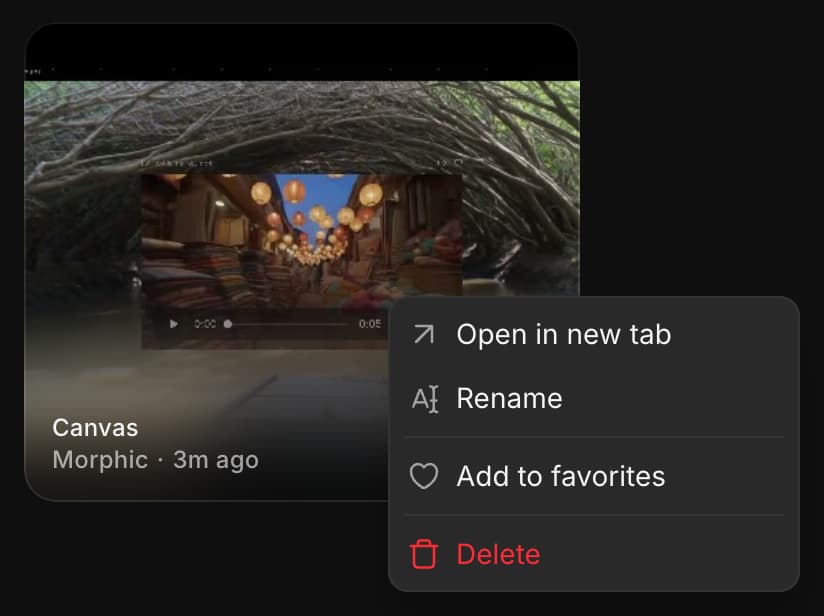
- Jede Datei hat ihre eigene Leinwand, auf der alle Ihre Generierungen für diese Datei an einem Ort organisiert sind.
Dateien helfen Ihnen dabei, Ihre Kreationen innerhalb jedes Projekts effizient zu verwalten, wie etwa verschiedene Animationsszenen oder Spiel-Assets.
Wenn Sie Probleme haben oder Fragen haben, können Sie sich gerne an uns wenden. Wir helfen Ihnen gerne. Schreiben Sie uns an support@morphic.com.
Projekte
Projekte in Morphic helfen Ihnen, Ihre Arbeit nach Thema, Kunde oder Ziel zu organisieren, damit Sie zusammengehörige Dateien zusammenhalten und alles fokussiert und strukturiert verwalten können.
Chats
Wie Sie eine frühere Copilot-Unterhaltung finden, die Liste eingrenzen und einen Chat umbenennen, als Favorit markieren oder löschen.