Extender vídeo
Cómo hacer un plano más largo de lo que permite una generación, extendiendo el clip con Seedance 2.5 o continuando desde uno de sus fotogramas.
Cada modelo de video en Morphic tiene una duración máxima de clip. Para hacer un plano más largo o continuar una escena, extiende el clip que ya tienes con Seedance 2.5, o empieza un clip nuevo desde uno de sus fotogramas y une los clips en Compose.
Extender con Seedance 2.5
Seedance 2.5 continúa un clip más allá de su último fotograma y mantiene el personaje, el movimiento y el estilo. También puede generar el momento anterior al primer fotograma.
- En el Canvas, haz clic en el selector de modo, abajo a la izquierda de la barra de prompt, pasa el cursor sobre 'Video' y haz clic en 'Referencia a video'
- Haz clic en el selector de modelo, pasa el cursor sobre 'Seedance' y selecciona 'Seedance 2.5'
- Haz clic en el cuadro 'Referencias' y añade el clip que quieres extender. Para ver de dónde puede venir una referencia, consulta Referencia a video
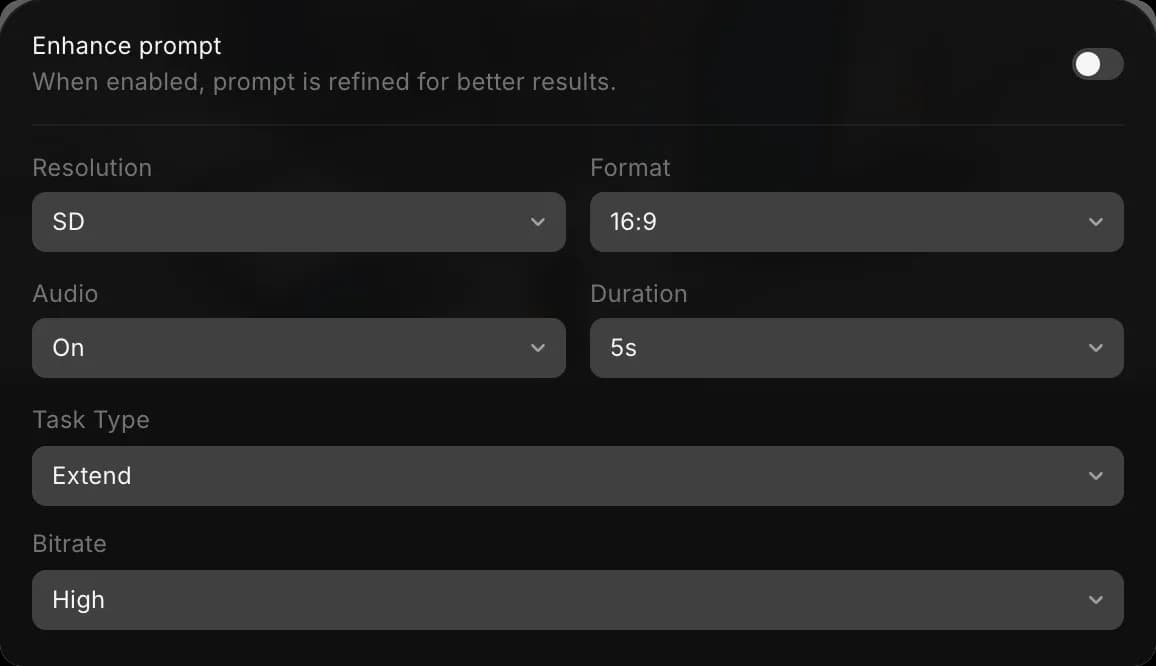
- Haz clic en el botón de ajustes, por ejemplo 'SD · 16:9 · On · 5s · Auto · High'. Pon 'Task Type' en 'Extend' y 'Duración' en la duración del clip final, el original más el metraje nuevo. Para añadir 5 segundos a un clip de 5 segundos, elige 10s
- Escribe el prompt con extender o continuar, y nombra el clip con @, por ejemplo
Extiende @Video 1 hacia delante: el jinete corona la colina y frena cuando aparece el pueblo - Haz clic en el botón azul de la barra de prompt. Muestra lo que costará el clip
El resultado es un solo clip con el original y el metraje nuevo, con la relación de aspecto del clip que adjuntaste. Para añadir metraje antes del clip, dilo: Continúa los 5 segundos anteriores a @Video 1.
Continuar desde un fotograma
Funciona con cualquier modelo de video, así que puedes cambiar de modelo o de dirección en el corte.
- Haz clic derecho en el clip del Canvas y elige 'Extraer el último fotograma al Canvas'. Para continuar desde un momento anterior, selecciona el clip, lleva el cabezal de reproducción al fotograma que quieras, haz clic derecho y elige 'Extraer fotograma al Canvas'
- Selecciona el fotograma extraído y ejecuta Imagen a video con él como fotograma inicial. Describe lo que pasa después, por ejemplo
ella sigue caminando al mismo ritmo y se gira hacia la ventana - Repite desde el final de cada clip nuevo hasta que la escena dure lo que necesitas
Aquí tienes un tutorial breve sobre cómo extraer un fotograma de un video en Morphic:
Unir los clips
Los clips creados desde fotogramas son videos separados. Únelos en Compose:
- Abre Compose
- Arrastra los clips desde la pestaña 'Recursos' a la línea de tiempo, en orden
- Haz clic en 'Exportar' arriba a la derecha. Consulta Exportar un video
Consejos
- Usa Extend cuando el plano tenga que fluir sin un corte visible. Continúa desde un fotograma cuando quieras dirigir tú cada clip siguiente.
- Mantén el mismo modelo, relación de aspecto y referencias en todos los clips para que el personaje y el estilo no cambien.
- En Copilot, pídelo con tus palabras, por ejemplo "extiende este clip 5 segundos".
Así es como se extiende un video en Morphic. Úsalo cuando un plano o una escena tenga que durar más que una generación.
Si tiene algún problema o alguna pregunta, no dude en ponerse en contacto con nosotros. Estaremos encantados de ayudarle. Escríbanos a support@morphic.com.
Etiqueta de múltiples personajes
Ahora puedes crear una escena con varios personajes en Morphic. Esto es útil para escenas que requieren diálogo, interacción o acción coordinada manteniendo la coherencia entre personajes.
Guion gráfico
Cómo planificar escenas, planos y flujo visual en Morphic antes de generar los fotogramas finales.