Imagen a video
La función de imagen a vídeo de Morphic te permite convertir una sola imagen en un vídeo corto generado por IA usando un prompt.
Aquí tienes un breve tutorial sobre cómo usar Imagen a video en Morphic:
- Sube o genera tu imagen en el lienzo
- Selecciona la imagen con la que quieres trabajar
- En la barra de indicaciones que aparece debajo de la imagen, establece el tipo de salida en 'Video' y ajusta la configuración, o déjala predeterminada
- Escribe una indicación que describa el video deseado
- Haz clic en el botón azul de la barra de indicaciones
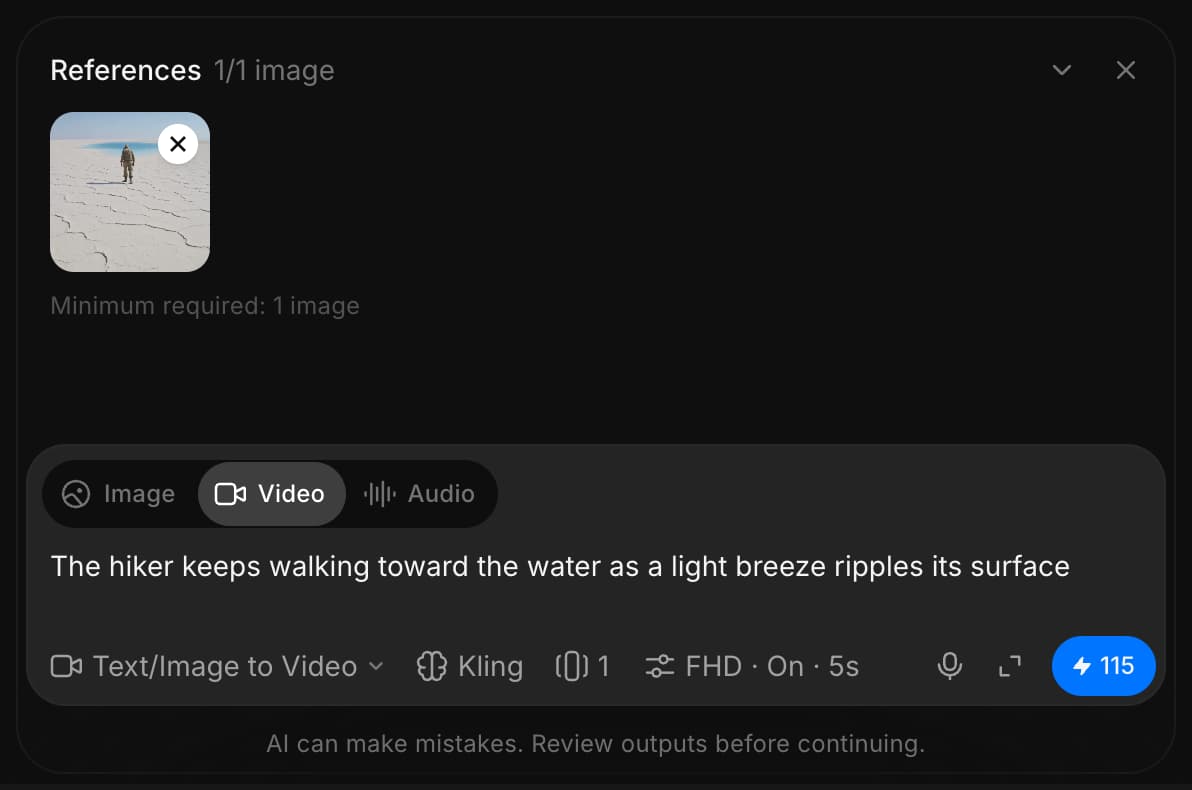
Morphic convertirá tu imagen en un video dinámico generado por IA.
Así es como usas la función Imagen a video en Morphic. Es una forma rápida de dar vida a imágenes estáticas.
Si tiene algún problema o alguna pregunta, no dude en ponerse en contacto con nosotros. Estaremos encantados de ayudarle. Escríbanos a support@morphic.com.
Texto a video
La función de texto a vídeo de Morphic te permite crear un vídeo nuevo desde cero usando solo un prompt.
Fotogramas a video
Frames to Video en Morphic te permite interpolar fotogramas clave en vídeo usando IA. Añade tus fotogramas, describe el movimiento entre ellos y genera la transición.