> For the complete documentation index, see [llms.txt](https://morphic.com/docs/llms.txt). Markdown versions of documentation pages are available by appending `.md` to page URLs; this page is available as [Markdown](https://morphic.com/docs/jp/getting-started/contextual-search.md).

# コンテキスト検索

Morphic内のどこからでもファイル、アセット、ワークフローを検索できるキーボードショートカット。

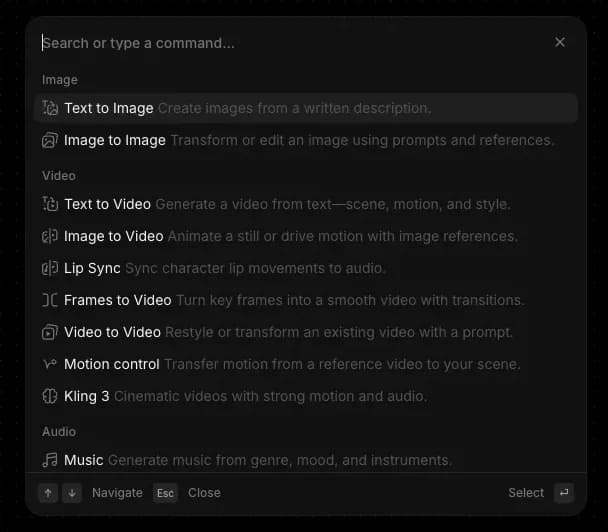
Morphic のコンテキスト検索を使うと、キーボードショートカットでプラットフォーム内のあらゆるものを見つけてアクセスできます。Mac では「Cmd+K」、Windows では「Ctrl+K」で開き、ファイル、アセット、ワークフローなどをプラットフォーム全体から検索できます。

Morphic でコンテキスト検索がどのように機能するかをご紹介します：

<figure><img src="https://2982589234-files.gitbook.io/~/files/v0/b/gitbook-x-prod.appspot.com/o/spaces%2FoPhHCbNZdzW70rakoLhf%2Fuploads%2F0CABByf1N0YIId6JhKnT%2FCleanShot%202026-04-21%20at%2009.42.54.png?alt=media&amp;token=be8abf15-efce-4ed8-b90a-ae360fecdfd2" alt=""><figcaption><p>コンテキスト検索（cmd/ctrl + k）</p></figcaption></figure>

1. Morphic のどこからでも、Mac では「Cmd+K」、Windows では「Ctrl+K」でコンテキスト検索を開けます。ダッシュボードでは、左サイドバー上部の「Search」をクリックしても同じメニューを開けます。
2. Morphic に慣れるときはこれを使い、スピードを重視したいときはこれに頼ってください。新規ユーザーには手軽に探索できる方法として役立ち、上級ユーザーはキーボードから離れずに作業の流れを保つために使います。
3. このメニューは、Morphic 内で今どこにいるかに応じて変化します。キャンバスでは作成ツールと編集ツールが表示されます。ダッシュボードでは整理、ファイル、アカウントの各オプションが表示されます。どの画面でも開けば、その時点で最も関連性の高いコマンドを確認できます。
4. キーワードを入力して、あらゆるものを横断検索できます。結果には、ファイル、プロジェクト、ワークフロー、アセット、モデル、および一致するコマンドが含まれます。
5. キーボードで操作できます。矢印キーで結果を移動し、「Enter」で選択、「Esc」で戻るかメニューを閉じます。

これが Morphic のコンテキスト検索機能の使い方です。1つのショートカットでプラットフォーム内のすべてにつながるので、流れを止めずに見つけ、移動し、操作できます。

***

ご不明な点やお困りのことがあれば、お気軽にご連絡ください。喜んでお手伝いします。以下までご連絡ください [**support@morphic.com**](mailto:support@morphic.com)**.**


---

# Agent Instructions
This documentation is published with GitBook. GitBook is the documentation platform designed so that both humans and AI agents can read, navigate, and reason over technical content effectively. Learn more at gitbook.com.

## Querying This Documentation
If you need additional information that is not directly available in this page, you can query the documentation dynamically by asking a question.

Perform an HTTP GET request on the current page URL with the `ask` query parameter, and the optional `goal` query parameter:

```
GET https://morphic.com/docs/jp/getting-started/contextual-search.md?ask=<question>&goal=<endgoal>
```

`ask` is the immediate question: it should be specific, self-contained, and written in natural language.
`goal` is optional and describes the broader end goal you are ultimately trying to accomplish on behalf of the user. GitBook uses it to tailor the answer towards what is most useful for that goal.

The response will contain a direct answer to the question and relevant excerpts and sources from the documentation.

Use this mechanism when the answer is not explicitly present in the current page, you need clarification or additional context, or you want to retrieve related documentation sections.