환경설정
새 Copilot 채팅이 어떤 모드로 시작할지 설정하는 방법과, 생성 준비가 되면 브라우저에서 알려줄지 여부를 설정하는 방법.
Morphic의 환경설정에서는 기본값을 직접 설정할 수 있습니다. 이 설정은 전체 조직이 아니라 사용자 본인에게만 적용되므로, 변경해도 팀원들에게는 영향을 주지 않습니다.
Morphic에서 환경설정을 설정하는 방법에 대한 간단한 튜토리얼입니다:
환경설정에 접근하기
- 대시보드 보기에서 왼쪽 상단 모서리의 Org 로고를 클릭합니다.
- 드롭다운에서 설정을 선택합니다.
- 왼쪽 사이드바 하단에서 '프로필 설정으로 이동'을 클릭한 다음, '환경설정'을 클릭합니다.
또는 바로 이동하세요: studio.morphic.com/settings/account/preferences
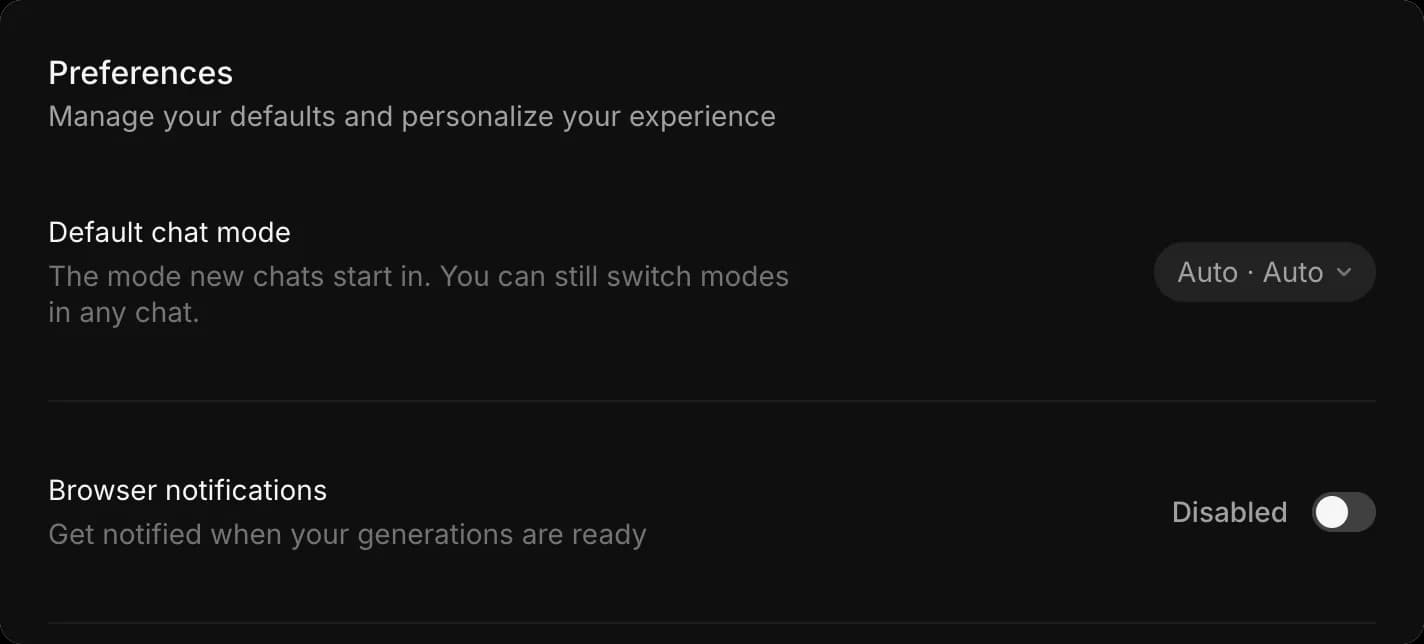
기본 채팅 모드
'기본 채팅 모드'는 새 Copilot 채팅이 시작되는 방식을 설정합니다. 이 컨트롤에는 두 가지 설정이 있으며, 옆의 알약형 표시에는 모드가 먼저, 모델이 두 번째로 표시되므로 'Auto · Auto'는 자동 모델에서 자동 생성됨을 의미합니다.
- '환경설정'을 엽니다
- '기본 채팅 모드' 옆의 드롭다운을 클릭합니다
- ‘Mode’ 아래에서, 생성 전에 설정과 크레딧 비용을 보여 주는 '생성 전에 묻기', 바로 생성하는 '자동 생성', 또는 생성하지 않고 계획만 작성하는 '계획만'을 선택합니다. 체크 표시가 활성화된 항목을 나타냅니다. 자세한 내용은 채팅 모드 각 항목이 무엇을 하는지
- ‘Model’ 아래에서 새 채팅이 시작될 모델을 선택합니다. 'Auto'는 각 작업에 가장 적합한 모델을 선택하며, 나머지는 작업공간에서 허용하는 명명된 모델입니다. 자세한 내용은 모델 선택
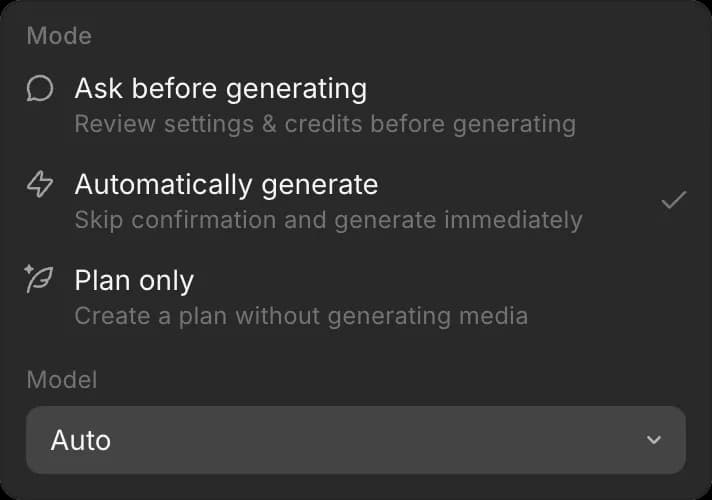
기본값을 'Auto'에서 특정 모델로 바꾸면 해당 채팅은 그 모델의 크레딧을 사용하게 되며, 이는 드롭다운 아래에 표시됩니다.
이 설정은 새 채팅에만 영향을 줍니다. 채팅에서는 언제든지 모드와 모델을 바꿀 수 있으며, 개별 채팅을 변경해도 기본값은 바뀌지 않습니다.
비디오를 자주 사용하거나 공유 크레딧 잔액으로 작업한다면, 기본값을 '생성 전에 묻기'로 설정하면 모든 새 채팅에서 실행 전에 생성 비용을 확인할 수 있습니다.
브라우저 알림
'브라우저 알림'은 생성이 완료되면 브라우저가 알려 주도록 하여, 긴 렌더링이 끝나는 동안 다른 탭에서 작업할 수 있게 합니다.
- '환경설정'을 엽니다
- '브라우저 알림' 켜기 또는 끄기
알아두면 좋아요
- 알림을 처음 켤 때 브라우저에서 권한을 요청합니다. 이후에도 알림이 보이지 않으면, 브라우저 설정에서 Morphic이 알림을 보낼 수 있도록 허용되어 있는지 확인하세요.
- 이 설정은 사용자 본인에게만 적용됩니다. 변경해도 조직의 다른 사람에게는 영향을 주지 않습니다.
- 비디오를 사용하거나 공유 잔액으로 작업한다면, 기본값을 '생성 전에 묻기'로 설정하면 모든 새 채팅에서 실행 전에 생성 비용을 확인할 수 있습니다.
그게 Morphic에서 환경설정을 설정하는 방법입니다. 이 설정은 새 채팅의 동작 방식과 완료된 작업에 대해 알림을 받는 방식을 정합니다.
문제가 있거나 궁금한 점이 있으면 언제든지 연락해 주세요. 기꺼이 도와드리겠습니다. 다음 주소로 이메일을 보내 주세요: support@morphic.com.