> For the complete documentation index, see [llms.txt](https://morphic.com/docs/llms.txt). Markdown versions of documentation pages are available by appending `.md` to page URLs; this page is available as [Markdown](https://morphic.com/docs/zh/account-and-billing/settings/plans.md).

# 方案

方案可让你轻松比较和管理套餐。你也可以轻松升级或降级套餐。如需帮助，请联系支持。

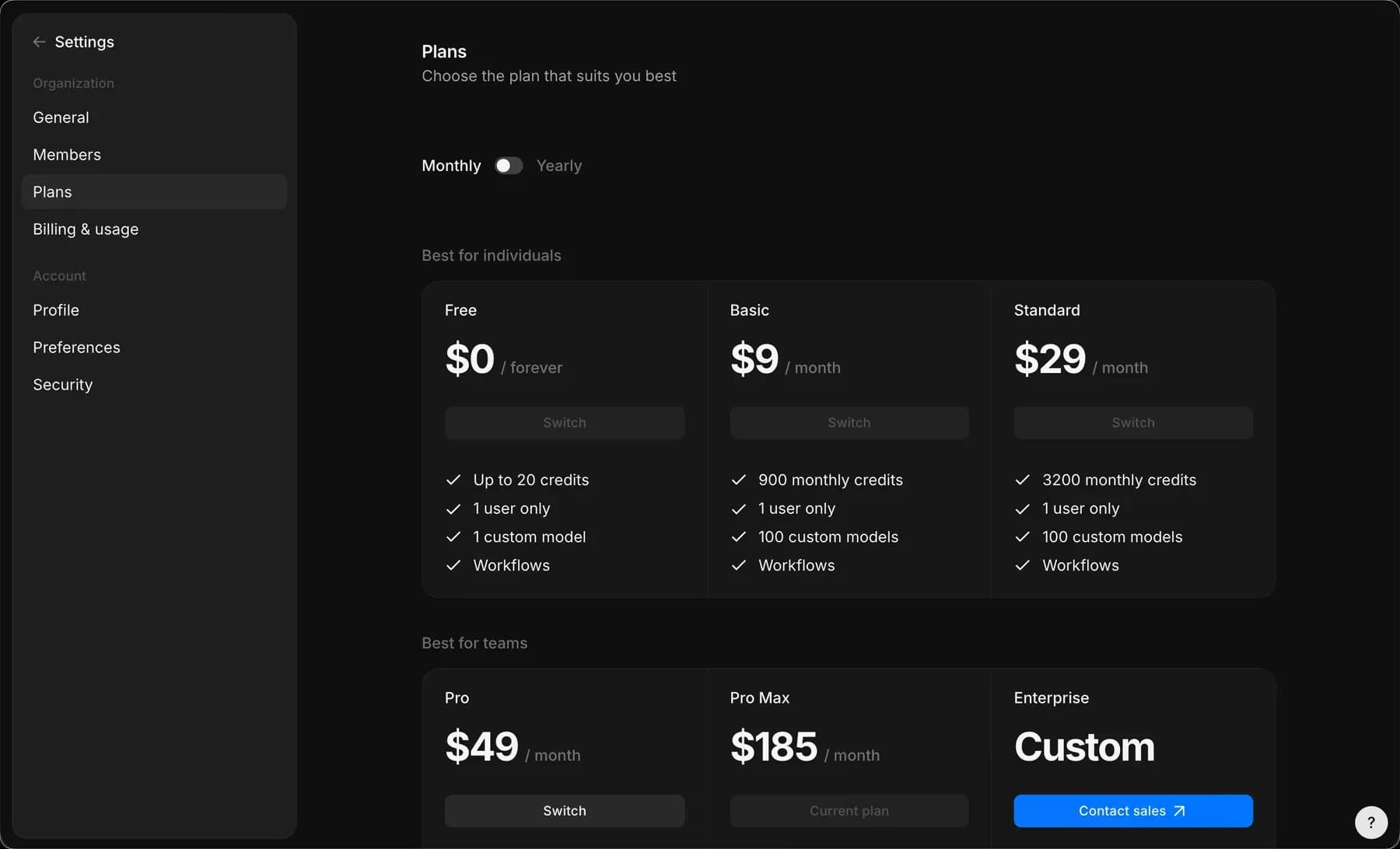
在“套餐”部分，您可以比较并管理您的订阅。Morphic 提供多种选项，让您可以选择最适合您需求的套餐。

### 访问套餐

1. 在仪表板视图中，点击左上角的 Org 标志。
2. 在下拉菜单中，选择“设置”。
3. 在左侧边栏中，点击“套餐”。
4. 您将进入“套餐”页面，在这里可以查看和管理订阅。

或者直接前往： [studio.morphic.com/settings/plans](https://studio.morphic.com/settings/plans)

### 升级或更改您的套餐

1. 在“套餐”页面上，查看可用的订阅选项。
2. 点击所需套餐下方的“升级”按钮。
3. 按照屏幕上的说明完成升级或更改。

<figure><img src="https://2197859893-files.gitbook.io/~/files/v0/b/gitbook-x-prod.appspot.com/o/spaces%2FoPhHCbNZdzW70rakoLhf%2Fuploads%2FV8RRq0DTTyRzaX1TWKeB%2FPricing.gif?alt=media&amp;token=9e5196af-11fa-4ee6-a891-e32cba9b5762" alt=""><figcaption><p>比较并选择套餐</p></figcaption></figure>

<figure><img src="https://2197859893-files.gitbook.io/~/files/v0/b/gitbook-x-prod.appspot.com/o/spaces%2FoPhHCbNZdzW70rakoLhf%2Fuploads%2FfTcEYiHmqtjRa3x1TNCO%2F%20.png?alt=media&amp;token=765793f1-5345-4c1c-9e34-39e9f8b4c596" alt=""><figcaption><p>可用的订阅套餐</p></figcaption></figure>

## 可用套餐

Morphic 提供以下套餐。年度价格为按年承诺下的每月价格。积分会在每个计费周期开始时重置。

| 套餐      | 月付    | 年付    | 积分 / 月    | 支持   | 额外成员       |
| ------- | ----- | ----- | --------- | ---- | ---------- |
| 免费      | 永久 $0 | 永久 $0 | 20 个一次性积分 | 社区支持 | 不可用        |
| 教育版     | $5    | $4    | 600       | 邮件支持 | 仅限 1 位用户   |
| 基础版     | $9    | $9    | 900       | 邮件支持 | 不可用        |
| 标准版     | $29   | $24   | 3,200     | 邮件支持 | 不可用        |
| 专业版     | $49   | $45   | 6,200     | 邮件支持 | 每位成员每月 $10 |
| Pro Max | $185  | $170  | 24,000    | 邮件支持 | 每位成员每月 $10 |
| 企业版     | 自定义   | 自定义   | 高流量\*     | 定制支持 | 自定义席位限制    |

一些套餐特定说明：

* 教育版套餐：折扣价格仅适用于教育用途，面向学生和教师。请联系 <support@morphic.com>.
* 企业版套餐：专为高级和团队需求打造。包括创意协助（按需提供）、无限样式、私人研讨会，以及定制化的定价和计费条款。请联系销售了解更多。

这就是在 Morphic 上比较和管理套餐的方法。当您的需求发生变化时，您可以随时切换到其他套餐。

***

如果您遇到任何问题或有任何疑问，欢迎随时联系我们。我们很乐意为您提供帮助。请写信至 [**support@morphic.com**](mailto:support@morphic.com)**.**


---

# Agent Instructions
This documentation is published with GitBook. GitBook is the documentation platform designed so that both humans and AI agents can read, navigate, and reason over technical content effectively. Learn more at gitbook.com.

## Querying This Documentation
If you need additional information that is not directly available in this page, you can query the documentation dynamically by asking a question.

Perform an HTTP GET request on the current page URL with the `ask` query parameter, and the optional `goal` query parameter:

```
GET https://morphic.com/docs/zh/account-and-billing/settings/plans.md?ask=<question>&goal=<endgoal>
```

`ask` is the immediate question: it should be specific, self-contained, and written in natural language.
`goal` is optional and describes the broader end goal you are ultimately trying to accomplish on behalf of the user. GitBook uses it to tailor the answer towards what is most useful for that goal.

The response will contain a direct answer to the question and relevant excerpts and sources from the documentation.

Use this mechanism when the answer is not explicitly present in the current page, you need clarification or additional context, or you want to retrieve related documentation sections.