> For the complete documentation index, see [llms.txt](https://morphic.com/docs/llms.txt). Markdown versions of documentation pages are available by appending `.md` to page URLs; this page is available as [Markdown](https://morphic.com/docs/zh/how-tos/storyboarding/storyboarding-using-a-script.md).

# 使用脚本制作分镜

当你希望 Copilot 生成一个故事，或者你已经有脚本并想将其可视化为分镜帧时，这种方法很有用。

这是一个关于如何在 Morphic 上使用脚本创建分镜板的简短教程：

1. 前往 [Copilot](https://studio.morphic.com/chat) 在 Morphic 上
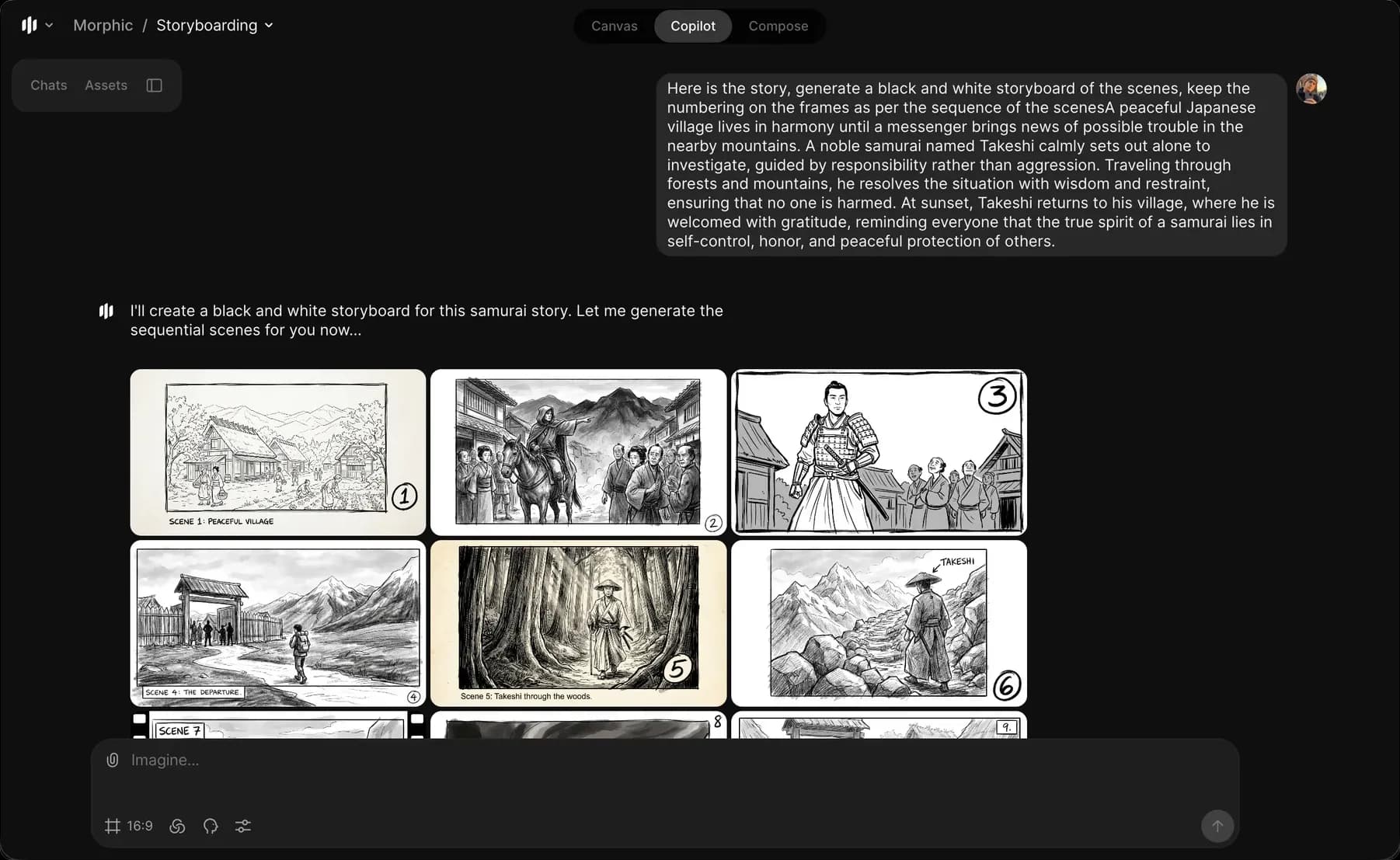
2. 输入一个提示，例如“生成这些场景的黑白分镜板……”
3. 可选地，加入角色动作、镜头角度、氛围或环境
4. 点击提示栏中的蓝色按钮来创建你的分镜板

<figure><img src="https://2197859893-files.gitbook.io/~/files/v0/b/gitbook-x-prod.appspot.com/o/spaces%2FoPhHCbNZdzW70rakoLhf%2Fuploads%2F6JFTMEybO1TAvQ6zFbSz%2FCleanShot%202026-01-12%20at%2019.45.50%402x.png?alt=media&amp;token=83683d2a-c7d8-4ba2-91ec-de5b9391f491" alt=""><figcaption></figcaption></figure>

Copilot 会通过将生成的故事或脚本拆分为清晰的视觉场景来创建分镜板。这就是你如何在 Morphic 上使用脚本创建分镜板的方式。这有助于将书面脚本转化为清晰的视觉场景。

***

如果您遇到任何问题或有任何疑问，欢迎随时联系我们。我们很乐意为您提供帮助。请写信至 [**support@morphic.com**](mailto:support@morphic.com)**.**


---

# Agent Instructions
This documentation is published with GitBook. GitBook is the documentation platform designed so that both humans and AI agents can read, navigate, and reason over technical content effectively. Learn more at gitbook.com.

## Querying This Documentation
If you need additional information that is not directly available in this page, you can query the documentation dynamically by asking a question.

Perform an HTTP GET request on the current page URL with the `ask` query parameter, and the optional `goal` query parameter:

```
GET https://morphic.com/docs/zh/how-tos/storyboarding/storyboarding-using-a-script.md?ask=<question>&goal=<endgoal>
```

`ask` is the immediate question: it should be specific, self-contained, and written in natural language.
`goal` is optional and describes the broader end goal you are ultimately trying to accomplish on behalf of the user. GitBook uses it to tailor the answer towards what is most useful for that goal.

The response will contain a direct answer to the question and relevant excerpts and sources from the documentation.

Use this mechanism when the answer is not explicitly present in the current page, you need clarification or additional context, or you want to retrieve related documentation sections.