Design inventive artificers in your browser with Morphic's artificer AI image generator. Generate artificer portraits and compositions like a goggled tinkerer at a rune-lit workbench, an armored gunsmith with a clockwork arm, or a mechanist walking beside a brass construct, and pair them with Style Transfer to hold one magitech look across the set. Hand the plates to Image to Video to make gears turn, arcane cores pulse, and steam vent.

Artificer types you can create

Artificer compositions you can produce

An artificer at a rune-lit workbench

An artificer bent over a cluttered workbench of gears, blueprints, and glowing arcane cores in a warm brass-and-wood workshop, soft blue magic-light and forge-glow, tools mid-air, cozy close cinematic shot.

Edit prompt
An artificer at a rune-lit workbench

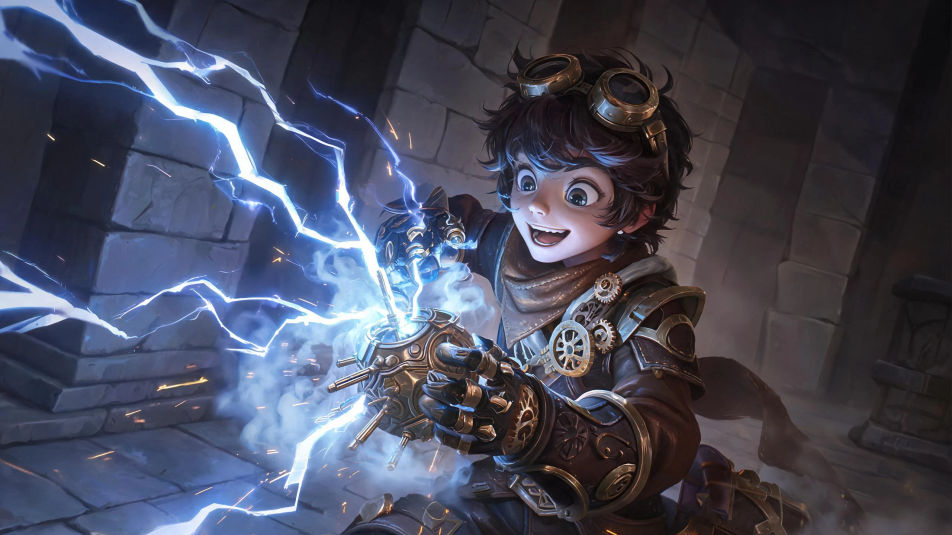
A magitech invention test

An artificer triggering a gadget that arcs blue lightning across a stone testing hall, sparks and steam scattering, a startled but delighted face lit from below, dynamic mid-action composition.

Edit prompt
A magitech invention test

A brass construct workshop

A tall vaulted workshop full of half-built clockwork automatons and hanging chains, an artificer walking among them with a glowing schematic slate, warm gold light and drifting steam, wide establishing shot.

Edit prompt
A brass construct workshop

An artificer and construct on the road

An artificer walking a misty forest road beside a towering brass automaton whose core glows warm blue, morning light through the trees, gear-laden pack on the construct, wide adventurous framing.

Edit prompt
An artificer and construct on the road

Make Artificer in three steps

  1. 01

    Describe your Artificer

    Describe the Artificer you want, in plain words.

  2. 02

    Generate the image

    Morphic generates a clean, ready-to-publish image on your canvas in seconds.

  3. 03

    Refine your Artificer

    Tweak the prompt, regenerate variations, then download or share the frame.

Related workflows

You might also like

Simple pricing

Get started for free today, with the option to upgrade or cancel anytime.

Basic

$0/ month
billed as $0 per year

900 monthly credits

1 user only

All models

Workflows

Standard

$0/ month
billed as $0 per year

3200 monthly credits

1 user only

All models

Workflows

Pro

$0/ month
billed as $0 per year

6200 shared monthly credits

1 user

+ up to 4 more at extra cost

All models

Workflows

Pro Max

$0/ month
billed as $0 per year

24000 shared monthly credits

1 user

+ up to 9 more at extra cost

All models

Workflows

Enterprise

For higher limits

Custom

pricing and billing terms

Unlimited credits
Custom seat limits
All models
Workflows
Pricing Gradient

Free

For playing around

$0

forever free

Up to 20 credits
1 user only
Limited models
Workflows

FAQs

Where can I make artificer images with AI?
You can create artificer images directly in your browser on Morphic. Open the Image tool, describe the inventor, the clockwork gadget or magitech weapon, the arcane glow, and the workshop lighting, and Morphic produces the artwork. No installs and no specialist software needed.
What kinds of artificers can I generate?
Any kind you can name: a goggled tinkerer, an arcane gunsmith with a clockwork arm, an armored mechanist, a clockwork alchemist, a construct wright, or a young prodigy. Name the gear, the gadget, and the arcane glow so Morphic builds the version you want.
How do I write a good prompt for an artificer image?
Name the goggles or coat, the clockwork gadget or magitech weapon, the glowing arcane core, the pose, and the workshop lighting. For example: "an artificer in brass goggles holding a glowing clockwork gadget at a rune-lit workbench." Naming the gears and the arcane glow keeps the artificer distinct from a plain blacksmith.
How do I keep one artificer consistent across several images?
Use the Character Lineup workflow to lock the artificer’s face, gear, and signature gadget, then reference that card in every prompt. Morphic preserves the same artificer across a workshop scene, an invention test, and a portrait so the set stays consistent.
Can I turn an artificer image into a video?
Yes. Take any artificer image into the Image to Video tool and describe the motion, such as gears turning, an arcane core pulsing, steam venting, or a drone circling. Morphic animates the still into a short clip you can use on its own or cut into a longer sequence.
Do I need any drawing skill to make artificer images?
No. Morphic runs in the browser and takes plain-language prompts. Anyone who can describe an artificer, the gadget, and the lighting can produce a finished artificer image. Drawing ability and illustration software are not required.





