Conceptual art AI art

Design Conceptual art in your browser with Morphic's Conceptual art AI image generator. Set a statement piece in plain serif text, stage a deadpan documentation photo in a white cube, lock the index-card look with Style Transfer, then animate any still with Image to Video.

Conceptual art subjects you can compose

Conceptual art compositions you can design

Statement sentence in a white cube

A white-cube gallery wall carrying a single plain black serif sentence, set large and centred with generous margins, no image and no frame, the idea standing as the whole work, even raking light, a polished concrete floor and a faint baseboard shadow.

Edit prompt
Statement sentence in a white cube

Index-card archive grid

A flat-on view of a white wall hung with a regular grid of typed cream index cards in neat rows, each bearing one terse typewriter line, thin pins casting tiny shadows, the dry repeating system the artwork, deadpan documentation lighting.

Edit prompt
Index-card archive grid

Instruction-and-diagram wall

A LeWitt-style install, a sheet of plain serif instructions pinned beside a small ruled pencil schematic on a white wall, the rules and the diagram the work rather than any finished picture, deadpan and bureaucratic, soft flat gallery light.

Edit prompt
Instruction-and-diagram wall

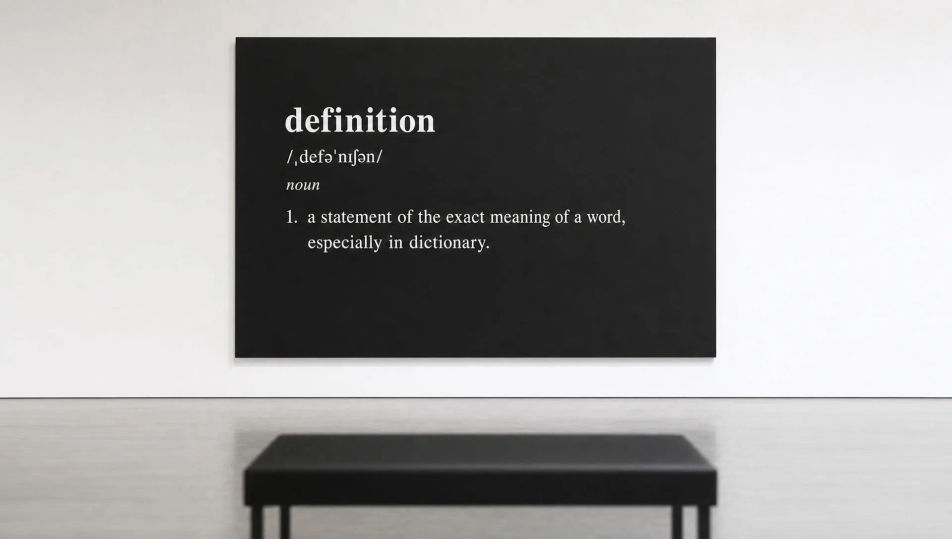
Dictionary-definition panel install

A Kosuth-style panel hung alone on a white wall, an enlarged dictionary entry printed white-on-black, the bold headword and its plain serif gloss centred, language presented as the object, flat even gallery light, a bench in soft focus opposite.

Edit prompt
Dictionary-definition panel install

Make Conceptual art in three steps

  1. 01

    Describe your Conceptual art

    Describe the Conceptual art you want, in plain words.

  2. 02

    Generate the image

    Morphic generates a clean, ready-to-publish image on your canvas in seconds.

  3. 03

    Refine your Conceptual art

    Tweak the prompt, regenerate variations, then download or share the frame.

Related workflows

You might also like

Simple pricing

Get started for free today, with the option to upgrade or cancel anytime.

Basic

$0/ month
billed as $0 per year

900 monthly credits

1 user only

All models

Workflows

Standard

$0/ month
billed as $0 per year

3200 monthly credits

1 user only

All models

Workflows

Pro

$0/ month
billed as $0 per year

6200 shared monthly credits

1 user

+ up to 4 more at extra cost

All models

Workflows

Pro Max

$0/ month
billed as $0 per year

24000 shared monthly credits

1 user

+ up to 9 more at extra cost

All models

Workflows

Enterprise

For higher limits

Custom

pricing and billing terms

Unlimited credits
Custom seat limits
All models
Workflows
Pricing Gradient

Free

For playing around

$0

forever free

Up to 20 credits
1 user only
Limited models
Workflows

FAQs

Where can I make Conceptual art with AI?
You can create Conceptual art directly in your browser on Morphic. Open the Image tool, describe a statement sentence, an instruction card, or a deadpan documentation shot in a white cube, and Morphic produces the composition. No installs and no specialist software needed.
What defines Conceptual art for an AI prompt?
Four locked-in choices: idea over object (the concept is the work), text-as-art or document-as-art (statement, instruction, certificate, definition), plain serif or typewriter typography, and a deadpan white-cube presentation with no decoration. Name all four so the image reads as Conceptual art rather than a graphic-design poster.
What is the difference between Conceptual art and graphic design?
Graphic design styles text to sell or decorate. Conceptual art presents text or a document as the artwork itself, deadpan and undesigned, in a white cube. Name the idea-over-object intent and a plain serif or typewriter face and the look reads as Conceptual rather than designed.
How do I keep a Conceptual art series feeling like one collection?
Use the Style Transfer workflow to lock the typeface, the margins, and the deadpan white-cube presentation before producing more pieces, then reference that style card in every prompt. A suite of statement panels or index-card works stays consistent across the whole run.
Can I turn Conceptual art pieces into animated video?
Yes. The Image to Video tool animates any still you generate, so a statement can type itself on, cards can be pinned up one by one, or a definition can fade in. Pair with the Music tool for a sparse, neutral score.
Do I need any prior art experience to make Conceptual art?
No. Morphic runs in your browser and you direct it with plain-language prompts. Anyone who can describe a single serif sentence on a white wall or a grid of typed index cards can produce a Conceptual art piece. The idea matters more than the technique here.