Wide rogue establishing
A landscape frame of a dark elf rogue mid-stalk with twin daggers drawn, ashen skin and white hair, obsidian leather in a faint violet cavern glow, with dark space to one side reserved for a title.
Edit prompt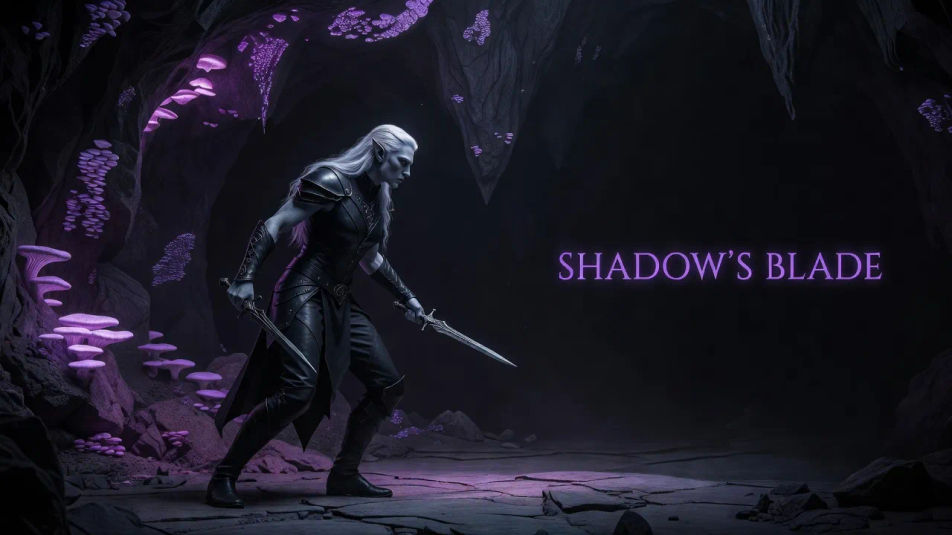
Create Dark elf images in your browser with Morphic's AI image generator. Design a shadowed rogue mid-stalk, or a spellblade wreathed in violet light, with ashen skin and obsidian armor. Keep one dark elf looking the same across a lineup with Character Lineup.
A landscape frame of a dark elf rogue mid-stalk with twin daggers drawn, ashen skin and white hair, obsidian leather in a faint violet cavern glow, with dark space to one side reserved for a title.
Edit promptA close landscape composition of a spellblade weaving violet energy along a black-etched sword, sculpted obsidian armor and white braids, cold underground light, with room to one side reserved for a caption.
Edit prompt
A wide composition of a dark elf noble in layered obsidian finery within a subterranean hall, violet skin and elaborate white hair, a cold crystalline glow throwing long shadows across the carved stone.
Edit prompt
An establishing landscape frame of a robed dark elf before a carved shrine, web-motif armor and cascading white hair, a violet gem casting cold glow over the scene and eerie fungi shimmer in the deep background.
Edit prompt
Describe the Dark elf you want, in plain words.
Morphic generates a clean, ready-to-publish image on your canvas in seconds.
Tweak the prompt, regenerate variations, then download or share the frame.

Take any character image and generate 6 distinct facial expressions on a single reference sheet.

Share a scene description with character references. Get a full storyboard with shot angles and mood.

Turn any photo or description into an animated chibi sprite. Dance, jump, wave, attack, and more.

All your characters on a single lineup image, side by side with height comparison.

Professional 7-panel location reference sheet from a single photo.
Restyle any video in a completely new visual style. Every frame transforms, all motion stays intact.
Elf AI Images
Create AI elf images on Morphic. High elves, wood elves, dark elves, archers, and woodland scenes from plain-language prompts, consistent across a full set.
Wizard AI Images
Create AI Wizard images with Morphic. Generate Wizard portraits, designs, and character art for any project in seconds.
Orc AI Images
Create AI orc images on Morphic. Warchiefs, berserkers, shamans, hunters, and battlefield scenes from plain-language prompts, consistent across a full set.
Paladin warrior AI Images
Create AI Paladin warrior images with Morphic. Generate authentic Paladin warrior artwork, scenes, and visuals for any project in seconds.
Get started for free today, with the option to upgrade or cancel anytime.
Basic
2400 monthly credits
1 user only
All models
Workflows
Standard
3625 monthly credits
1 user only
All models
Workflows
Pro
6350 shared monthly credits
1 user
All models
Workflows
Max
24650 shared monthly credits
1 user
All models
Workflows
Enterprise
For higher limits
Custom
pricing and billing terms

Free
For playing around
$0
forever free