Design photorealism art in your browser with Morphic's Photorealism AI image generator. Paint glossy 1970s Americana, chrome bumpers, neon, and storefront reflections in neutral deadpan with uniform sharp focus, lock the look with Style Transfer, then animate any still with Image to Video.

Photorealism subjects you can compose

Photorealism compositions you can design

Main Street storefronts

A row of 1970s Main Street storefronts painted from a photograph, plate-glass windows layering reflections of parked cars over the goods inside, neon signs dead in flat daylight, uniform sharp focus down the block, neutral deadpan framing, glossy Americana, the ordinary street transcribed as fact.

Edit prompt
Main Street storefronts

Diner exterior at midday

A chrome-trimmed roadside diner at flat midday, polished metal mirroring the parking lot and a pale sky, a neon sign cold in daylight, a single parked car, uniform sharp focus across the whole facade, neutral deadpan light, glossy 1970s Americana, no shadows for drama.

Edit prompt
Diner exterior at midday

Used-car lot

A used-car lot painted from a snapshot, rows of chrome bumpers and grilles each mirroring a slightly different slice of the lot, plastic pennant strings overhead, flat grey asphalt, uniform sharp focus to the back fence, neutral deadpan framing, glossy banal Americana throughout.

Edit prompt
Used-car lot

Phone booth and reflections

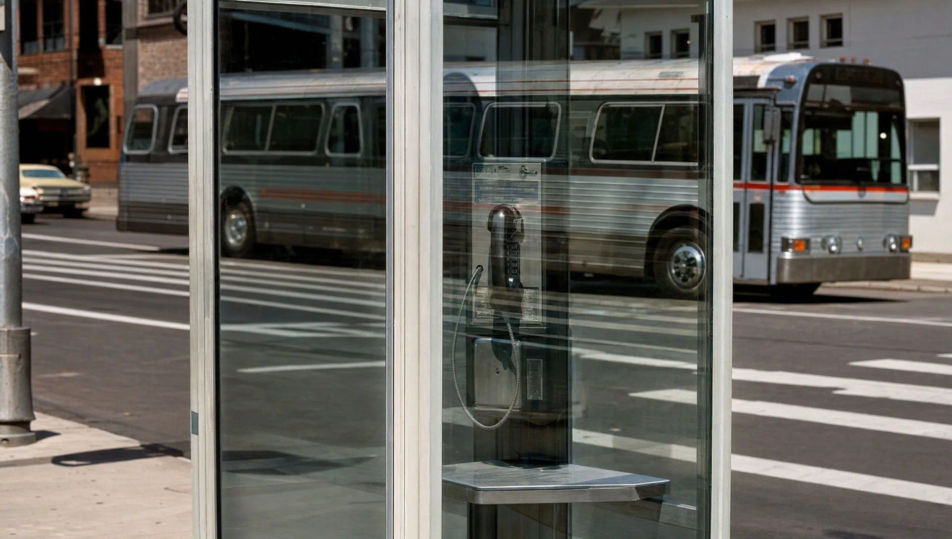
A glass phone booth on a city corner painted from a photo, the panes layering a reflection of the crosswalk and a bus over the interior, all planes in uniform sharp focus, neutral framing dead-on, glossy 1970s surface, the doubled reflection rendered as deadpan everyday fact.

Edit prompt
Phone booth and reflections

Make Photorealism in three steps

  1. 01

    Describe your Photorealism

    Describe the Photorealism you want, in plain words.

  2. 02

    Generate the image

    Morphic generates a clean, ready-to-publish image on your canvas in seconds.

  3. 03

    Refine your Photorealism

    Tweak the prompt, regenerate variations, then download or share the frame.

Related workflows

You might also like

Simple pricing

Get started for free today, with the option to upgrade or cancel anytime.

Basic

$0/ month
billed as $0 per year

900 monthly credits

1 user only

All models

Workflows

Standard

$0/ month
billed as $0 per year

3200 monthly credits

1 user only

All models

Workflows

Pro

$0/ month
billed as $0 per year

6200 shared monthly credits

1 user

+ up to 4 more at extra cost

All models

Workflows

Pro Max

$0/ month
billed as $0 per year

24000 shared monthly credits

1 user

+ up to 9 more at extra cost

All models

Workflows

Enterprise

For higher limits

Custom

pricing and billing terms

Unlimited credits
Custom seat limits
All models
Workflows
Pricing Gradient

Free

For playing around

$0

forever free

Up to 20 credits
1 user only
Limited models
Workflows

FAQs

Where can I make photorealism art with AI?
You can create photorealism images directly in your browser on Morphic. Open the Image tool, describe the glossy Americana subject, the neutral deadpan framing, and the uniform sharp focus, and Morphic produces the composition. No installs and no specialist software needed.
What defines photorealism for an AI prompt?
Four locked-in choices: a glossy Americana subject (chrome, neon, storefront reflections, diners), neutral deadpan framing, uniform sharp focus front to back, and a painted-from-a-photograph surface. Name all four for the 1970s look to land rather than a generic photo.
What is the difference between photorealism and hyperrealism?
Photorealism faithfully matches a photograph, keeping its focus and banality intact. Hyperrealism exaggerates past the photo with pores, droplets, and texture sharper than any lens. Name "uniform focus, faithful to the photo, no exaggeration" and the look reads as photorealism, not hyperrealism.
How do I keep a photorealism series feeling like one collection?
Use the Style Transfer workflow to lock the neutral deadpan light and the glossy Americana register before producing additional pieces, then reference that style card in every prompt. A storefront series or a chrome-and-neon set stays consistent in framing and surface across the run.
Can I turn photorealism compositions into animated video?
Yes. The Image to Video tool animates any still you generate, and a slow dolly past a chrome reflection or a steady push down a storefront row suits the deadpan register. Pair with the Music tool for a cool, neutral score.
Do I need any prior painting experience to make photorealism art?
No. Morphic runs in your browser and you direct it with plain-language prompts. Anyone who can describe a chrome bumper, a neon sign, and uniform sharp focus can produce a photorealism composition. Airbrush, masking film, and a gridded reference photo are not required.