القطع التفاعلية (Artifacts)
اطلب من Copilot تحويل صور دردشة واحدة ومقاطعها وصوتياتها ومستنداتها إلى صفحة أو عرض شرائح يمكنك مراجعته والرد عليه ومشاركته، مع مطالبات جاهزة للنسخ.
الـ artifacts في Morphic هي صفحات يبنيها Copilot من صور دردشة واحدة ومقاطعها والتعليق الصوتي والموسيقى والمؤثرات الصوتية والمستندات. صف الصفحة أو عرض الشرائح الذي تريده فيُفتح بجانب الدردشة، جاهزًا للمراجعة أو الرد أو المشاركة.
إليك شرحًا سريعًا حول كيفية استخدام الـ artifacts في Morphic:
حالات الاستخدام
- أوراق المراجعة: كل أصل مع مطالبته
- لقطات متجاورة لاختيار الأفضل
- مراجع الشخصيات وفحوص الاستمرارية
- صفحات الاعتماد: اختر اللقطات والموسيقى والصوت، وعلّم ما يحتاج إلى تحسين
- اللوحات القصصية، والسيناريو بجانب إطاراته
- خرائط القصة ومخططات مسار العمل
- قوائم اللقطات للمونتير، بترتيب القطع
- ملخصات العملاء وعروض الشرائح
إنشاء artifact
- افتح دردشة في Copilot تحتوي على العمل
- صف الصفحة، مثل: 'ضع هذه اللقطات في صفحة: كل صورة تحتها مطالبتها، في شبكة'
- انقر على البطاقة التي تحمل 'Artifact' لفتح الصفحة في اللوحة الجانبية
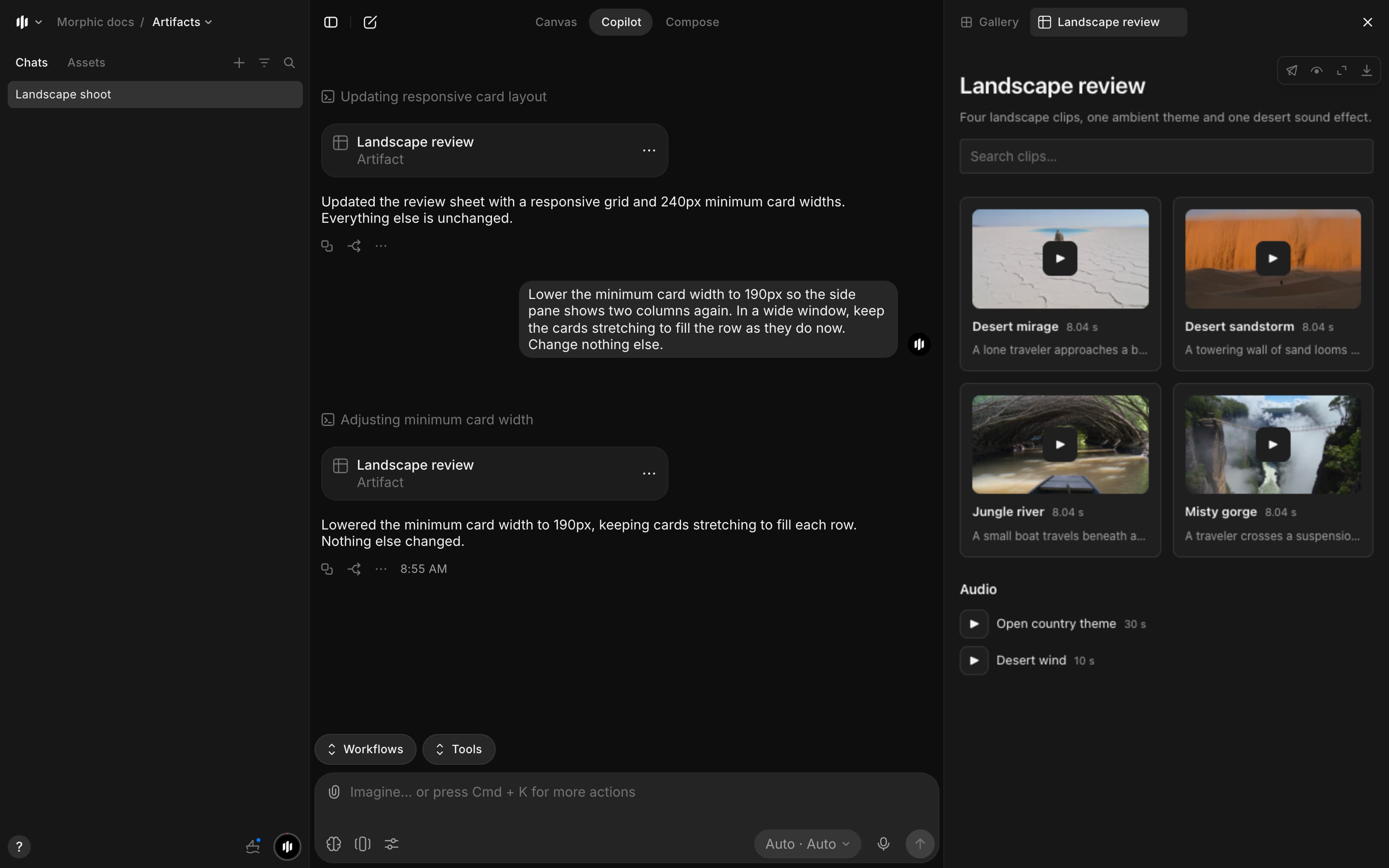
- يستخدم Copilot ملفات تلك الدردشة ونصوصها، والأسماء التي أطلقتها على المشاهد واللقطات والشخصيات
- السيناريو أو المعالجة أو الملاحظات تأتي كمستند
عرض artifact
يُفتح الـ artifact في علامة تبويب خاصة به في اللوحة الجانبية، بجانب 'Gallery'. في الصفحة:
- الصور: انقر على أي صورة لعرضها بالحجم الكامل
- المقاطع: يعرض كل مقطع إطاره الأول ويُحمَّل عند الضغط على تشغيل
- التعليق الصوتي والموسيقى والمؤثرات الصوتية
- القوائم الطويلة: 100 عنصر في كل مرة، مع زر لعرض المزيد
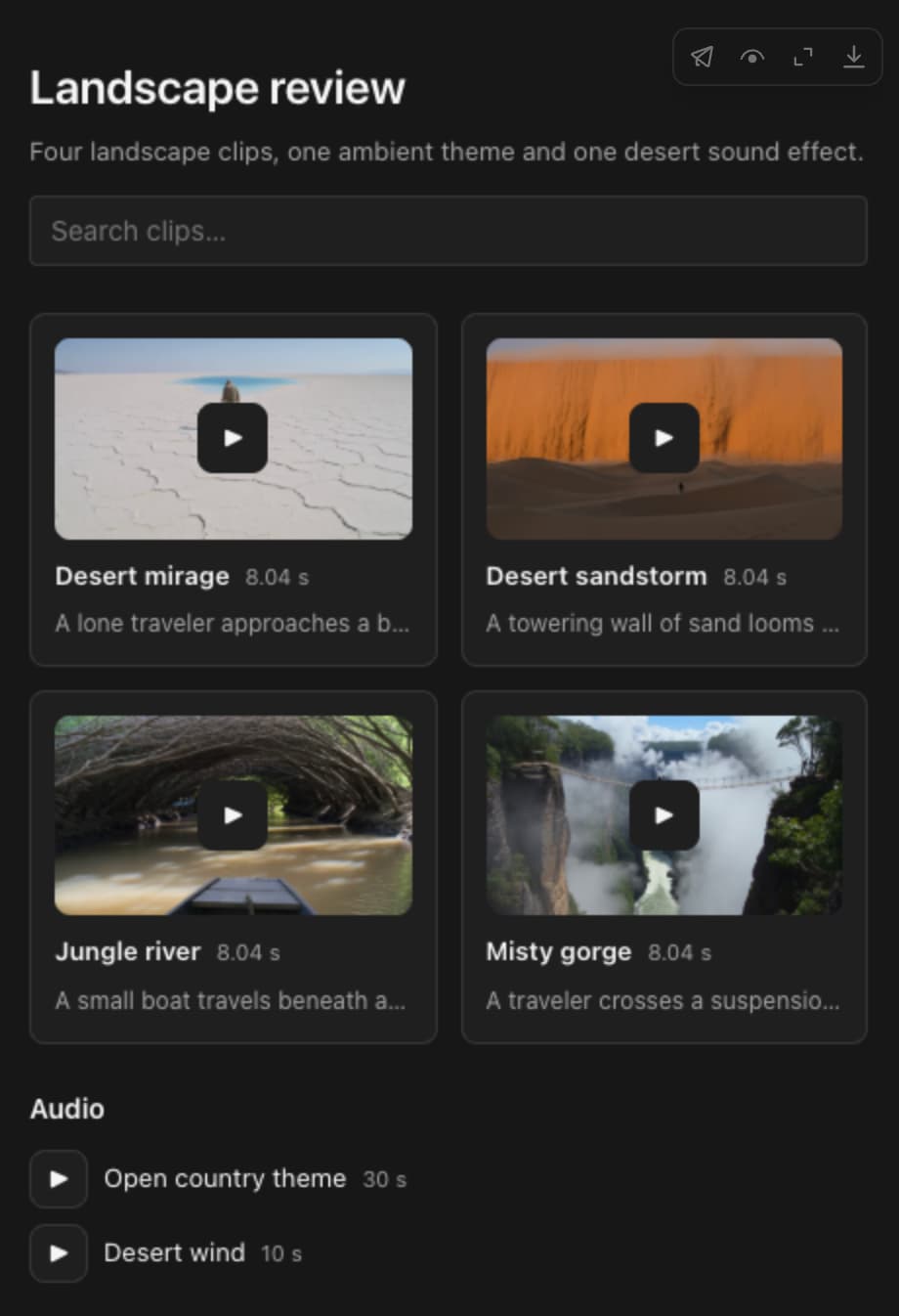
الأيقونات أعلى يمينه:
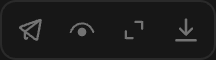
| الأيقونة | وظيفتها |
|---|---|
| Share | ينسخ رابطًا، ويشغّل المشاركة الخارجية أو يوقفها |
| Show raw | يعرض مصدر الصفحة |
| Full screen | يفتح الصفحة على كامل النافذة |
| Download | يحفظ الصفحة كملف HTML. تُحمَّل وسائطها من Morphic، لذا يلزم اتصال بالإنترنت |
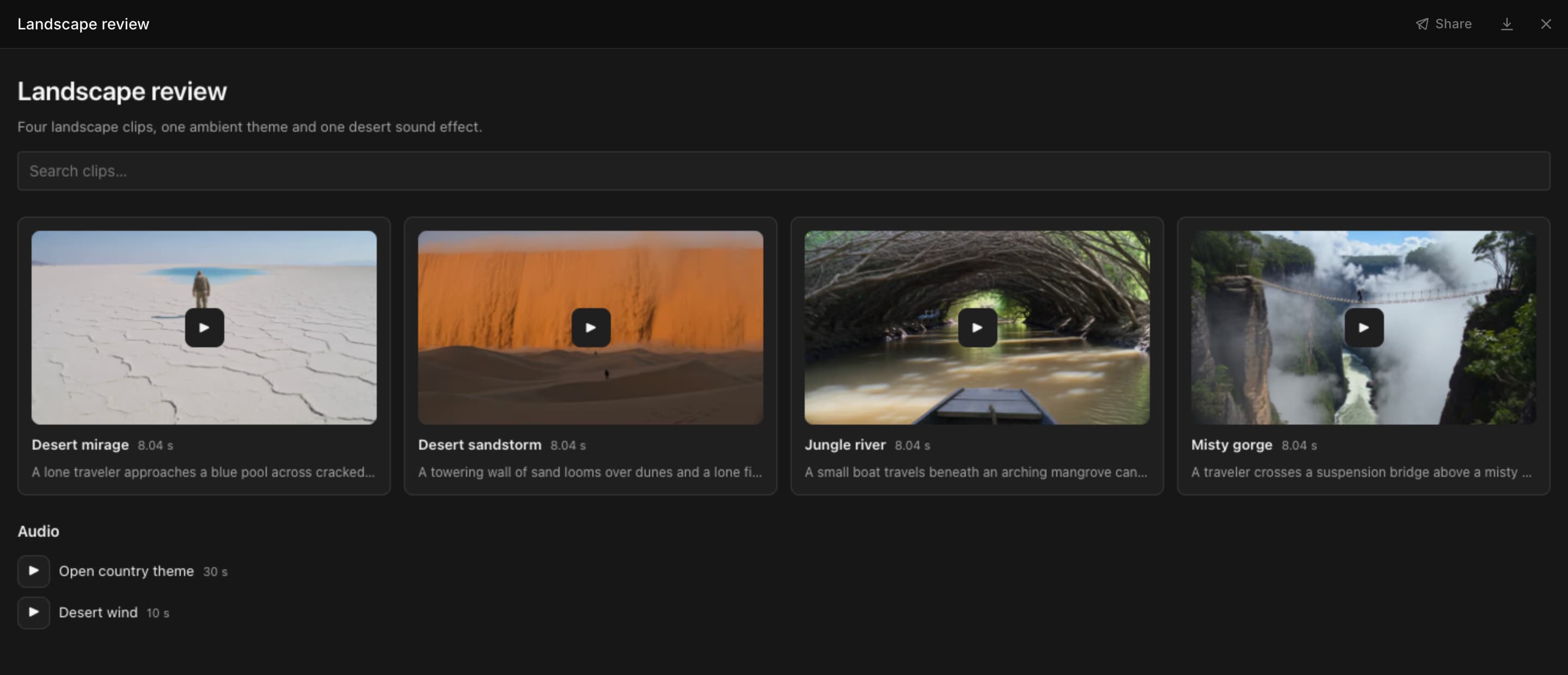
في وضع ملء الشاشة، يوجد 'Share' والتنزيل في الأعلى. اضغط Esc للعودة إلى اللوحة الجانبية.
- لعرض الـ artifacts في دردشة: افتح 'Gallery'، وانقر على أيقونة التصفية، ثم 'Type' > 'Artifacts'
- تضم قائمة '...' في بطاقة الـ artifact الخيارات 'Add to favorites' و'Attach as reference' و'Download'
صف التخطيط
كلما وصفت أكثر، جاءت الصفحة أقرب إلى ما تريد. اذكر:
- طريقة ترتيب العناصر: شبكة، أو صفوف، أو متجاورة، أو بترتيب القطع
- ما يظهر تحت كل عنصر: مطالبته، أو مدته، أو رقم اللقطة، أو شارة حالة
- هل تريد بحثًا أو عوامل تصفية
- ما يجب استبعاده

اصنع ورقة مراجعة لهذه الدردشة: بطاقات في شبكة من ثلاثة أعمدة، ومربع بحث في الأعلى، ومطالبة كل عنصر تحتهاصنع صفحة اعتماد: اللقطات في شبكة مع زرّي اعتماد ويحتاج إلى تحسين، والموسيقى والصوت كصفوف للاختيار منهاتنسيق الصفحة
أضف أيًّا من هذه العبارات إلى مطالبتك:
| للحصول على | أضف |
|---|---|
| الحالة | 'مع شارة حالة على كل عنصر' |
| درجات التقييم | 'قيّم كل عنصر من 0 إلى 100 مع شريط' |
| تمييز | 'ضع إطارًا حول الأفضل' |
| الألوان | 'اعرض الألوان كعينات مع رموزها السداسية' |
| الإجماليات | 'ضع الإجماليات في الأعلى' |
| الترتيب | 'صف لكل لقطة' أو 'بترتيب القطع' |
| البحث | 'أضف مربع بحث وعامل تصفية حسب الحالة' |
| مخطط واضح | 'سمِّ كل رابط وأضف مفتاحًا للرموز' أو 'أضف صورة مصغّرة عند كل خطوة' |
| بلا صور جديدة | 'لا تولّد أي صور' |
نصائح:
- ابنِ عدة صفحات دفعة واحدة بترقيمها: 'اصنع ثلاثة artifacts منفصلة: 1) قائمة فحص اللقطات، 2) ورقة معاينة مصغّرة، 3) سيناريو ألوان.'
- اعتبر درجات Copilot ومختاراته نقطة بداية
تجد مطالبات جاهزة في قوالب المطالبات.
تعديل artifact
- اطلب التغيير في الدردشة نفسها، مثل: 'أضف عمودًا للتعليق الصوتي' أو 'اللقطات المرفوضة فقط'
- يحفظه Copilot كنسخة تالية من الـ artifact نفسه، لها بطاقتها الخاصة
- إذا ظهرت في اللوحة عبارة 'Newer version available'، فانقر على 'Open latest'

صفحات يمكنك الرد عليها
ترسل صفحة الاعتماد أو جولة ضبط الجودة اختياراتك إلى الدردشة.
- اختر في الصفحة: اختر لقطة، أو علّم لقطة بأنها معتمدة أو تحتاج إلى تحسين، أو اكتب ملاحظة
- يعدّ الشريط أسفل الصفحة اختياراتك، مثل '3 answers'
- انقر على 'Add to message'. يعرض الشريط 'Added to your message' وتنتقل اختياراتك إلى مربع الرسائل
- (اختياري) أضف سطرًا، مثل 'أعد توليد اللقطات المعلَّمة بـ يحتاج إلى تحسين'
- أرسل الرسالة
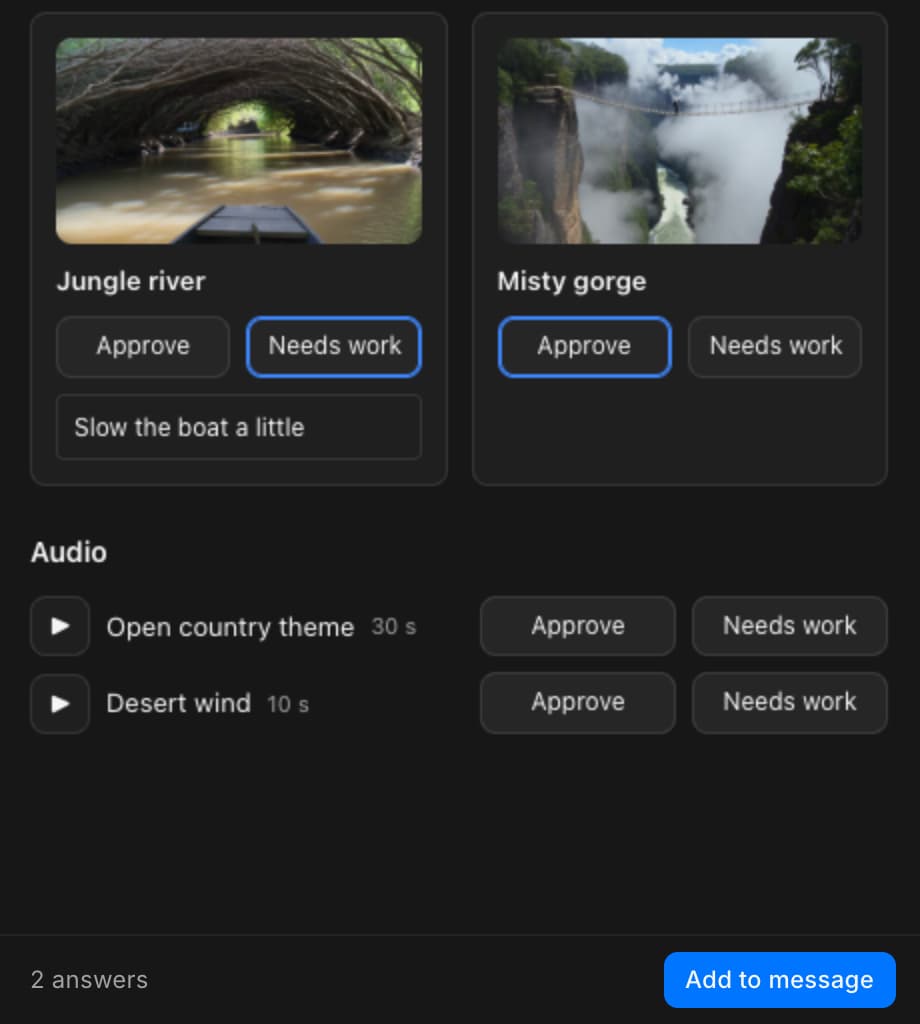
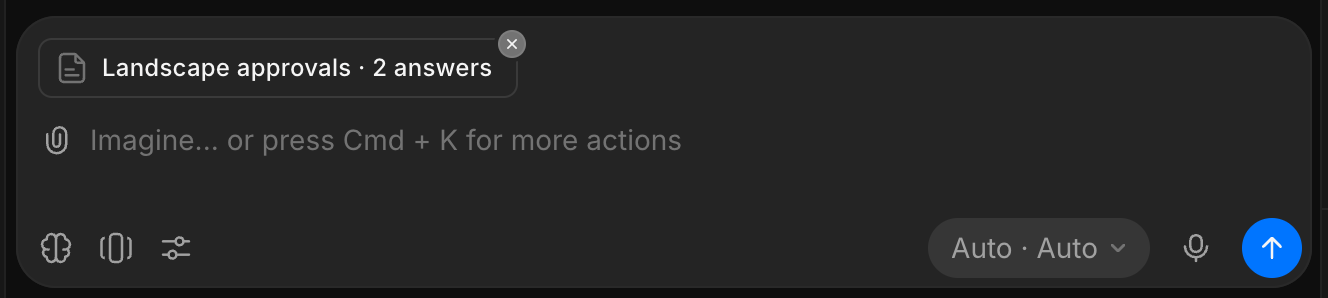
يتصرف Copilot بناءً على كل إجابة ويترك العناصر المعتمدة أو الفارغة كما هي. لعرض النتائج في الصفحة، اطلب ذلك، مثل 'حدّث الصفحة باللقطات الجديدة'.
- لا تُرسَل إلا العناصر التي تختارها، وتبقى اختياراتك إذا أغلقت الصفحة ثم عدت إليها في المتصفح نفسه
- في وضع ملء الشاشة، يغلق 'Add to message' الصفحة وينقلك إلى مربع الرسائل
مشاركة artifact
- انقر على أيقونة المشاركة أعلى يمين الـ artifact، أو على 'Share' في وضع ملء الشاشة
- اختر رابطًا:
- 'Copy link'، للأشخاص الذين يمكنهم فتح هذا الملف. يفتح الدردشة مع الـ artifact في اللوحة الجانبية
- 'Copy external link'، لأي شخص، دون حساب في Morphic. فعّل 'External sharing' أولًا
- يعرض الصف 'Copied!' عند نسخ الرابط
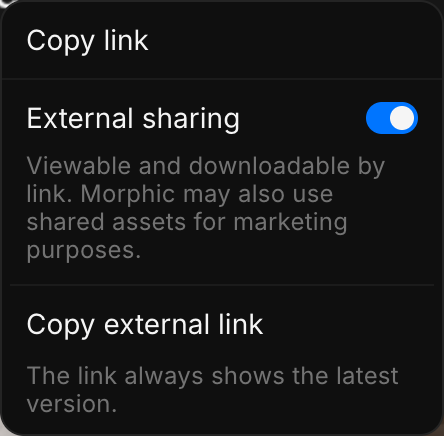
- يفتح الرابطان أحدث نسخة، حتى إذا نُسخا من نسخة أقدم
- لا يعرض الرابط الخارجي إلا الصفحة، لا الدردشة ولا ملفاتك الأخرى
- أوقف 'External sharing' لإيقاف المشاركة
- تعمل الصفحة داخل إطار معزول: لا تستطيع قراءة حسابك أو ملفاتك الأخرى، ولا الاتصال بالإنترنت
- Copilot وحده ينشئ الـ artifacts، لذا لا يمكن رفع ملف HTML ليصبح artifact
قد تستخدم Morphic الأصول المشتركة لأغراض تسويقية. اترك 'External sharing' متوقفًا للأعمال التي لا تريد عرضها.
عروض الشرائح
اطلب شرائح أو عرضًا أو عرضًا تقديميًا، مثل عرض ترويجي (pitch deck) أو ملخص لموسم، وسيبني Copilot عرض شرائح.
- صف العرض، مثلًا 'اصنع عرضًا ترويجيًا من 10 شرائح لهذا المسلسل، واستخدم أقوى الصور كصور رئيسية'
- انقر على شريحة في الشريط أسفل العرض للانتقال إليها
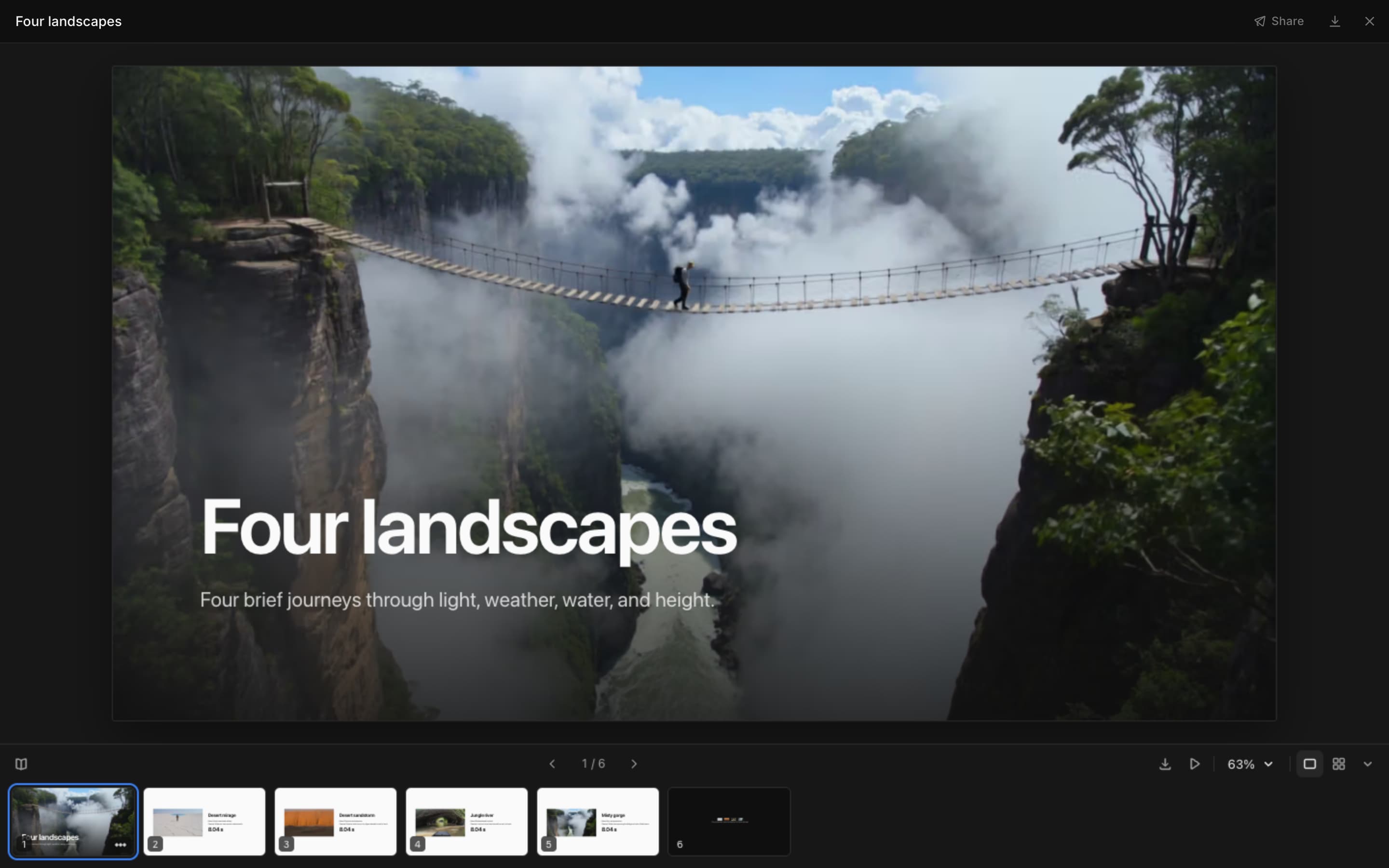
الشريط أسفل الشريحة:
| عنصر التحكم | ما يفعله |
|---|---|
| Speaker notes | يعرض ملاحظات الشريحة الحالية |
| Previous slide, Next slide | ينتقل شريحة واحدة للخلف أو للأمام |
| Save as PDF | يفتح نافذة الطباعة. اختر 'Save as PDF' كوجهة |
| Present | يعرض الشرائح بملء الشاشة. انقر أو اضغط → للمتابعة، وEsc للإيقاف |
| Zoom | يكبّر أو يصغّر، أو يلائم الشريحة، أو يضبط التكبير من 25% إلى 200% |
| Slide view, Grid view | شريحة واحدة في كل مرة، أو كل الشرائح مجمّعة حسب القسم |
| Hide slides | يخفي شريط الشرائح |
انقر على '...' على شريحة في الشريط، أو انقر عليها بزر الماوس الأيمن، لتحصل على:
- 'Present from here'
- 'Copy slide text'
- 'Ask about this slide'، الذي يضيف الشريحة إلى رسالتك التالية
اختصارات لوحة المفاتيح:
| المفاتيح | ما تفعله |
|---|---|
| → ↓ Space Page Down | الشريحة التالية |
| ← ↑ Page Up | الشريحة السابقة |
| Home, End | الشريحة الأولى أو الأخيرة |
| Cmd/Ctrl + =, Cmd/Ctrl + - | تكبير، تصغير |
| Cmd/Ctrl + 0 | ملاءمة الشريحة |
| Esc | إيقاف العرض |
لعرض أفضل:
- حدّد عدد الشرائح وترتيبها، مثل 'العنوان، الفكرة الرئيسية، الشخصيات، لقطات نموذجية، الطلب'
- أضف 'ملاحظات للمتحدث على كل شريحة' ليكون لديك ما تقوله أثناء العرض
- الشرائح داكنة بألوان Morphic. أضف 'شرائح فاتحة' للجداول والصفحات الكثيفة
- العروض الأطول تُقسَّم إلى أقسام تتصدّر عرض الشبكة
- غيّر شريحة واحدة برقمها، مثل 'اجعل الشريحة 4 جدول مقارنة'
حجم الـ artifact
- يتسع الـ artifact الواحد لما يصل إلى 1 MB و2,000 ملف
- للمشروع الأكبر، اطلب artifact لكل حلقة أو مشهد، مثل 'اصنع ورقة مراجعة لكل حلقة'
قوالب المطالبات
- انقر على أيقونة النسخ بجانب المطالبة
- الصقها في دردشة تحتوي على العمل
- إذا انتهت بتسمية ونقطتين، فالصق بياناتك بعدها
- أرسلها
المراجعة وضبط الجودة
راجع الفحص الأولي الذي أجراه Copilot بنفسك قبل أن تعتمد الورقة.
اصنع ورقة مراجعة لكل الصور ومقاطع الفيديو في هذه الدردشة، بترتيب المطالبات: التسمية، ثم الصورة أو المقطع، وتحته مطالبته، مع شارة حالة على كل عنصر: معتمد أو يحتاج إلى تحسين أو مرفوض.افحص كل عنصر في ورقة المراجعة مقابل مطالبته. علّمه بـ معتمد، أو بـ يحتاج إلى تحسين إذا كان فيه أي خلل (كائن أو زاوية أو وسيط خاطئ، أو نص داخل الإطار، أو شيء يشبه علامة تجارية حقيقية)، مع سبب في سطر واحد.اصنع قائمة فحص لكل مقطع فيديو في هذه الدردشة: رقم اللقطة، صورة مصغّرة، وصف قصير، المدة، نسبة العرض إلى الارتفاع، وحالة مضبوطة على قيد المراجعة، مع الإجماليات في الأعلى.ضع كل صورة لهذه الشخصية بجانب صورتها المرجعية، بترتيب القصة، وعلّم أي لقطة لا يتطابق فيها الوجه أو الشعر أو الزي. الشخصية:اصنع صفحة تضم فقط اللقطات المعلَّمة بـ يحتاج إلى تحسين، بقسم لكل حلقة، وفي كل منها الصورة والمطالبة والسبب.وزّع قائمة اللقطات على الأوقات الواردة في النص المفرغ أو السيناريو المرفق، بصف لكل لقطة، وعلّم أي فترة بلا لقطة.المقارنة والاختيار
اعرض هذه اللقطات متجاورة. قيّم كل واحدة من 0 إلى 100 في الحركة والشبه والإضاءة مع شريط لكل معيار، وأضف تحتها ملاحظة من سطر واحد، وضع إطارًا حول الأفضل. اللقطات:ضع كل إطار ومقطع في هذه الدردشة على ورقة معاينة مصغّرة. ضع إطارًا حول الأقوى الأربعة كمختارات، واذكرها تحتها مع سبب من سطر واحد لكل منها.اعرض نتائج كل نموذج في هذه الدردشة متجاورة، مع اسم النموذج وإعداداته تحت كل نتيجة.تخطيط تسلسل
اصنع لوحة قصصية من الصور والمقاطع في هذه الدردشة، بأفضل ترتيب. في كل لوحة: رقم اللقطة، الإطار، حجم اللقطة، حركة الكاميرا، المدة، وسطر واحد يصف الحدث. المدة المستهدفة:اصنع سيناريو ألوان: إطار رئيسي لكل لقطة، ولونه الأساسي كعينة مع رمزه السداسي، وشريط متدرج يمتد عبر المجموعة كاملة.ارسم مخططًا يوضح كيف صُنعت هذه اللقطات، من الموجز حتى الملفات النهائية، مع صورة مصغّرة عند كل خطوة.تطوير قصة
الصق فكرتك وأبطالك ومواقعك في الدردشة أولًا.
قبل أن أولّد أي شيء، ضع كل أوراق المراجع للشخصيات والمواقع في هذه الدردشة على صفحة واحدة، وعلّم أي تعارض: الوجوه أو الأزياء أو الألوان أو الإكسسوارات.اصنع دليل شخصيات: دور كل شخصية وعمرها وملاحظات مظهرها ورغبتها وسرّها، ولوحة ألوان كعينات مع رموزها السداسية، وقواعد الاستمرارية التي يجب أن تتبعها كل لقطة. استخدم أي صور مرجعية في هذه الدردشة.ارسم شبكة علاقات توضح من يدين لمن، ومن يحب من، ومن يعمل مع من، مع تسمية كل رابط ومفتاح للرموز.اصنع دليل مواقع لكل موقع: وقت اليوم والأجواء والمشاهد التي تدور فيه والإكسسوارات الأساسية والصوت ولوحة الألوان.اصنع ورقة أحداث رئيسية: عمود لكل حلقة مع أهم أحداثها، وعلّم كل نهاية مفتوحة.اصنع ورقة تصوير يومية تضم في أعلاها وقت الحضور والغروب والطقس وانتهاء التصوير، ثم جدولًا بالمشاهد مع الموقع والممثلين والصفحات ووقت البدء. تاريخ التصوير والموقع والأوقات:مشاركة العمل
اصنع صفحة عرض موجزة بأقوى صورة في هذه الدردشة كصورة رئيسية، ثم الفكرة في سطر واحد والصيغة والجمهور والنبرة وجملة جذب من سطر واحد لكل حلقة.اصنع عرضًا ترويجيًا من عمل هذه الدردشة: شريحة عنوان بأقوى صورة كصورة رئيسية، ثم الفكرة الرئيسية، والعالم، والشخصيات الرئيسية، ولقطات نموذجية، والصيغة والجمهور، وطلب ختامي. أضف ملاحظات للمتحدث إلى كل شريحة.اصنع عرض شرائح يلخّص هذا الموسم: قسم لكل حلقة مع إطارها الرئيسي وأبرز أحداثها وما تغيّر لكل شخصية.ضع كل نسخة نهائية معتمدة في هذه الدردشة على صفحة واحدة للعميل: لكل منها عنوانها وصيغتها، مجمّعة حسب المُخرَج.اصنع ورقة تسليم للمونتاج: صف لكل لقطة بترتيب القطع، مع سطر السيناريو والإطار النهائي واسم الملف.وزّع نسخ الإعلان في شبكة: جملة جذب في كل صف وصيغة في كل عمود (9:16 و1:1 و16:9).اصنع صفحة اعتماد: كل عمل بنسخته القديمة بجانب الجديدة، مع ملاحظة من سطر واحد عمّا تغيّر، وشارة حالة: معتمد أو يحتاج إلى تعديل أو قيد المراجعة.اصنع صفحة أعمال من أفضل ما في هذه الدردشة: عمل رئيسي كبير، ثم شبكة بعنوان وسطر واحد لكل عمل، واسمي وبيانات التواصل معي في الأسفل. الاسم وبيانات التواصل:التتبع والتنظيم
اصنع صفحة تقدم من قائمة الحالة أدناه: صف لكل حلقة مع اللقطات المنجزة وقيد الفحص وما يحتاج إلى إعادة، وشريط تقدم، والمشكلات المفتوحة. قائمة الحالة:اصنع شبكة توطين من القائمة أدناه: صف لكل حلقة وعمود لكل لغة، وعلّم كل خلية بـ تم أو قيد التنفيذ أو لم يبدأ. القائمة:افحص كل صورة ومقطع في هذه الدردشة مقابل قواعد علامتنا التجارية وعلّم كل واحد بـ ناجح أو يحتاج إلى تحسين، مع سبب من سطر واحد. قواعد العلامة التجارية:اصنع تقويم محتوى من الخطة أدناه: صف لكل يوم مع التاريخ والقناة والمادة والتعليق. الخطة:اصنع فهرسًا لكل صورة ومقطع فيديو في هذا الملف، الأحدث أولًا، مع صورة مصغّرة واسم ومربع بحث.اصنع سجلًا قابلًا للبحث لكل مرجع للشخصيات والمواقع في هذا الملف: الصورة والاسم وما تُستخدم فيه.اعرض كل ما صنعته هذه الدردشة بالترتيب: صورة مصغّرة، وما هو، والنموذج المستخدم، والخطوة التي جاء منها.اعرض كل مطالبة في هذه الدردشة مع ما صنعته، مجمّعة حسب المشهد.اصنع دليلًا يشرح كيف صنعنا هذا: خطوة في كل صف مع ما يحدث فيها، والنموذج أو الإعداد المستخدم، والمخرجات الفعلية من هذه الدردشة.ما بعد الإنتاج
اكتب المطالبة باللغة التي تريد أن تكون بها الصفحة.
اصنع كتاب إلهام من الصور في هذه الدردشة: صورة غلاف كبيرة، ثم شبكة مجمّعة حسب الأجواء، مع تعليق قصير لكل صورة.اصنع تقريرًا عن مقاطع الفيديو في هذه الدردشة: صورة مصغّرة ومدة وملخص قصير لكل مقطع، مع ملاحظات عمّا يحتاج إلى إصلاح.اصنع مجموعة بطاقات تعليمية من هذه القائمة، بالكلمة على الوجه والمعنى على الظهر، وزر لقلب كل بطاقة. القائمة:اصنع صفحة آلة حاسبة بسيطة من الأرقام أدناه، بمدخلات يمكنني تغييرها وإجماليات تتحدث تلقائيًا. الأرقام:اصنع لعبة نقر بسيطة باستخدام الصور في هذه الدردشة، مع عدّاد للنقاط وزر لإعادة التعيين.هذه هي طريقة عمل الـ artifacts في Morphic. استخدم واحدًا عندما يكون في الدردشة عمل أكثر مما يمكنك تصفحه بالتمرير، أو عندما تحتاج إلى اختيارات شخص ما، أو لعرض العمل على الآخرين.
إذا واجهت أي مشكلة أو كانت لديك أي أسئلة، فلا تتردد في التواصل معنا. يسعدنا مساعدتك. اكتب لنا على support@morphic.com.