اختيار نموذج
كيفية اختيار النموذج الذي يشغّل دردشة Copilot، وما الذي يناسبه كل نموذج، وأين تضبط النموذج الذي تبدأ به الدردشات الجديدة.
يعمل Copilot على نموذج لغوي، ويمكنك اختيار أيٍّ منه. إنه النموذج الذي يقرأ طلبك، ويخطط للعمل، ويتحدث إليك. أما أي نموذج للصور أو الفيديو ينشئ الوسائط فهو إعداد منفصل، تحت "تفضيلات النموذج" في شريط المطالبة.
النماذج
| النموذج | مناسب لـ |
|---|---|
| تلقائي | يختار أفضل نموذج لكل مهمة. الافتراضي |
| Sonnet 4.6 | ذكاء وسرعة متوازنان لمعظم المهام |
| Sonnet 5.5 | ذكاء وسرعة متوازنان لمعظم المهام |
| Haiku 5.5 | سريع وموفّر للمهام السريعة والمركّزة |
| Grok 4.6 | استجابات سريعة ومباشرة للمهام اليومية |
| Grok 4.7 | سريع مثل Grok 4.6، وأقوى في المهام الطويلة متعددة الخطوات |
| GPT 6 Sol | استدلال عميق للمهام المعقدة متعددة الخطوات |
| GPT 6.1 Sol | استدلال قادر وفعّال للمشاريع المعقدة متعددة الخطوات |
| GPT 5.6 Terra | ذكاء وتكلفة متوازنان للعمل اليومي المتطلب |
| Fable 5.1 | استجابات إبداعية ومصقولة للسرد وتوليد الأفكار |
| Opus 5.5 | استدلال قوي وحكم إبداعي للمشاريع المتطلبة |
اتركه على "تلقائي" ما لم يكن لديك سبب لعدم ذلك. يحتاج GPT 6 Sol وGPT 5.6 Terra وFable 5.1 وOpus 5.5 إلى خطة مدفوعة. بعض النماذج مُدرجة ولكنها باهتة؛ ولا يمكن اختيارها بعد.
الأرصدة
كل رد يستهلك أرصدة، ويحدد النموذج المعدل. يستخدم "تلقائي" أقل عدد. أي نموذج تختاره يُحتسب دائمًا، وهو ما تنص عليه القائمة المنسدلة أسفل القائمة: "سيؤدي الانتقال من Auto إلى أي نموذج محدد إلى تكلفتك الأرصدة ذات الصلة". وقد يُحتسب "تلقائي" أيضًا، حسب حسابك.
يطلب منك تغيير النموذج في منتصف المحادثة تأكيدًا أولًا: فالنموذج الجديد يقرأ المحادثة كاملة قبل أن يجيب، لذا تكون تكلفة رده الأول أعلى. اختر النموذج عند بدء المحادثة لتجنب ذلك.
الأرصدة المعتادة لكل رد لكل نموذج موجودة أسفل تكاليف ردود Copilot.
اختر واحدًا للمحادثة
- افتح Copilot
- انقر الزر في أسفل يمين شريط المطالبة. يقرأ الوضع أولًا ثم النموذج ثانيًا، لذا فإن "تلقائي · Sonnet 4.6" هو توليد تلقائي يعمل على Sonnet 4.6
- ضمن "النموذج"، افتح القائمة المنسدلة واختر واحدًا. تشير علامة صح إلى النموذج النشط
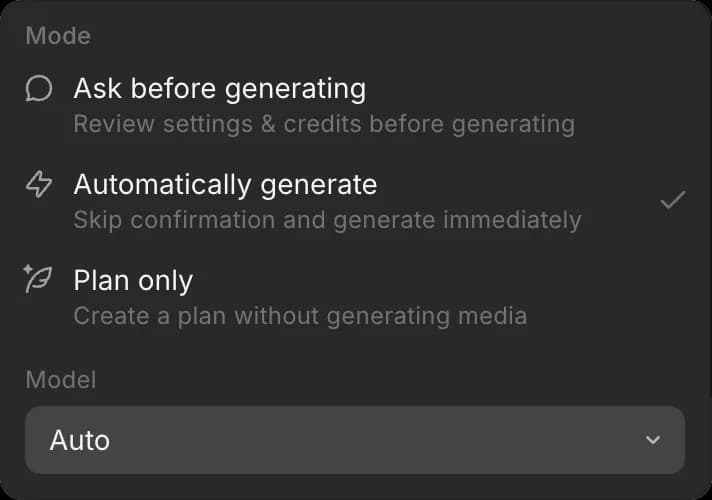
الاختيار خاص بالمحادثة، لذا يمكن للمحادثات أن تعمل على نماذج مختلفة في الوقت نفسه، ويظل ذلك قائمًا حتى تغيّره.
عيّن الافتراضي للمحادثات الجديدة
- افتح "التفضيلات"
- بجوار "وضع الدردشة الافتراضي"، افتح القائمة المنسدلة
- اختر النموذج ضمن "النموذج"، والوضع ضمن "الوضع" أثناء وجودك هناك
تبدأ المحادثات الجديدة على ذلك النموذج. تغيير نموذج محادثة لا يغيّر الإعداد الافتراضي.
هكذا تختار نموذجًا في Morphic. معظم الأعمال مناسبة على "تلقائي"؛ اختر واحدًا بنفسك عندما تتطلب المحادثة السرعة أو مزيدًا من الاستدلال.
إذا واجهت أي مشكلة أو كانت لديك أي أسئلة، فلا تتردد في التواصل معنا. يسعدنا مساعدتك. اكتب لنا على support@morphic.com.