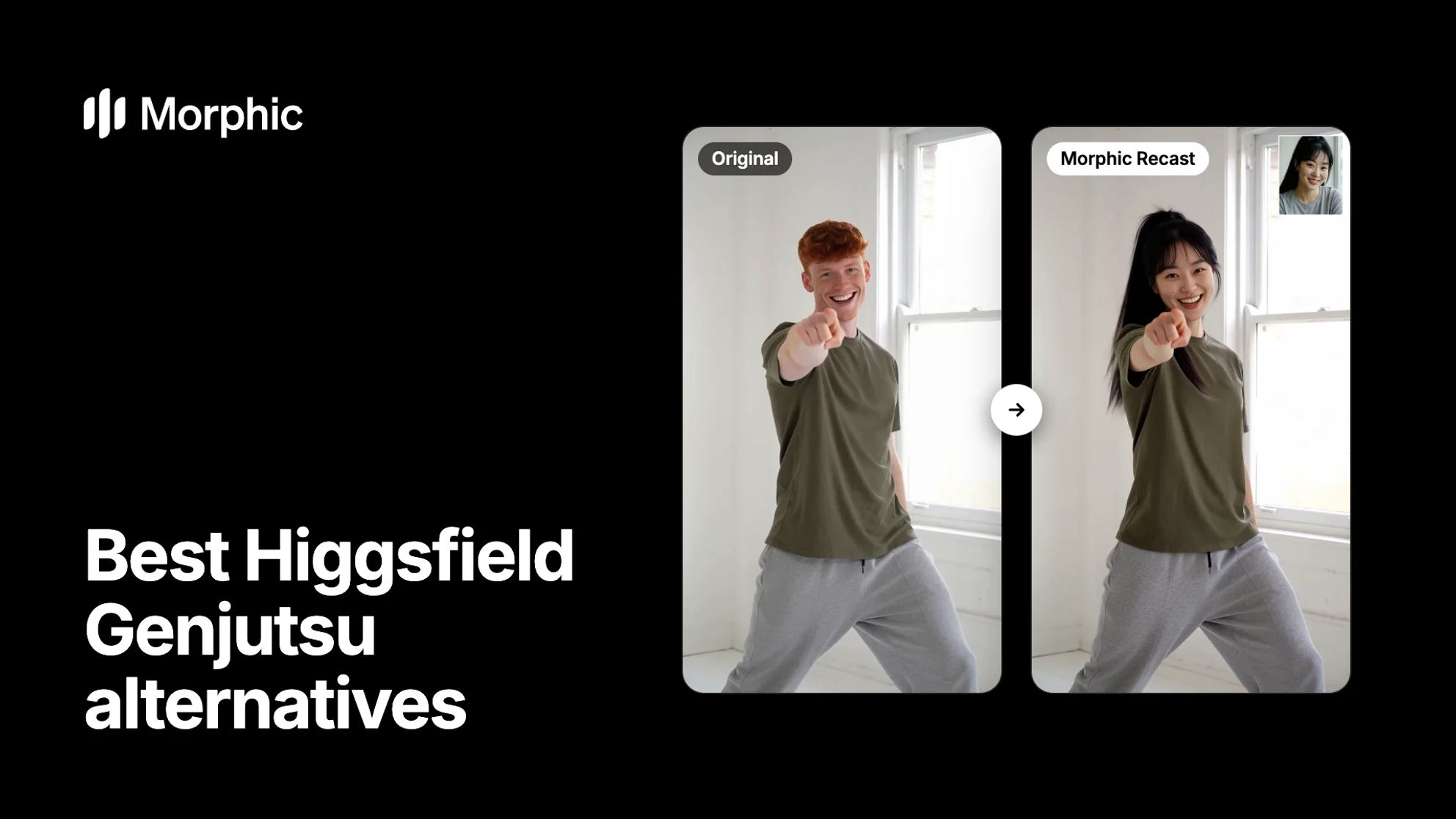
Higgsfield Genjutsu vs Morphic, feature by feature
Each row starts from something Genjutsu does and shows the Morphic feature that does the same job.
| What you want to do | Morphic | Higgsfield Genjutsu |
|---|---|---|
| Swap a person and keep the rest of the shot | Morphic Recast | Objects swap |
| Swap an outfit, product or prop | Video edit by instruction | Objects swap |
| Keep only the motion and rebuild the scene | Motion transfer | Motion transfer |
| Restyle the whole clip | Video to video | Style |
| Start from a trending motion | No built-in library | Motion Library |
| Source clip length | Up to 30 seconds | 4 to 30 seconds |
| References per job | One photo per new person | Up to 30 images (Lite: 10) |
| Several versions at once | Copilot runs takes side by side | Batch |
| Prompt | Optional, or ask Copilot | Optional |
Genjutsu details from Higgsfield's product page and help article, November 2026. Morphic Recast is on paid plans.
What Higgsfield Genjutsu does well
Genjutsu is the video transformation tool inside Higgsfield. It rebuilds part of an existing clip while the motion, timing and camera stay as filmed.
- Two modes. Motion transfer keeps only the movement and rebuilds the rest from your references. Objects swap changes one thing, such as a person, a product, an outfit or on-screen text.
- A trend library. The Motion Library offers trending dances, transitions and formats to rebuild around your own character.
- Plenty of references. Standard Genjutsu takes up to 30 reference images. Genjutsu Lite is faster, takes up to 10 and decides the changes on its own.
If your whole job is putting your face into this week's trend, that library is a real head start. This page is about what comes after the swap, when the clip has to become part of a finished video.
Morphic Recast examples
Take a look at a few recasts and an outfit change. The small photo shows who each new person came from.
Recast a trend dance with a new dancer
Every bounce, wave and spin lands on the same beat. The room, the light and the phone framing stay as shot.
Original
Morphic Recast
Recast one dancer and keep the other
Only the man on the left gets a photo. His partner, the court and the timing of the routine stay exactly as filmed.
Original
Morphic Recast: the man on the left only
Swap an outfit by describing it
Genjutsu's Objects swap also covers clothing and products. On Morphic you describe the change, and the walk, the turn of the head and the corridor carry over.
Original
Video edit by instruction: a new coat
Everything after the swap, in one Morphic workspace
A recast is rarely the last step. The lead has to match in the next shot, the scene has to be cut, and the video often needs subtitles and a second language. Morphic is a complete AI video production workspace, so each of those steps happens where the recast already is.
Copilot runs the job
Say who replaces whom, or describe the whole video. The agentic Copilot plans the steps, runs the generations and brings back the results.
Takes side by side
Ask for three casts at once. The versions arrive together, so you compare them before you commit.
A cast that holds
Save a lead as a reference sheet or a named Element. It goes into every shot, so the face stays the same across a series.
One Canvas for the team
Plan, generate and review on a free-flowing Canvas. On the Pro plan and above, the team works on it live, together.
A timeline to finish the cut
Compose is a multi-track timeline. Trim, add transitions, grade, lay in music and voiceover, and leave notes pinned to the cut.
Subtitles from the same cut
Turn the speech into a subtitle file, translate it for a second market and burn styled captions onto the video.
Dubbing with matched lips
On paid plans, dub the finished video in one step, in the speaker's own voice, with the lips redrawn to the new words.
Workflows you can rerun
Turn recast, cut and dub into a Workflow. Anyone on the team runs it again on the next clip with the same steps.
From one recast to a finished video
- Recast the scene. Upload the shot and a photo of each new lead, then ask for three casts to compare.
- Lock the character. Save the lead you pick as a reference sheet, so later shots and recasts use the same face.
- Cut the episode. Place the shots on the Compose timeline, grade them, add music and leave notes for the team.
- Ship it to more markets. Generate subtitles and dub the finished episode into the next language.
Nothing is exported or uploaded again between those steps.
How to choose a Higgsfield Genjutsu alternative
For creators and freelancers
If the whole job is one vertical clip built on a trending motion, a tool with a trend library is the quick route. If the recast is one shot in something longer, such as a series, a pitch or a client video, Morphic saves the hand-offs. Recast on the Canvas, keep the character on a reference sheet and finish the cut on the timeline.
For agencies and businesses
At volume, the recast is the easy part. The work is keeping ten market versions of one ad consistent, reviewed and delivered. On Morphic the team reviews on one shared Canvas, Copilot runs the same recast and dub for each market, and a Workflow makes the process repeatable.
Moving your recast pipeline to Morphic? Let's build your workflow.
For studios, micro drama platforms and agencies. Share what you recast, how often and in which languages, and we'll set up a workflow with you that takes each clip from recast to a subtitled, dubbed cut.
The verdict: Morphic is the Higgsfield Genjutsu alternative for finished videos
Genjutsu is a capable way to rebuild a clip around new characters, and its Motion Library is made for trend content. Morphic covers the same core jobs with Morphic Recast, edits by instruction, motion transfer and video to video. Then it keeps going: Copilot plans the work, reference sheets hold the cast, and the timeline, subtitles and dubbing turn one recast into a video you can deliver in more than one market.
For the wider picture, see the full Morphic vs Higgsfield comparison, the Higgsfield AI alternative page, the ranked best Higgsfield alternatives, and how AI character swap works on Morphic.
What creators say about Morphic
This is a 100% AI-made film. But so well done!
This is how AI filmmaking should be done.
Very realistic and professionally written and directed by the @morphic team on their platform and without using Seedance 2.0

Morphic has been my first choice for image generation for more than 9 months now.
But it's also a great all-in-one platform that can fully support your entire creative workflow.
Highly recommend trying Morphic.

On Morphic Canvas, you can easily group and sort your files, making it a breeze to pick what you need or just grab everything at once. @morphic
Current obsession: GPT Image 2 on Morphic.
Simple pricing
Get started for free today, with the option to upgrade or cancel anytime.
Basic
2400 monthly credits
1 user only
All models
Workflows
Standard
3625 monthly credits
1 user only
All models
Workflows
Pro
6350 shared monthly credits
1 user
All models
Workflows
Max
24650 shared monthly credits
1 user
All models
Workflows
Enterprise
For higher limits
Custom
pricing and billing terms
Free
For playing around
$0
forever free
FAQs
Higgsfield Genjutsu is Higgsfield's video transformation tool. It changes part of an existing clip while the motion, timing and camera stay as filmed. Motion transfer keeps only the movement and rebuilds the rest, and Objects swap changes one element, such as a person, product, outfit or on-screen text. Source clips run from 4 to 30 seconds.
Morphic. Morphic Recast swaps the people in a clip up to 30 seconds long and keeps the motion, cuts and sound as shot. Around it, Morphic is a complete AI video production workspace: an agentic Copilot, reference sheets for a consistent cast, a built-in timeline editor, subtitles and dubbing, so the recast becomes a finished video in one place.
Both change who is on screen and keep the rest of the shot. With Morphic Recast you attach one photo per new person and say who replaces whom, in the prompt bar or by asking Copilot. Anyone without a photo stays as filmed. For an outfit, a product or a prop, describe the change and Morphic edits the clip by instruction.
Yes. Save the character as a reference sheet and use it on every shot and every recast. Copilot carries each attached reference through to the model, so the lead stays recognizable from scene to scene. For a longer scene, recast it shot by shot with the same sheet.
Yes. On paid plans, Morphic dubs a finished video in one step. The speech is translated, re-voiced in the speaker's own voice, and the lips are redrawn to the new words. You can also turn the cut into a subtitle file and translate it. Run one dub per target language.
No. Morphic has no built-in trend library. You bring the clip you want to recast or the motion you want to transfer, from your own footage or from a shot you made in Morphic. If rebuilding trending formats is your main job, Genjutsu's Motion Library is built for it.
A Morphic Workflow is a reusable, multi-step creative process. You create one by describing it to Copilot or by saving a session you liked, such as a recast-then-dub run for each market. It runs from the Canvas, Copilot or the dashboard and asks for the inputs it needs.
Yes. Tell Copilot what to adjust: add or remove steps, swap the model on a step, rewrite prompts or change the inputs. Every edit creates a new version, and you can roll back to any earlier one.