Bild zu Video
Mit Bild zu Video in Morphic können Sie mit einem Prompt ein einzelnes Bild in ein kurzes KI-generiertes Video verwandeln.
Hier ist eine kurze Anleitung zur Verwendung von Bild-zu-Video in Morphic:
- Laden Sie Ihr Bild auf der Leinwand hoch oder generieren Sie es dort
- Wählen Sie das Bild aus, mit dem Sie arbeiten möchten
- Stellen Sie in der Prompt-Leiste, die unter dem Bild erscheint, den Ausgabetyp auf „Video“ ein und passen Sie die Einstellungen an, oder belassen Sie sie auf den Standardwerten
- Verfassen Sie einen Prompt, der das gewünschte Video beschreibt
- Klicken Sie auf den blauen Button in der Eingabeleiste
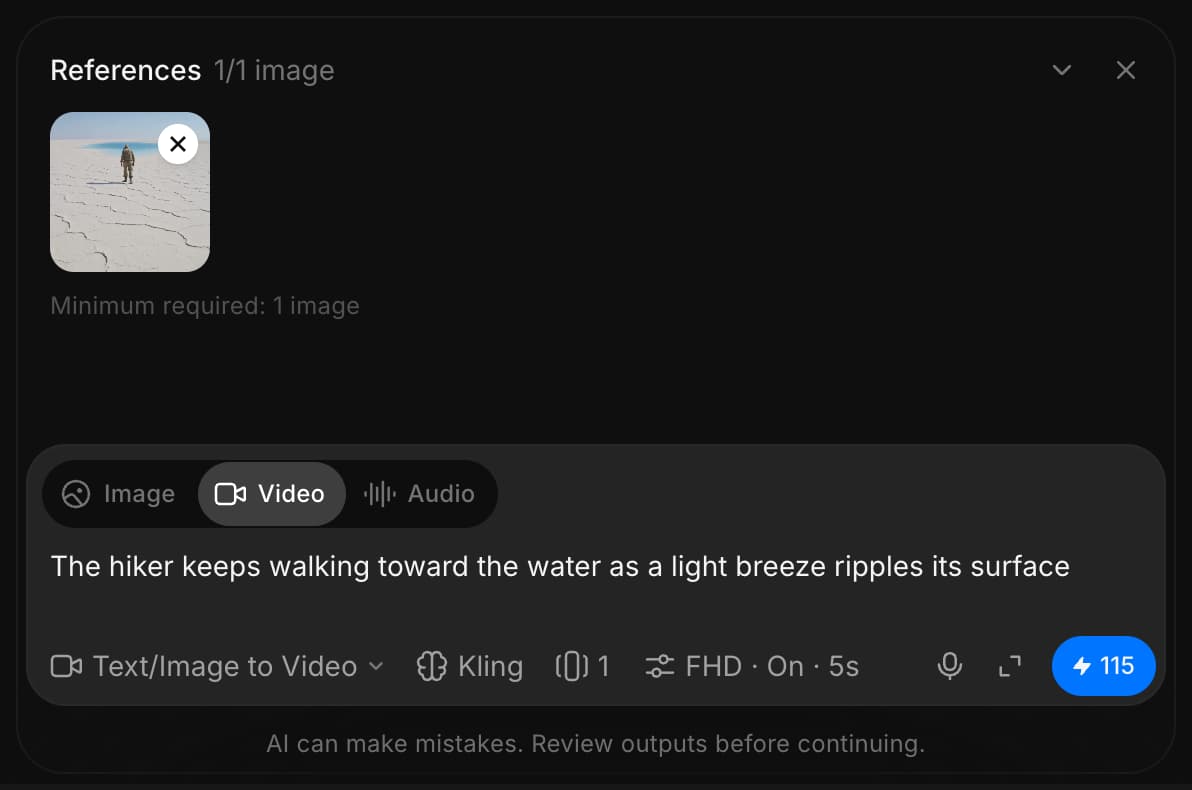
Morphic verwandelt Ihr Bild in ein dynamisches, KI-generiertes Video.
So verwenden Sie die Funktion Bild-zu-Video in Morphic. Es ist ein schneller Weg, statische Bilder zum Leben zu erwecken.
Wenn Sie Probleme haben oder Fragen haben, können Sie sich gerne an uns wenden. Wir helfen Ihnen gerne. Schreiben Sie uns an support@morphic.com.
Text zu Video
Mit Text zu Video in Morphic können Sie mit nur einem Prompt ein neues Video von Grund auf erstellen.
Frames zu Video
Frames zu Video in Morphic ermöglicht es Ihnen, Keyframes mithilfe von KI in Video zu interpolieren. Fügen Sie Ihre Frames hinzu, beschreiben Sie die Bewegung dazwischen und generieren Sie die Übergänge.