Two ways to make 3D animation in Morphic
Morphic makes a 3D animation from two starting points: a prompt when the look matters most, or a 3D scene when the staging and the camera matter most. Both routes end on the same Compose timeline with voice, music and sound. For modelling, rigging and final rendering, see the best 3D animation software.
Below is the 3D scene route: a frame from the blocking, and the frame generated from it with each figure named by colour.
 Generated frame
 3D Scene blocking
Make a 3D animation in three steps
- 01
Pick the starting point
Describe the shot and its 3D look, or block the set, the cast and the camera in a 3D scene.
- 02
Generate the animation
Generate each shot from the prompt, or from the rendered blocking with each figure named by colour.
- 03
Finish in Compose
Cut the shots together and add voice, music and sound effects on their own tracks.
Start a 3D animation from a prompt or a 3D scene
From a prompt: name the 3D look
Describe the subject, the action, the look and the camera: a low poly fox trotting through an autumn forest, a slow dolly at ground height. Photoreal, low poly and stylised CGI all work. Browse 3D animation videos, low poly 3D videos and photoreal 3D videos for prompts to adapt.
From a 3D scene: control the camera and staging
Describe the scene and Copilot builds the set, cast, action and camera, or place it all by hand. Render the blocking video, attach it, and name each figure by colour; the blocking guides the generation. The 3D animation guide walks through it.
Keep 3D animation characters consistent, then finish the cut
Consistent characters across shots
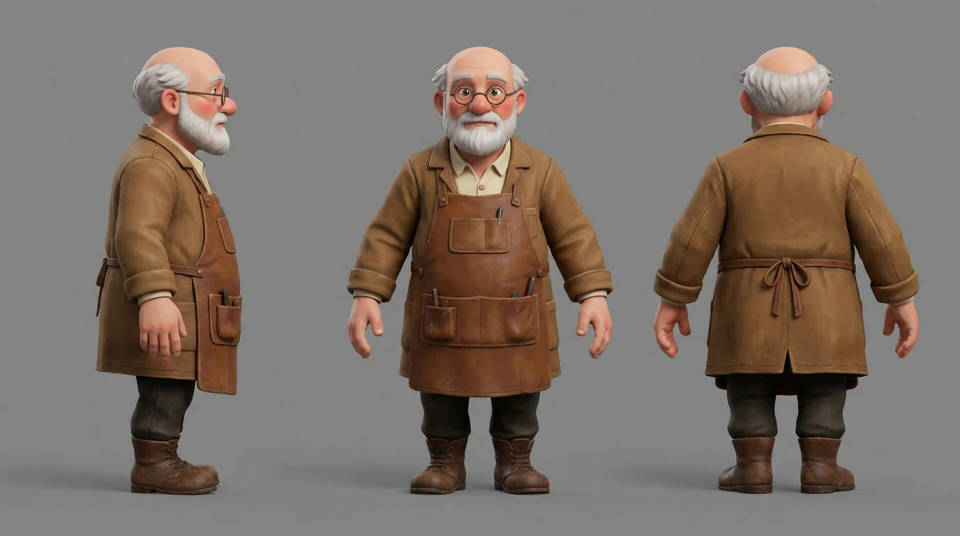
Build a character sheet with front, side and back views, or save the character as an element from one or several images, and attach it to every shot. A location sheet does the same for a set. Design one with the 3D character generator.
Finish the 3D animation in Compose
Trim, reorder and grade the generated shots, and add titles. Generate a voiceover, music or sound effects and lay each on its own track with its own level, then export the finished animation from the same timeline.
3D animation examples made in Morphic
From a 3D scene: a shot generated from the blocking
Made on the 3D scene route. The workshop was blocked with a push-in towards the bench, rendered as a blocking video and attached to the shot. The red and blue figures, named by colour, became the toymaker and his robot.
From a prompt: a low poly 3D animation
Made on the prompt route, text only, with no 3D scene: a faceted lighthouse on a low poly island, waves rolling in, the beam sweeping at dusk, and a slow orbit around the rock.
From a prompt: a photoreal 3D frame
Photoreal 3D suits products and machines: a small orange delivery robot crossing a rain-wet plaza at blue hour, reflections under its wheels, framed low and wide.

A character sheet that keeps the 3D cast consistent
The toymaker's sheet holds his front, side and back views in one stylised CGI look. It rides along on every shot he appears in, so his face and coat hold from shot to shot.
All on Morphic
3D scene maker
Describe a shot and Copilot builds the set, cast, action and camera, then direct any detail.
3D character generator
Design a 3D-style character and its reference sheet before the first animated shot.
3D storyboard maker
Board each beat in a 3D scene and play it back as an animatic with timing.
Previs software
Previs a whole sequence in 3D, then use the blocking video as the reference for every shot.
