Tarife
Auf dem Tab Pläne können Sie Ihre Pläne einfach vergleichen und verwalten. Sie können Pläne auch problemlos upgraden oder downgraden. Wenn Sie Hilfe benötigen, wenden Sie sich an den Support.
Im Bereich „Tarife“ können Sie Ihr Abonnement vergleichen und verwalten. Morphic bietet verschiedene Optionen, sodass Sie den Tarif auswählen können, der am besten zu Ihren Bedürfnissen passt.
Tarife aufrufen
- Klicken Sie in der Dashboard-Ansicht oben links auf das Org-Logo.
- Wähle im Dropdown-Menü Einstellungen aus.
- Klicken Sie in der linken Seitenleiste auf „Tarife“.
- Sie gelangen auf die Seite „Tarife“, auf der Sie Abonnements anzeigen und verwalten können.
Oder gehe direkt dorthin: studio.morphic.com/settings/plans
Tarif upgraden oder ändern
- Überprüfen Sie auf der Seite „Tarife“ die verfügbaren Abonnementoptionen.
- Klicken Sie unter dem gewünschten Tarif auf die Schaltfläche „Upgraden“.
- Folgen Sie den Anweisungen auf dem Bildschirm, um das Upgrade oder die Änderung abzuschließen.
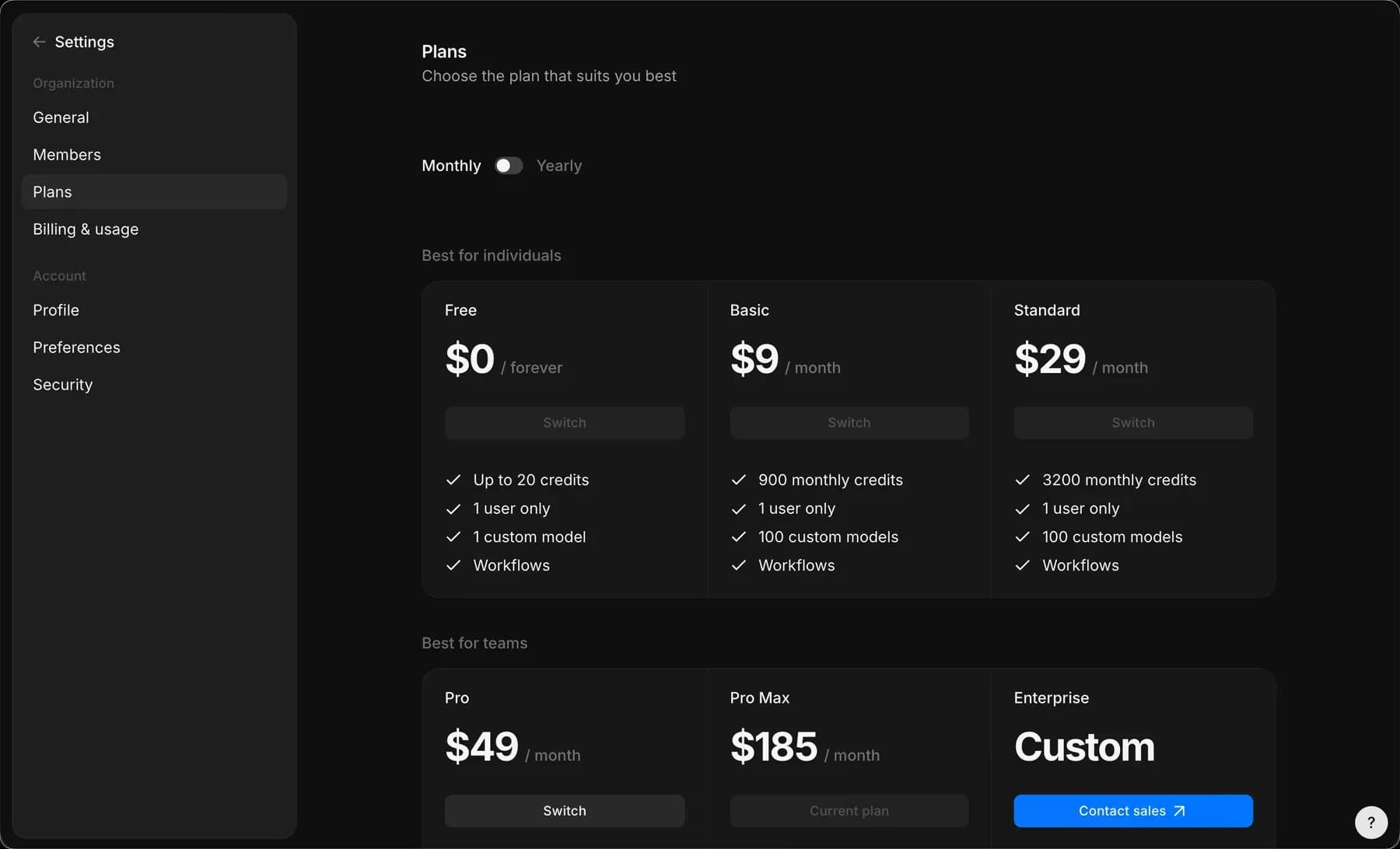
Verfügbare Tarife
Morphic bietet die folgenden Tarife. „Jährlich“ ist der monatliche Preis bei jährlicher Bindung. In beiden Fällen sind die Tarif-Credits ein monatliches Kontingent: Sie werden jeden Monat zurückgesetzt, und nicht genutzte Credits werden nicht übertragen.
| Tarif | Monatlich | Jährlich | Credits / Monat | Support | Zusätzliche Mitglieder |
|---|---|---|---|---|---|
| Kostenlos | 0 $ für immer | 0 $ für immer | 20 einmalige Credits | Community-Support | Nicht verfügbar |
| Bildung | $5 | $4 | 610 | E-Mail-Support | Nur 1 Nutzer |
| Basic | $19 | $19 | 2,400 | E-Mail-Support | Nicht verfügbar |
| Standard | $29 | $24 | 3,625 | E-Mail-Support | Nicht verfügbar |
| Pro | $49 | $45 | 6,350 | E-Mail-Support | 10 $/Monat pro Mitglied |
| Max | $185 | $170 | 24,650 | E-Mail-Support | 10 $/Monat pro Mitglied |
| Enterprise | Benutzerdefiniert | Benutzerdefiniert | Hohes Volumen* | Benutzerdefinierter Support | Benutzerdefinierte Sitzplatzlimits |
Einige detailspezifische Hinweise zu den Tarifen:
- Basic-Tarif: Der Preis wurde im September 2026 geändert. Er betrug 9 $ pro Monat (108 $ pro Jahr) mit 1.100 Credits pro Monat und beträgt jetzt 19 $ pro Monat (228 $ pro Jahr) mit 2.400 Credits pro Monat. Wenn Sie vor der Änderung abonniert haben, bleiben Sie bei 9 $ mit 1.100 Credits pro Monat.
- Education-Tarif: Vergünstigte Preise sind ausschließlich für den Bildungsbereich verfügbar, für Studierende und Lehrkräfte. Wenden Sie sich an support@morphic.com.
- Enterprise-Tarif: entwickelt für anspruchsvolle Anforderungen und Teamanforderungen. Enthält kreative Unterstützung (auf Anfrage), unbegrenzte Stile, private Workshops sowie individuell zugeschnittene Preis- und Abrechnungsbedingungen. Kontaktieren Sie den Vertrieb, um mehr zu erfahren.
So vergleichen und verwalten Sie Tarife in Morphic. Sie können jederzeit zu einem anderen Tarif wechseln, wenn sich Ihre Anforderungen ändern.
Wenn Sie Probleme haben oder Fragen haben, können Sie sich gerne an uns wenden. Wir helfen Ihnen gerne. Schreiben Sie uns an support@morphic.com.