設定
新しい Copilot チャットの開始モードの設定方法と、生成完了時にブラウザで通知するかどうかの設定。
Morphic の Preferences では、自分用のデフォルトを設定できます。これらの設定は組織全体ではなくあなた個人に適用されるため、変更してもチームメイトには影響しません。
Morphic で Preferences を設定する簡単なチュートリアルはこちらです:
Preferences にアクセスする
- Dashboard 画面で、左上隅の Org ロゴをクリックします。
- ドロップダウンから「Settings」を選択します。
- 左サイドバー下部の「Go to Profile settings」をクリックし、次に「Preferences」をクリックします。
または、直接こちらへ: studio.morphic.com/settings/account/preferences
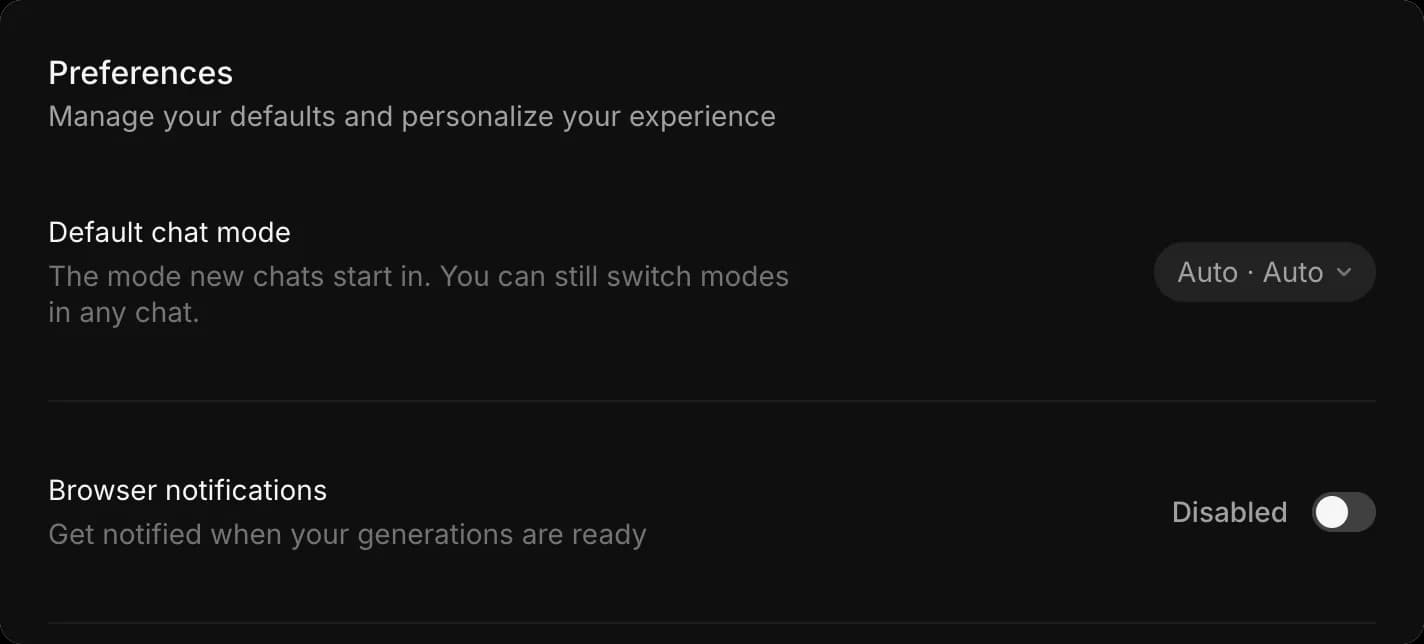
デフォルトのチャットモード
「Default chat mode」は、新しい Copilot チャットの開始方法を設定します。コントロールには 2 つの設定があり、横の表示にはまず mode、その次に model が示されるため、「Auto · Auto」は自動モデルでの自動生成を意味します。
- 「Preferences」を開く
- 「Default chat mode」の横にあるドロップダウンをクリックします
- 「Mode」では、「Ask before generating」(実行前に設定とクレジット消費量を表示)、「Automatically generate」(すぐに生成)、「Plan only」(生成せずに計画のみ作成)から選びます。現在有効なものにはチェックマークが付きます。参照: チャットモード それぞれの機能について
- 「Model」では、新しいチャットの開始モデルを選びます。「Auto」は各タスクに最適なモデルを選択し、それ以外はワークスペースで利用できる名前付きモデルです。参照: モデルを選ぶ
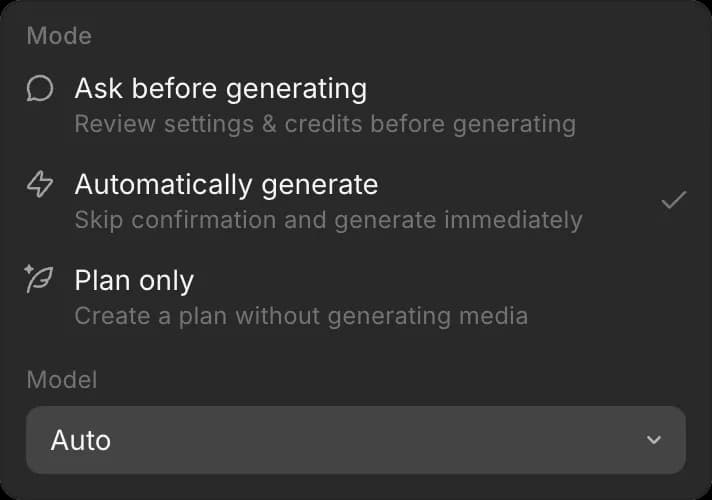
デフォルトを「Auto」から特定のモデルに切り替えると、そのチャットにはそのモデルのクレジットが課金され、ドロップダウンの下にその旨が表示されます。
影響するのは新しいチャットのみです。どのチャットでもモードとモデルは切り替えられ、個別のチャットを変更してもデフォルトは変わりません。
動画を扱うことが多い場合や共有クレジット残高で作業している場合、デフォルトを「Ask before generating」に設定すると、新しいチャットのたびに実行前に生成コストが表示されます。
ブラウザ通知
「Browser notifications」は、生成が完了したらブラウザに通知させる機能です。これにより、長いレンダリングが終わるまで別のタブで作業できます。
- 「Preferences」を開く
- 「Browser notifications」をオンまたはオフに切り替える
知っておくとよいこと
- 通知を初めてオンにすると、ブラウザが許可を求めます。その後通知が表示されない場合は、ブラウザの設定で Morphic の通知送信が許可されているか確認してください。
- これらの設定はあなただけのものです。変更しても組織内の他の人には影響しません。
- 動画を扱うことが多い場合や共有残高から利用している場合、デフォルトを「Ask before generating」にしておくと、新しいチャットのたびに実行前に生成コストが表示されます。
これで Morphic で Preferences を設定できます。新しいチャットの動作と、完了した作業の通知方法が決まります。
何かお困りのことやご質問がありましたら、お気軽にご連絡ください。喜んでお手伝いします。こちらまでご連絡ください support@morphic.com.