Every video model
One workspaceB-roll shots you can generate
Generate b-roll in three steps
- 01
Open Morphic
Sign up and start creating on a free-flowing, infinite visual canvas.
- 02
Describe the cutaway
The exact shot you need. Subject, camera move, light, and the grade to match your edit.
- 03
Generate and drop it in
Render in minutes, then lay the cutaway over your narration on Compose.
Use cases
The exact cutaway, not the closest stock clip
Stop scrubbing a stock library for a near-match. Describe the exact insert your edit needs, a lone streetlight in fog or a hand closing a laptop, and get that shot.

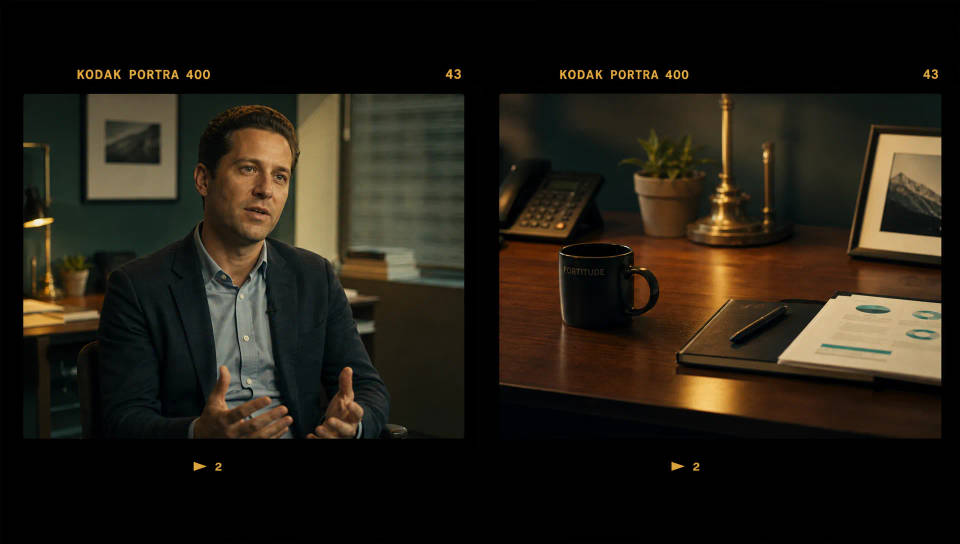
Match b-roll to your edit's grade and look
Name the color tone, lens, and mood so the cutaway sits next to your A-roll instead of fighting it, reading as part of the same shoot.
No licenses or repeat clips
Skip the license hunt. Generate footage that is yours to use across ads, client work, and social, with no overused stock clip.

B-roll for talking-head, docs, and ads
Fill the gaps in an interview, documentary, or ad with cutaways that carry the story. Generate each insert and drop it over your narration on Compose.

Time-freeze effect
Cinematic time-freeze short film for any scene
Dance your character
Upload a character image and make it dance in any style.
Put yourself in a movie
Drop in a photo of yourself. Get a 12-second cinematic movie with animation and a matched soundtrack.
Motion transfer
Pair a character image with a reference video. Your character picks up that exact motion.
Video style transfer
Restyle any video in a completely new visual style. Every frame transforms, all motion stays intact.
Renovation timelapse
Photo of any real-estate becomes a cinematic renovation timelapse video with construction SFX and music.
All on Morphic
Your complete video stackModels
Kling 3.0, Hailuo 2.3, LTX 2.3, Seedance 2.0, Veo 3.1, Vidu Q3, and more. Pick the model that suits each cutaway and swap mid-project.
Camera rig
Match the lens and grade of your footage. Pick the camera body, lens, and focal length so the cutaway sits next to your A-roll.
Image to video
Turn a still into a moving shot. Drop in a frame, describe the motion, and the model animates it into a cutaway.
Workflows
Save a repeatable cutaway job as a Workflow, rerun it anytime, and share it with your team. The same recipe, every batch.
